PickUp Filter
- By
Auto loot that leaves the junk behind. Pick up only what's worth having, by item quality and vendor, TSM or Auctionator price, with your own always and never lists.
1.png
Description
Auto loot, without the junk
WoW Forever drops a lot of junk. PickUp Filter loots for you and takes only what's worth having. The rest stays on the corpse and the loot window closes, so your bags stay clean without clicking every item.
Rules by quality
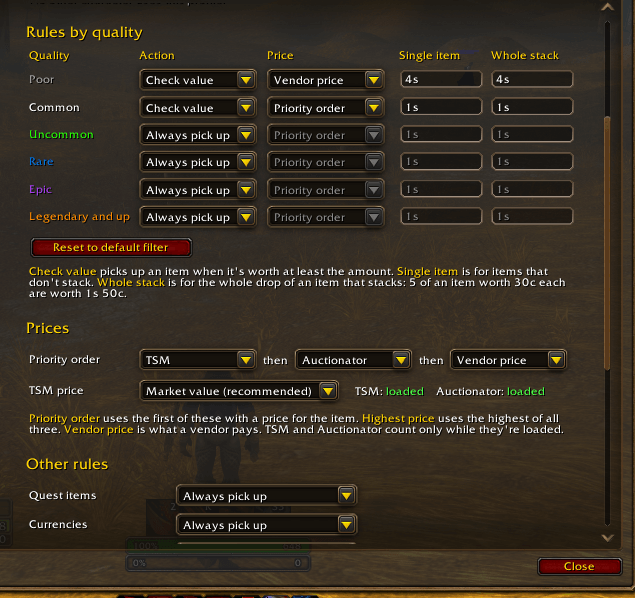
One row for each item quality, from grey to Legendary:
- Always pick up, never pick up, or pick up when it's worth at least an amount you set, like
1sor2g 50s. - Items that don't stack and the whole drop of items that stack each get their own amount: 5 linen worth 30c each counts as 1s 50c.
- Each quality picks its price: the vendor price, a priority order of TSM, Auctionator and vendor price, or the highest of them.
Out of the box, grey items are picked up when a vendor pays 1s or more, white items when they're worth 1s, and everything green and better always. One click brings that back.
Your own lists
Always pick up and Never pick up lists win over every other rule. Start typing an item's name and pick it from your bags, or Shift-click or drag it in.
Profiles
Each character uses a whole filter of its own, or shares one with your other characters.
More choices
- Quest items, currencies and items no one has a price for each get their own rule.
- The most valuable items go into your bags first, so full bags leave the cheap stuff behind. When something you wanted doesn't fit, the window stays open.
- Leave the loot window open after looting if you'd rather pick through what's left yourself.
- An optional chat line lists what was left behind and what it was worth.
- Hold Shift while looting to take everything.
Good to know
- PickUp Filter does the auto looting itself, so the game's own Auto Loot has to be off. It offers to turn it off for you.
- Works with TradeSkillMaster and Auctionator. Without them, vendor prices are used.
- /puf opens the options. /puf check [item] says whether an item would be picked up, and why.
- Made for WoW Forever.
Feedback and bug reports are welcome in the comments.
PickUp Filter Team