Mats Forever
- By
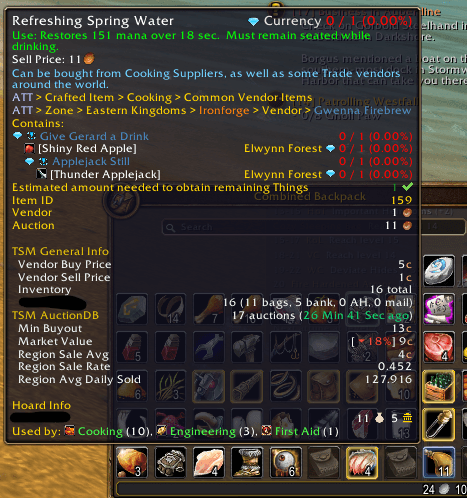
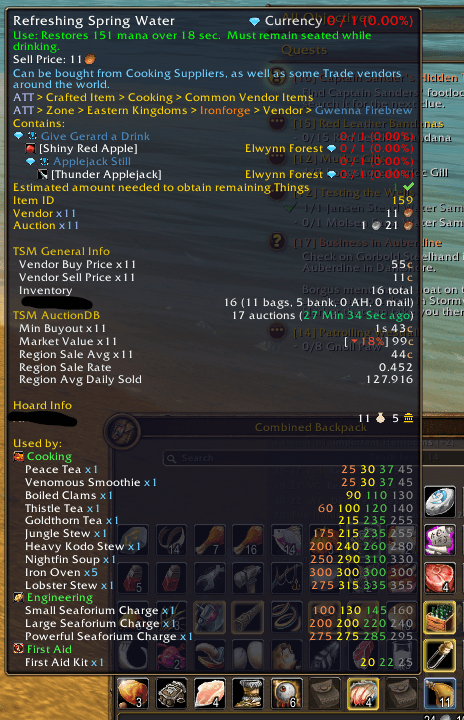
See which professions use any crafting material, and in how many recipes, right on its tooltip. Hold Shift for the recipes.
1.png
2.png
Description
Keep it or sell it?
Mats Forever shows on every crafting material's tooltip not just which professions use it, but how many recipes each one has for it, and with Shift held, the recipes themselves with their skill levels. You know what a material is worth to you the moment you loot it.
Example, on Linen Cloth: Used by: Engineering (6), Blacksmithing (3), First Aid (2), Tailoring (1)
Hold Shift for the recipes
Hold Shift while hovering a material to see each profession's recipes that use it, easiest first, with how many of the material each one takes and its skill levels in the recipe colors: the skill it needs (orange, for recipes learned from a recipe item), then where it turns yellow, green and grey.
Example, on Linen Cloth:
Engineering
Rough Dynamite x1 30 45 60
EZ-Thro Dynamite x1 100 115 122 130
Your professions first
Each profession shows its icon, and the ones your character has come first, in green. One glance tells you whether a material is for you, for an alt, or for the auction house.
Every profession, every recipe
- All professions count, not just yours: Alchemy, Blacksmithing, Cooking, Enchanting, Engineering, First Aid, Leatherworking, Tailoring, Mining smelting, rogue Poisons, and the new Herbalism, Skinning and Fishing crafts.
- Recipes you haven't learned count too, so a material you've never used still tells you who wants it.
- The recipes new to WoW Forever are included. Peacebloom, for example, also goes into First Aid's healing potions, Cooking's Peace Tea and Herbalism's Incense Candles.
Everywhere you see items
Bags, bank, the auction house, mail, loot windows, chat links and recipe windows.
In your language
Profession and recipe names follow your game's language.
WoW Forever
Made for WoW Forever.
Good to know
- A big WoW Forever update that adds recipes may need an update here to show them.
- /matsforever opens the options, where you can turn off the tooltip line or the Shift list.
Feedback and bug reports are welcome in the comments.
Mats Forever Team