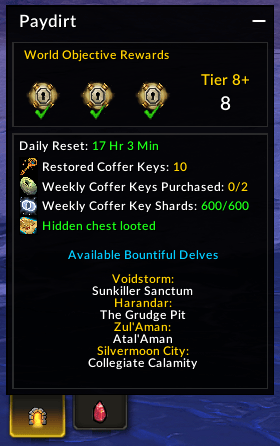
Delves tab with Great Vault full of Tier 8+ rewards
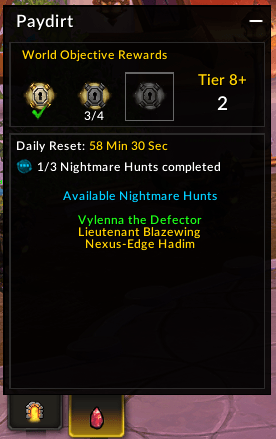
Prey Tab with weekly quest progress and available Nightmare Hunts
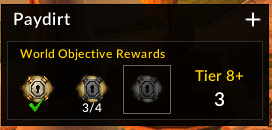
Information is hidden with only Great Vault information shown to reduce UI clutter
Description
Paydirt
Maximize Great Vault rewards from world objectives and track them at a glance
Feedback on this AddOn or any others that I develop/maintain is always welcome. If you enjoy using any of my AddOns and would like to support future development, it is greatly appreciated.




Paydirt is a compact window that displays information to help you make sure your Great Vault world objective slots all contain Hero track items. Currently, the AddOn tracks and presents information about Bountiful Delve locations, Coffer Keys, Trovehunter's Bounty status, and Nightmare Prey weekly quest and available hunts.
Whether you are a solo player or just play on a ton of characters, this AddOn will help you keep a close eye on your activities each week and help you hit "Paydirt" from your Great Vault.
Paydirt was developed as a replacement for the Bountiful Delves Tracker WeakAura that was available in The War Within. The UI is heavily based on the one available from the WeakAura with some modifications of my own to account for updates to Delves, Coffer Key availability, and Nightmare Prey hunts.
- Original WeakAura created by Anasya
- I was a contributor on the WeakAura for identifying Overcharged Delves while they were active.
- Updated version maintained through the 11.2 patch cycle by TemporalSpleen.
Highlights
- Displays Great Vault world objective reward previews
- Shows the number of Tier 8+ world objective completions for the current reset period
- Lists all currently active Bountiful Delves, grouped by zone
- Shows your current Restored Coffer Key count along with weekly purchasable keys and Coffer Key Shards earned this week
- Tracks your Trovehunter's Bounty per character (whether it's been obtained, used, or the hidden chest has already been looted)
- Tracks available Nightmare Prey hunts and weekly Nightmare Prey quest progress
- Requires visiting the Hunt Table once per week on your character
- Optional auto-hide mode that closes the window once all Great Vault world activity slots are filled with Hero track rewards
- Minimizable window with saved position across sessions
- Countdown timer to the next daily reset
Usage
The Great Vault rewards section shows your current world objective vault rewards and highlights how many Tier 8+ completions you've recorded so far. This remains visible when the AddOn window is minimized.
The Delves tab shows all currently active Bountiful Delves across every supported zone, your Coffer Key supply (total keys, weekly purchasable keys, weekly Coffer Key Shards), and the status of your Trovehunter's Bounty for the week.
The Prey tab shows your available Nightmare Prey hunts along with the status of the weekly Nightmare Prey quest. Active hunts are highlighted in green and available hunts appear in yellow. If no hunts are currently tracked, the panel will prompt you to visit the Hunt Table to refresh your options.
The AddOn is visible by default when entering a current expansion zone at max level. It also automatically hides itself when you enter combat, zone into an instance, leave a current expansion zone, or log in to a character that hasn't reached max level. It re-appears when conditions are met again.
Slash Commands
Slash commands can be invoked using either /paydirt or /pd.
/pd- Enable or disable the AddOn window from appearing on the UI under appropriate conditions/pd auto- Toggle automatic hiding once all Great Vault world objective slots are filled with Hero track rewards/pd help- List available slash commands
The Paydirt Team