Party Sense
- By
See who is typing, reading a quest, looking at the map, in their bags or AFK - right above their head and on party frames. Plus live ghost cursors and Alt+click pings on the world map that your whole party can see.
map-features-3.15.32.gif
1-typing-and-drawing.gif
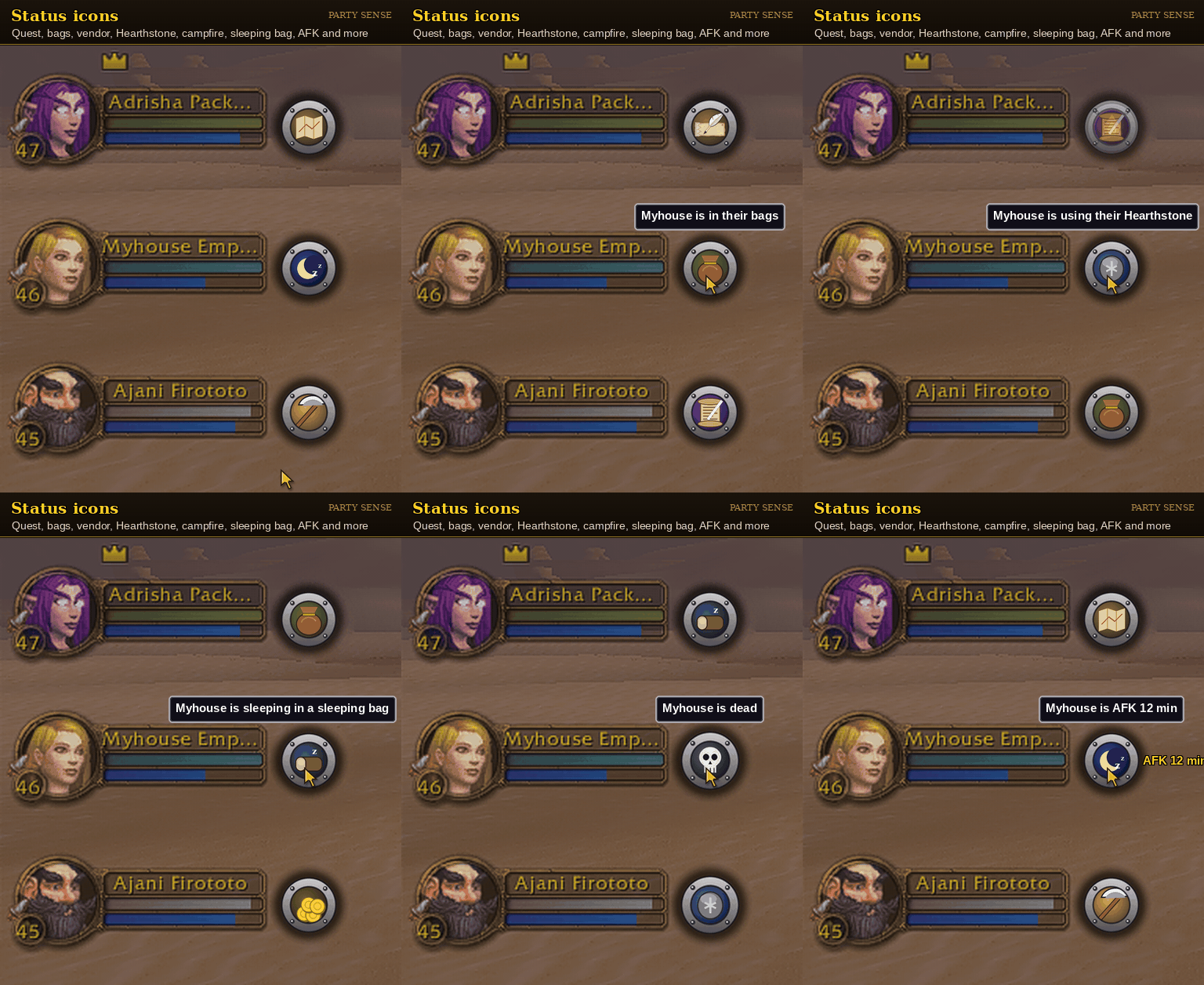
2-status-icons (1).gif
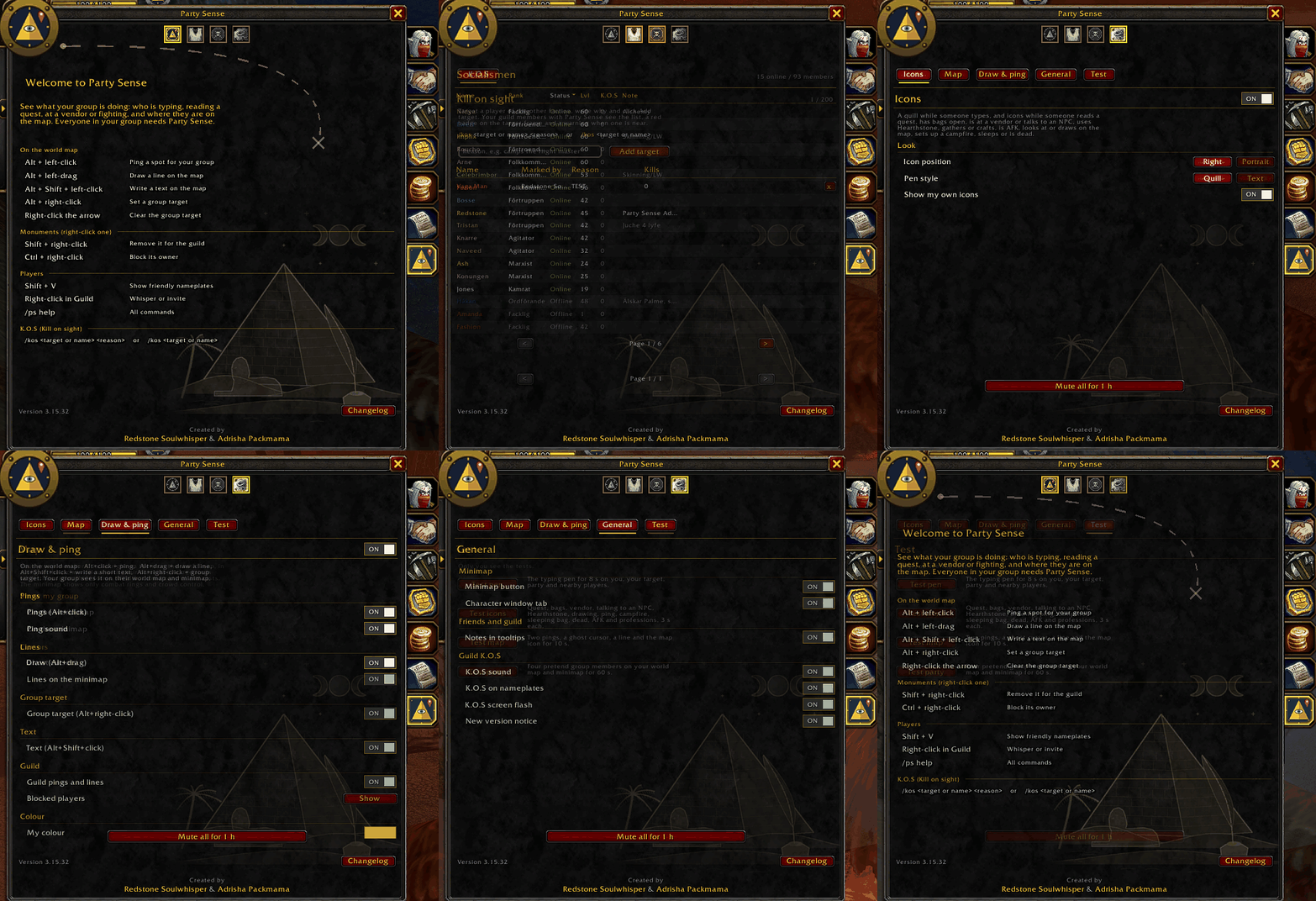
ps-menu-3.15.32.gif
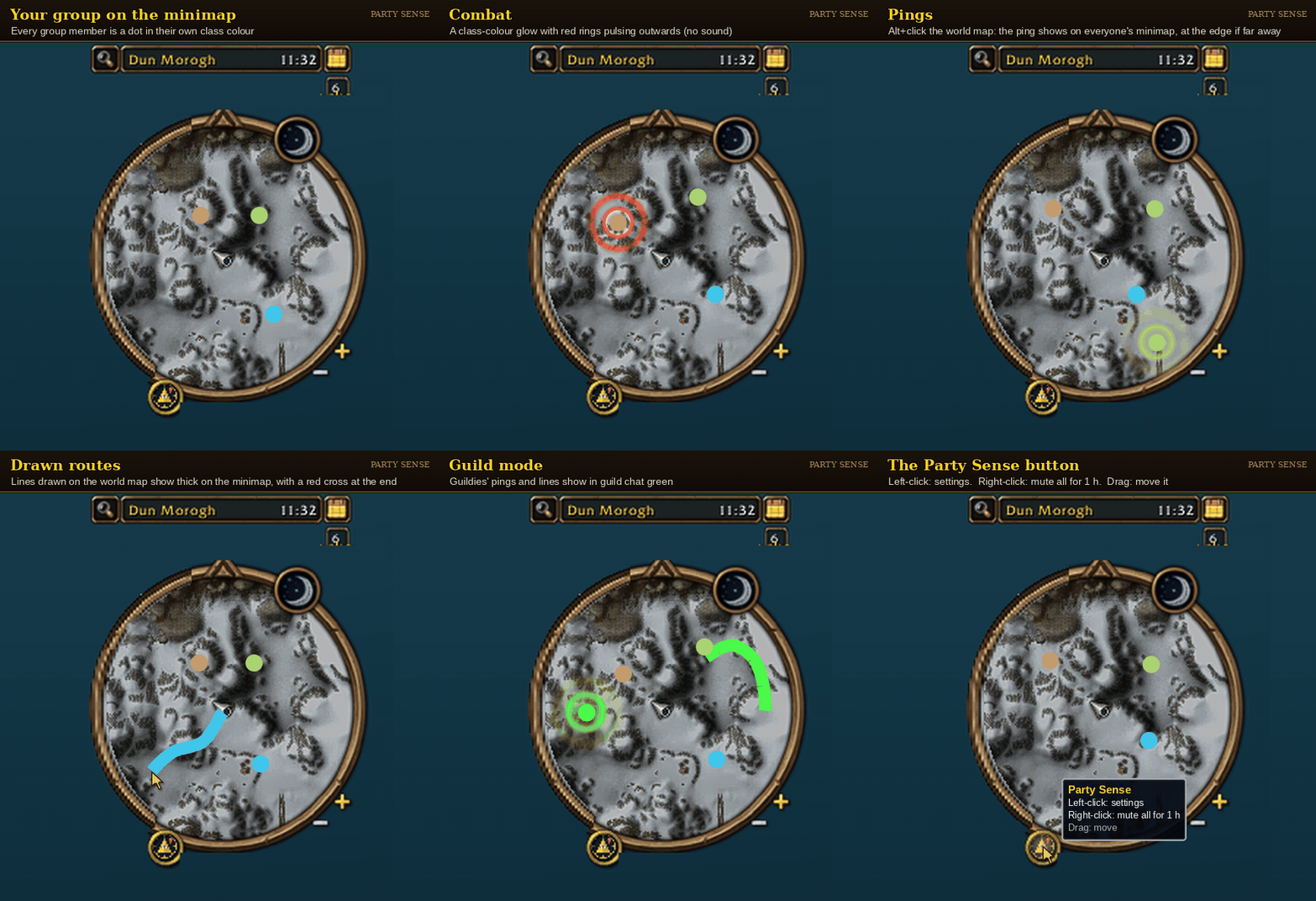
minimap-features-3.15.32.gif
Description
# Party Sense
**See what your group is doing.** A feather quill writes above players while they type, and small icons show who is reading a quest, in their bags, at a vendor, using their Hearthstone and more. Your group shows up on your world map and minimap, and you can ping, draw routes, write short notes and set one shared target for everyone.
Made for **WoW: Forever** by Redstone Soulwhisper & Adrisha Packmama (formerly *Typing Indicator*).
`/ps` or `/partysense` opens the Party Sense window.
## Typing and drawing, right above the frame
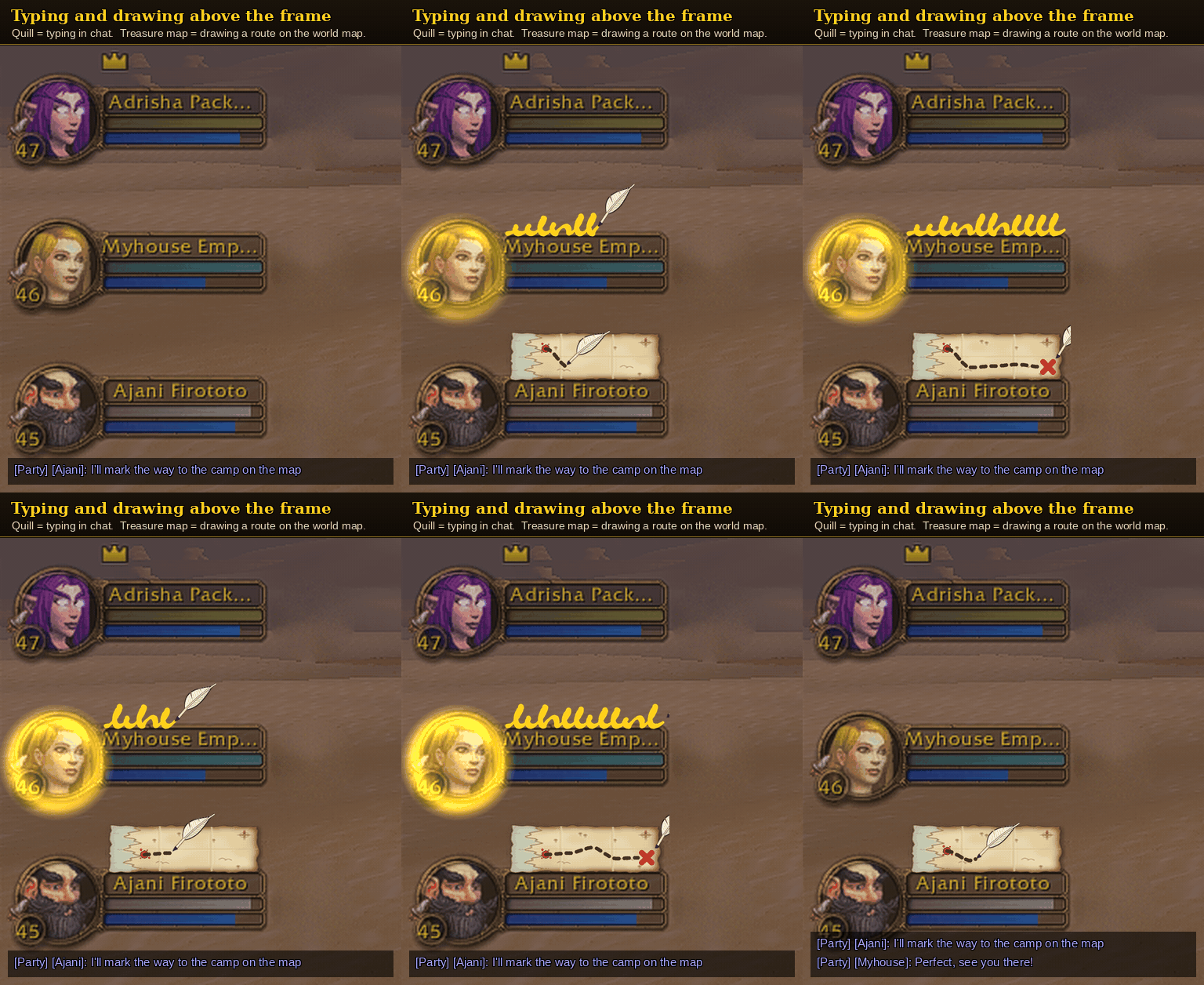
- **A feather quill writes in gold cursive** while someone has the chat box open. The ink has thick and thin strokes like a real broad nib, the quill sways with the hand, and the finished word fades before a new one starts.
- On your player frame and party frames the quill writes **on the line just above the frame**, from its left edge to its right edge. Above nameplates and inside raid frames it shows too.
- **Drawing on the map** shows a little treasure map instead: a red ink splash, a dashed route and a red X, so you can see that someone is marking the way.
- Typing is not shown for /commands, whispers or numbered channels (General, Trade).
- Prefer text? Set Pen style to **Text** for a gold "Typing..." with waving dots.
[GIF: 2-status-icons.gif]
## Status icons
An icon at the player shows what they are doing:
- Reading a quest, bags open, at a vendor, using the Hearthstone
- Setting up a campfire, in a sleeping bag
- Gathering and crafting (mining, herbalism, skinning, fishing, smelting and every profession)
- Looking at the map, drawing on the map, pinging the map
- Dead or ghost, and AFK with the time ("AFK 12 min")
Hover an icon for a tooltip. Choose where icons sit on your frames: **Right** (just outside the frame, next to the bars) or **Portrait**.

## Your group on the world map and minimap
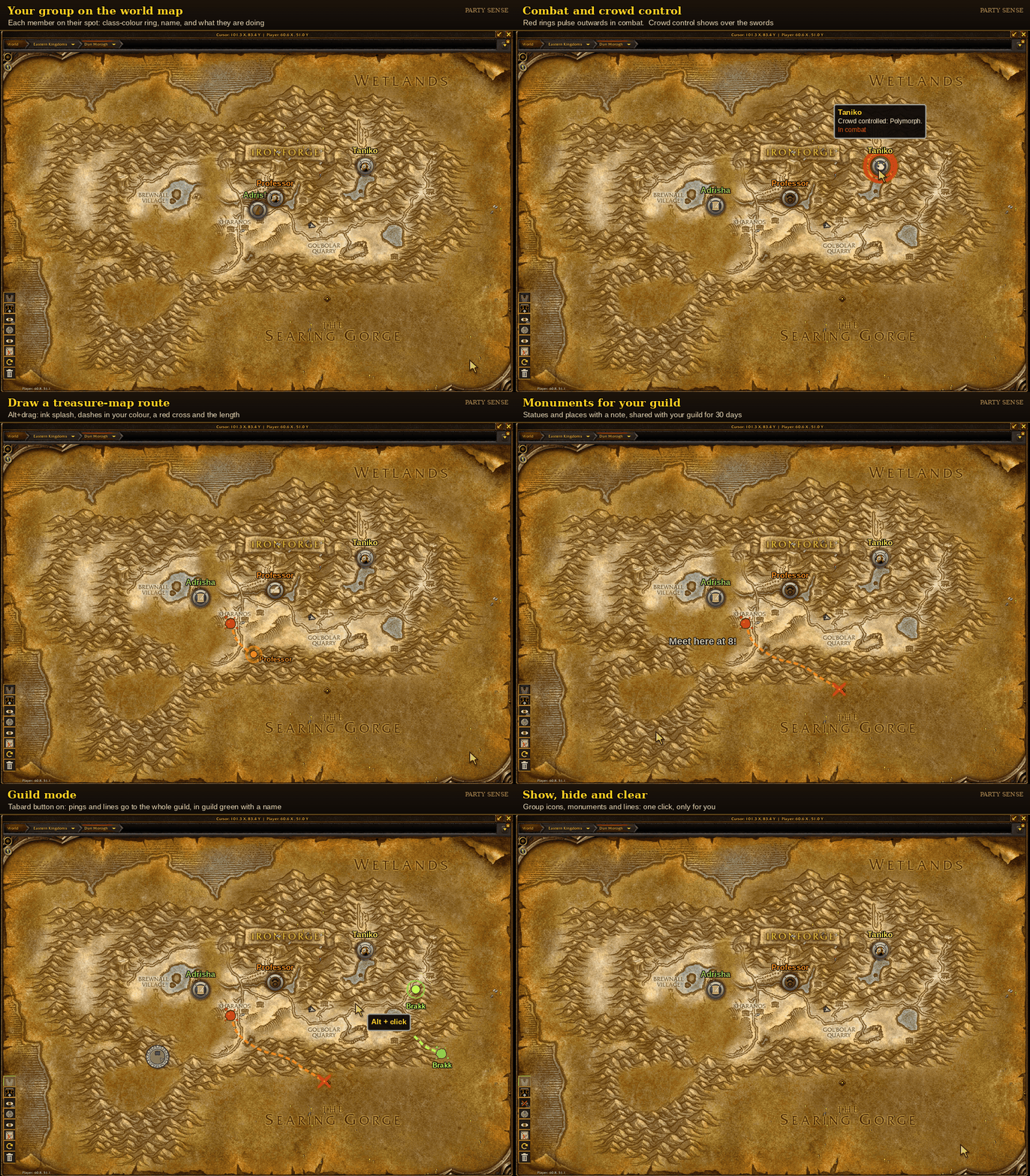
- Each group member's status icon **at their position** on your world map and minimap (members far away show at the edge of the minimap).
- **Crossed swords** while they fight. Hover for their target and what they are casting.
- A **horse** while they ride, and a **skull** where their body lies.

## Ghost cursors, pings and map texts
- See your group's **mouse pointers live** on your world map when you look at the same map.
- **Alt+click** to ping a spot, with an optional ping sound.
- **Alt+Shift+click** to write a few words on the map ("meet here", "boss") for 30 seconds.
- Everything shows in each player's own colour. Pick yours under Settings, or keep your class colour.

## Routes like on a treasure map
- **Alt+drag** on the world map to draw a route for your group: a red ink splash at the start, a dashed line in your colour and a soft red cross at the end. Your group sees it live, on the world map and the minimap.
- Next to the buttons at the bottom left of the map you see **how long the line is**, in yards and metres.
- **Undo** removes your newest line (for your group too), the **trash can** clears all lines for you.
- **Saved routes**: give a line a name and save it. Saved routes never fade and stay after you log out (up to 30). Tick to show or hide, click a name to rename, **Share** sends it to your group, X deletes it. Routes your group shares with you show at the top, ready to save.
- The **eye button** hides or shows all saved routes at once.

## Group target
- **Alt+right-click** the world map to set **one target for your whole group**: a star on everyone's world map and minimap.
- A gold **3D arrow** on everyone's screen points the way, with the distance in yards and metres. It turns smoothly with you.
- Drag the arrow to move it. Right-click it, or Alt+right-click the star again, to clear the target for everyone. It goes away by itself after an hour.
## The Party Sense window (/ps)
**Start page: who is online with Party Sense.** Everyone on the server who uses Party Sense, with status, level and a short note.
- An **Alliance or Horde emblem** shows each player's faction.
- **Right-click a player** to whisper them or invite them to your group.
- Write your own **note** (up to 60 letters). Friends, guild and group also see it in your tooltip.
- Offline players stay on the list, greyed out, for 30 days.
- Very little traffic: your line goes out when you log in, join a group, level up or change your note, never on a timer.
**Settings** on five clear pages, each with one big ON/OFF switch: **Icons, Map, Draw & ping, General** and **Test**.
- **Mute all for 1 h** hides every icon and silences the ping sound (others still see yours). Also on the minimap button with a right-click.
- **New version notice**: one line in your chat when a friend, guild or group member has a newer Party Sense, so you know it is time to update.
## Commands
- `/ps` or `/partysense` opens the window. `/ps settings` opens the settings.
- `/ps note <text>` sets your note. `/ps on`, `/ps off` turn all icons on or off.
- `/ps mute`, `/ps unmute` mute all icons and the ping sound for an hour.
- `/ps test`, `/ps statustest`, `/ps maptest`, `/ps partytest` show test versions only you can see.
- `/ps version`, `/ps changelog`, `/ps channel`, `/ps perf` (measures how much Party Sense costs).
## Good to know
- **Both players need Party Sense**, except AFK, combat and Hearthstone, which the game shows for players near you.
- Icons above players need friendly nameplates on (Shift+V).
- Light on your computer: no work on timers you do not use, and `/ps perf` shows the cost where you stand.
- Updating from Typing Indicator: delete the old TypingIndicator folder. Players with either addon still see each other while everyone updates.
- After an update that adds new files to the Media folder, **restart the game completely** (a /reload is not enough).
## Install
Copy the **PartySense** folder, with its **Media** folder, to `World of Warcraft\_forever_\Interface\AddOns\`, then restart the game.
*The animations on this page are mockups made from in-game screenshots and the addon's own art.*
Party Sense Team