Deathroll by Redstone
- By
Play Deathroll with a click: pick a stake, challenge your target and track your wins, losses and streaks.
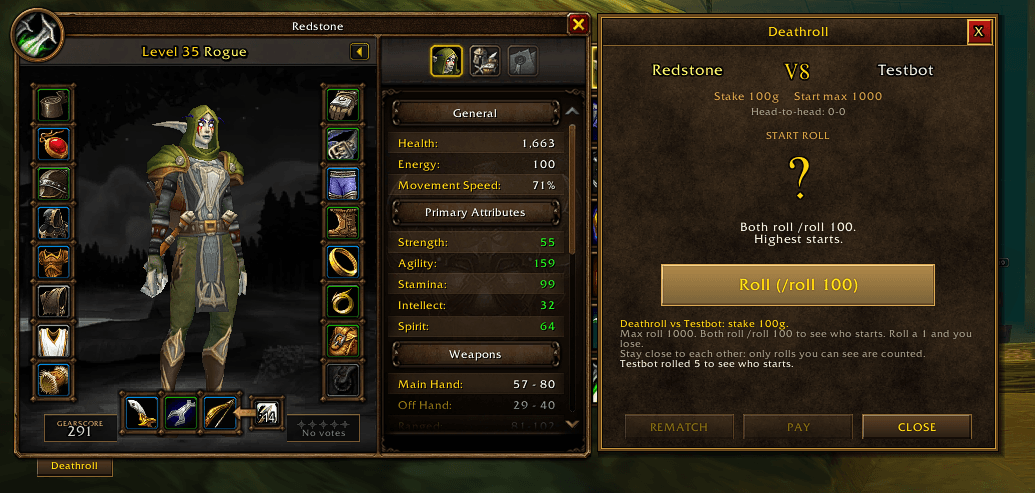
deathroll.png
Description
Deathroll adds a small tab under your character window. Target a player, pick a stake and press one button to challenge them to a Deathroll.
How Deathroll works
- Both players roll
/roll 100. The highest roll starts. - You take turns rolling
/roll <previous result>. - Whoever rolls 1 loses.
- The first max roll is your stake in gold x 10 (at least 10 for stakes under 1g).
- The loser pays the stake with a trade. The addon checks the trade amount and warns you if it is wrong.
Features
- Deathroll tab under the character window. It opens a panel with your target’s name, level, race and class.
- Stake box with quick buttons (10s, 1g, 10g, 100g). Your last stake is remembered.
- One-click challenge. The other player gets an invite window and has to accept the stake.
- Game window that keeps track of whose turn it is, the current max roll and a short roll log. Rolls are read from the game’s own chat messages, so wrong rolls and rolls out of turn are ignored.
- REMATCH, PAY and REMIND buttons. PAY opens the trade window, and REMIND whispers the loser.
- Record and streaks. The addon keeps your wins, losses, best streak and your head-to-head record against each player.
- Test bot. Play against “Testbot” with
/dr testto check that everything works. Test games are not recorded.
Commands
/dropens or closes the Deathroll panel/dr 50schallenges your target (also1g,100and so on, minimum 10 silver)/dr test [stake]plays against the test bot/dr statsshows your record/dr chartabturns the tab under the character window on or off/dr safe on|offsafe mode, which hides the tab under the character window/deathrollworks the same as/dr
Good to know
- Both players need the addon, and you must be close to each other or in the same party so that you can see each other’s rolls.
- The addon never moves gold itself. You always enter the amount in the trade window and accept it yourself.
- Saved data is stored in
DeathrollDB.
Deathroll by Redstone Team