GearScore Rating by Redstone
- By
Rate other players 1–5 stars and see their GearScore and community rating every time you inspect them.
gearstoneraitingredstone.png
Description
GearScore Rating by Redstone
See how geared other players are, and what the community thinks of them, without leaving the inspect window.
FEATURES
- GearScore and average item level
Calculated from the player's equipped items using the classic GearScore formula, and color-coded by how good the gear is for their level.
- Community star rating (1–5)
Rate any player you meet. Everyone who uses the addon shares their votes, so you see the average rating and how many people have voted.
- Inspect tab
A new tab on the right side of the inspect window, styled like the existing tabs. It shows GearScore, item level, class, race, guild and the community rating, and lets you cast your own vote.
- GearScore and stars in your windows
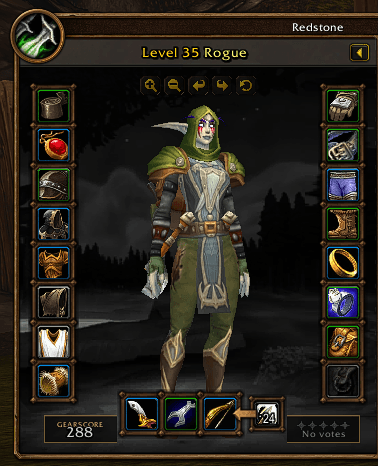
Small plates show GearScore and the rating directly in both the inspect window and your character window. No extra clicks needed.
- Profile
A Profile tab in your character window shows how other players see you: your own GearScore and the rating others have given you.
- Tooltip rating
When you hover over a player who has been rated, a small box under the tooltip shows their stars and number of votes.
HOW VOTING WORKS
- Votes are shared automatically between players who use the addon, through your guild and a hidden addon channel.
- One vote per account. All your characters count as one voter, and you can change your vote at any time.
- You can't vote on yourself or your own characters.
- Votes from players who are offline are passed on by others, so ratings build up over time.
COMMANDS
/gsr – show all commands
/gsr me – open your Profile
/gsr target – show the rating of your current target
/gsr vote 1-5 – vote on your target without inspecting (0 removes your vote)
/gsr plates – show or hide the GearScore and star plates
/gsr tooltip – turn the tooltip rating box on or off
/gsr stats – how many players you have voted on
GOOD TO KNOW
- Ratings only come from other players who also use the addon. The more people use it, the more accurate the ratings get.
- Nothing is sent or received inside instances, since the game blocks addon communication there.
- There is no central server, so ratings are shared player to player.
Made for WoW: Forever.
GearScore Rating by Redstone Team