Party Buff Tracker Forever
- By
See who’s buffed and who isn’t. Track food, flasks, class buffs, readiness, durability and remaining buff time in a compact party/raid panel.
Description
Party Buff Tracker Forever
Party Buff Tracker Forever is a compact party and raid readiness tracker designed for World of Warcraft: Forever.
It gives you a quick overview of who is ready, who is missing food or consumables, which important class buffs are active, which Paladin Auras are currently covering the group, and how much time remains before tracked buffs expire — without turning your screen into another giant raid-management window.
The addon is designed to remain useful even when you are the only person in the group who has it installed.
See what your group is missing
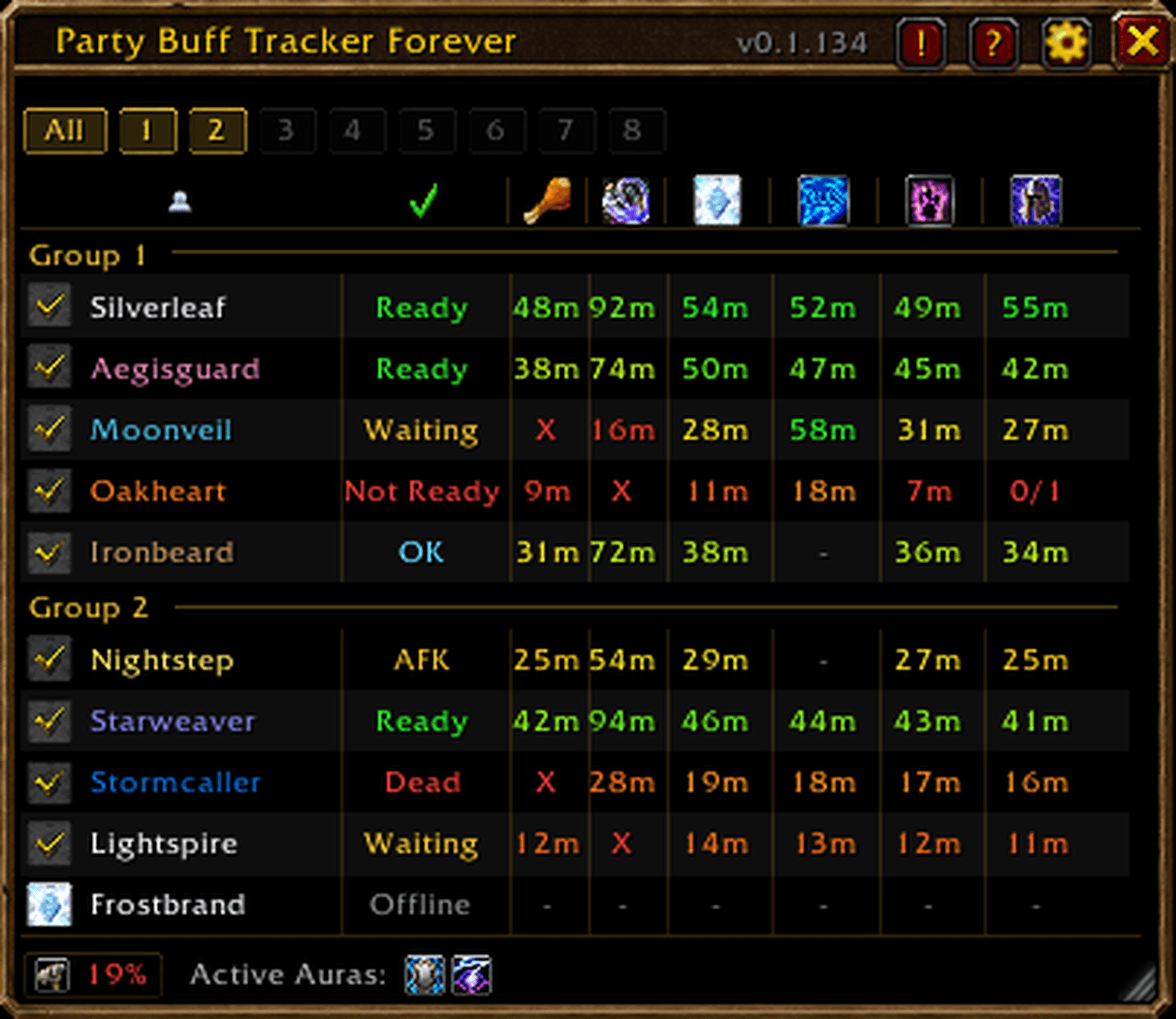
Party Buff Tracker Forever displays your group in a compact table with clear indicators for player status, food, flask/elixir and available class buffs.
Buff requirements are composition-aware. A class-buff column only becomes relevant when someone in the group can actually provide that buff.
For example:
- Priest presence enables Fortitude tracking
- Mage presence enables Intellect tracking where appropriate
- Druid presence enables Mark of the Wild tracking
- Paladin presence enables Blessing tracking
The addon checks the buffs players actually have rather than assigning blame to a particular buffer. Multiple players of the same class can divide buffing responsibilities however they want.
Main features
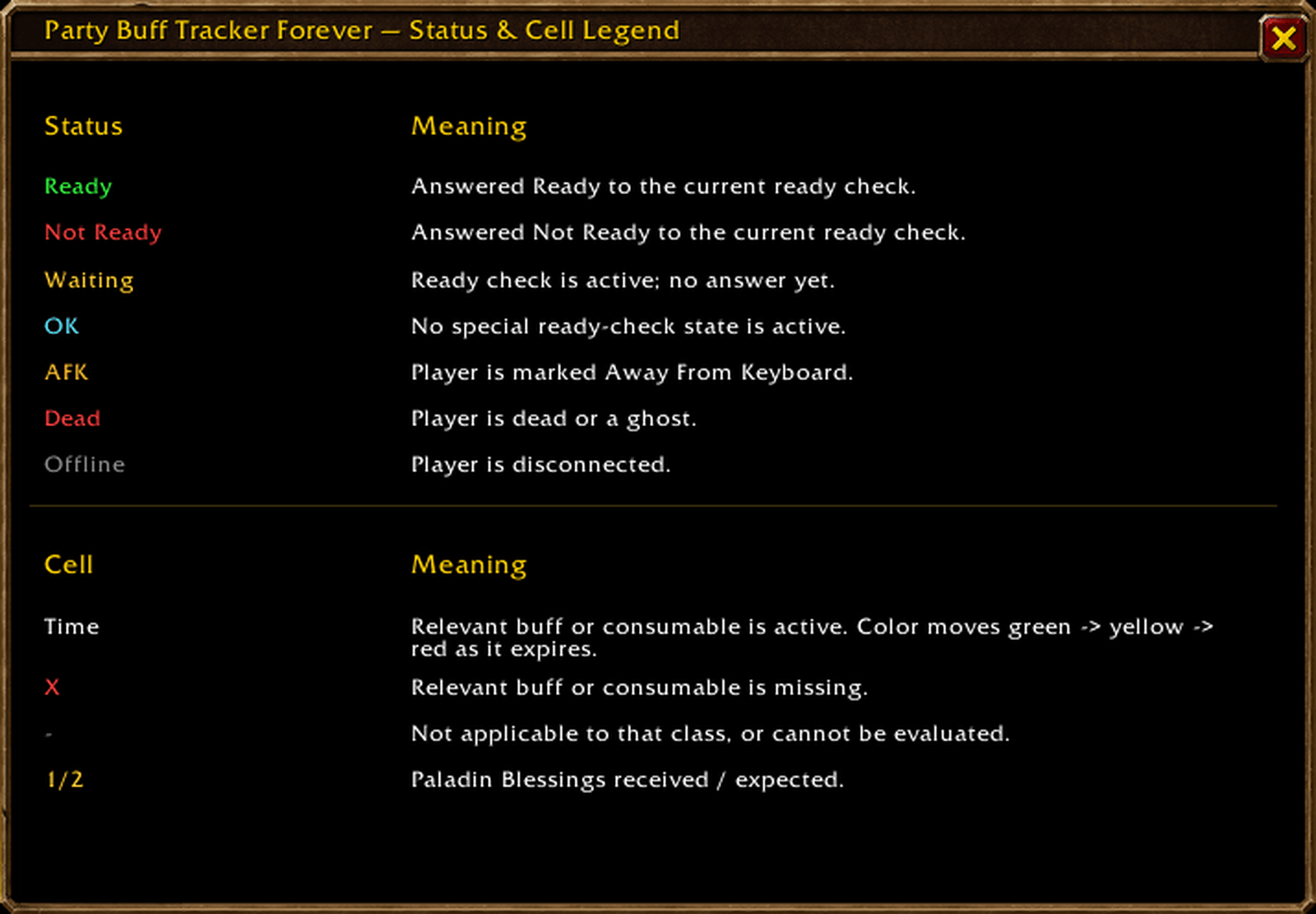
- Party and raid readiness overview with Ready, Not Ready, Waiting, OK, AFK, Dead and Offline states.
- Food tracking for visible Well Fed buffs.
- Flask / Elixir tracking for supported long-duration consumable buffs.
- Dynamic class-buff tracking for Priest Fortitude, Mage Intellect, Druid Mark of the Wild and Paladin Blessings.
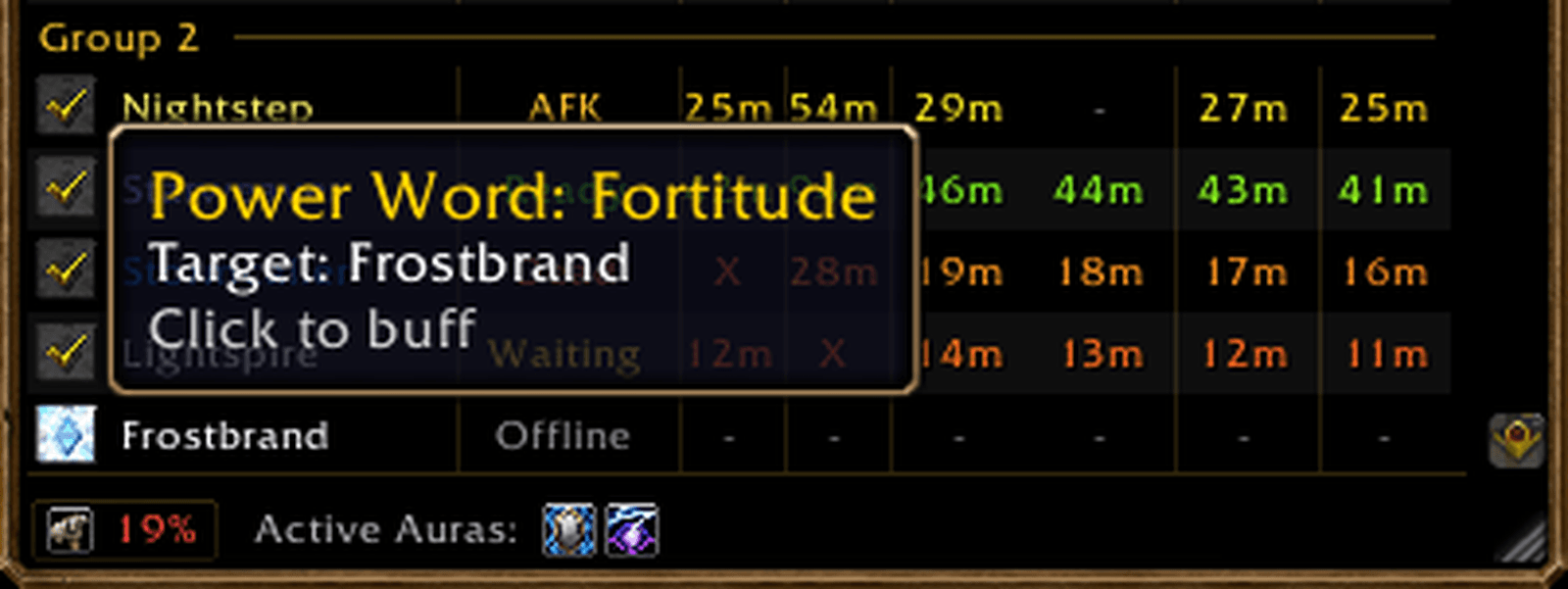
- Remaining buff duration displayed directly in minutes, such as
41m,12mor<1m. - Remaining-time colors gradually change from green → yellow → red as a buff approaches expiration.
- Paladin multi-buff support with received/expected Blessing tracking.
- Per-player Paladin Blessing assignments for Kings, Wisdom and Might.
- Active Paladin Aura display in the footer for quick group-wide Aura coverage information.
- Click-to-buff controls for your own Priest, Mage, Druid or Paladin when appropriate.
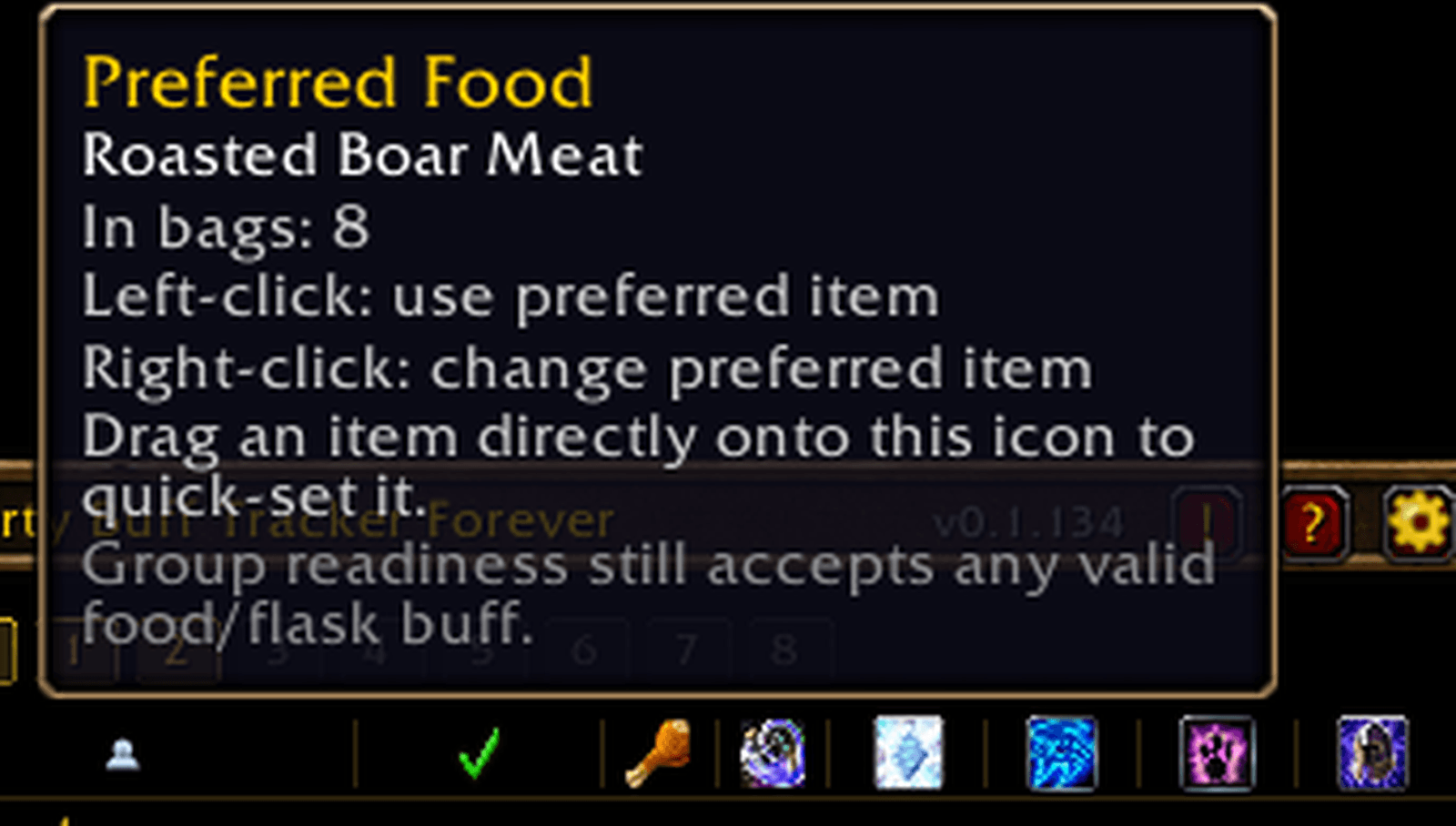
- Personal consumable shortcuts for a preferred Food and Flask / Elixir.
- Drag food or a flask/elixir directly onto its header icon to configure it, then left-click the header to use it.
- Personal durability display in the window footer.
- Click the durability hammer for Repair controls and optionally enable Auto Repair when visiting repair-capable merchants.
- All + Groups 1–8 raid filtering, including multi-select group viewing.
- Your own raid group is highlighted so it is easy to locate.
- Supports large raids while keeping the window compact through scrolling instead of automatically expanding.
- The scrollbar automatically disappears when the displayed roster fits inside the window.
- Alternating player-row shading and subtle column separators improve readability.
- Resizable and scalable main window with optional Hide Title mode for an especially compact layout.
- Customizable background color, border color, opacity and border thickness.
- Optional minimap button with quick access to the tracker and Settings.
- Built-in
?help legend explaining status values, missing buffs, unavailable checks and Paladin counts.
Smart class-buff expectations
Party Buff Tracker Forever does not simply put a red X beside every buff that exists in the game.
It looks at the current group composition and player class first.
If there is no Priest in the group, Fortitude is not treated as a missing requirement. The same principle applies to Mage, Druid and Paladin buffs.
Mage Intellect is only expected on classes where it makes sense rather than being blindly required on every player. A class for which a buff is not relevant displays - instead of being incorrectly marked as missing.
For tracked buffs:
- A duration means the relevant buff is active.
- A red X means the buff is expected but missing.
- A gray - means the check is not applicable or cannot currently be evaluated.
Buff directly from the tracker
When your character can provide one of the tracked buffs, Party Buff Tracker Forever places a small action icon beside relevant players.
Priests, Mages and Druids receive direct controls for their tracked group buff. When the buff is active, the icon becomes completed with a checkmark so you can immediately see that the player has been handled.
Paladin Blessing coordination
Paladins receive additional controls because Blessings can vary by player and multiple Paladins may be present in the same group.
Each player initially uses Blessing of Kings as the Paladin action icon.
Hovering the icon opens a compact Blessing flyout containing the other relevant options, such as Blessing of Wisdom and Blessing of Might.
If you choose a different Blessing for a player, that Blessing becomes your main icon for that player.
For example:
- assign Kings → Kings becomes the main icon
- assign Wisdom → Wisdom becomes the main icon
- assign Might → Might becomes the main icon
The main icon represents the Blessing you have chosen to handle for that player on your client.
The assignment is local and session-based, so two Paladins can divide responsibilities independently.
For example, one Paladin can handle Kings while another handles Wisdom.
The Blessing checkmarks are based on the player's actual active buffs, regardless of who cast them. If a player already has Kings and Wisdom, both will show as completed, while an absent Might remains unchecked.
This lets multiple Paladins coordinate naturally without the addon pretending to know which Paladin originally cast an existing aura.
The Paladin readiness column can also display received/expected coverage such as 1/2, allowing missing Blessing coverage to be spotted quickly.
Active Paladin Auras
Paladin Auras are handled differently from normal readiness buffs.
Because there is not always one universally correct Aura for every encounter, Party Buff Tracker Forever does not mark missing Auras with a red X or use them as a readiness requirement.
Instead, currently detected Paladin Auras are shown as compact icons in the bottom footer beside your durability display under Active Auras.
This provides a quick group-level view of Aura coverage without adding another player-table column.
Tracked Auras include supported versions of:
- Devotion Aura
- Retribution Aura
- Concentration Aura
- Fire Resistance Aura
- Frost Resistance Aura
- Shadow Resistance Aura
- Resistance Aura where applicable
- Crusader Aura
Duplicate Auras are collapsed so the footer remains compact.
Hover an Aura icon to see its name.
Aura tracking is informational only and does not affect player readiness.
Personal Food and Flask shortcuts
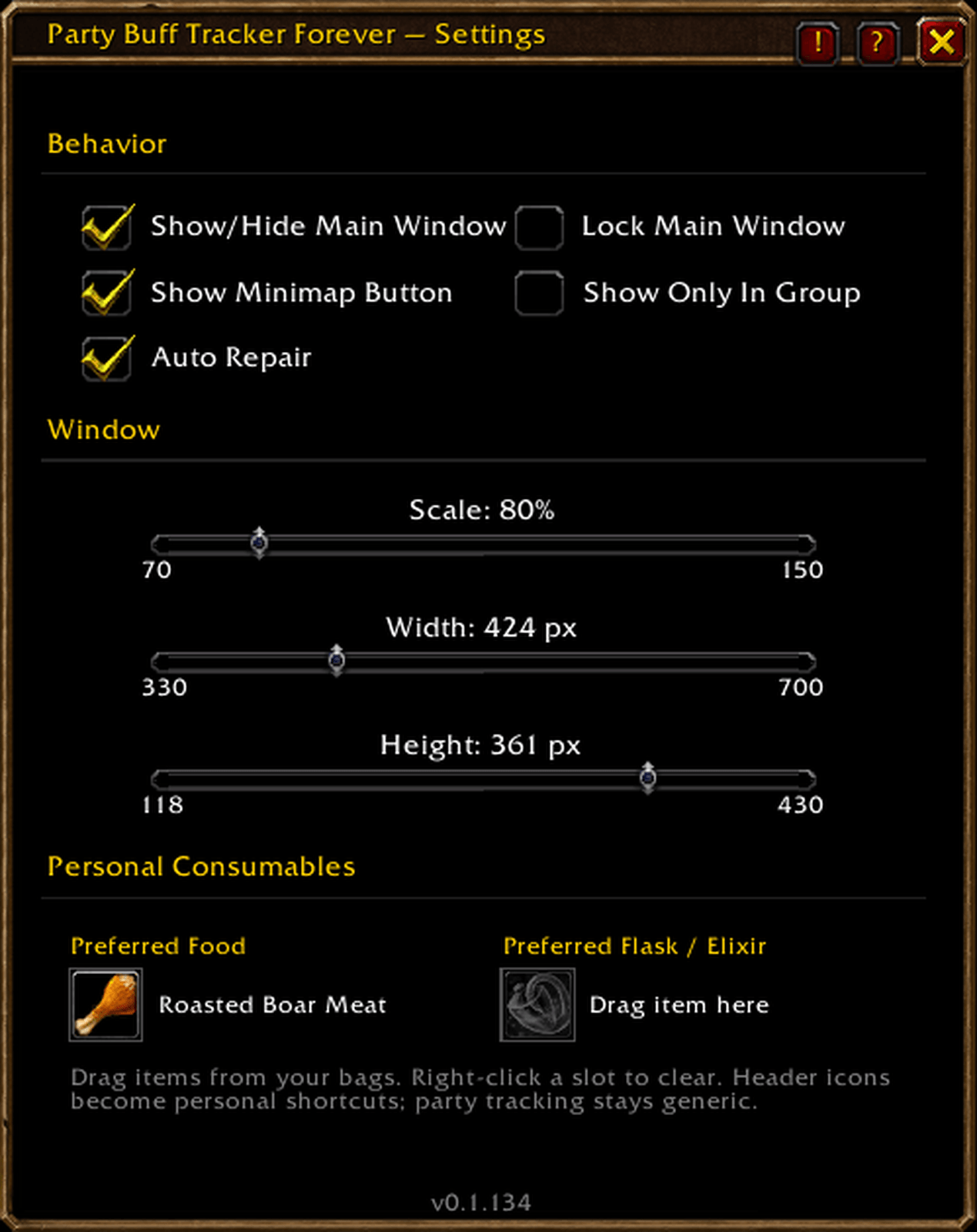
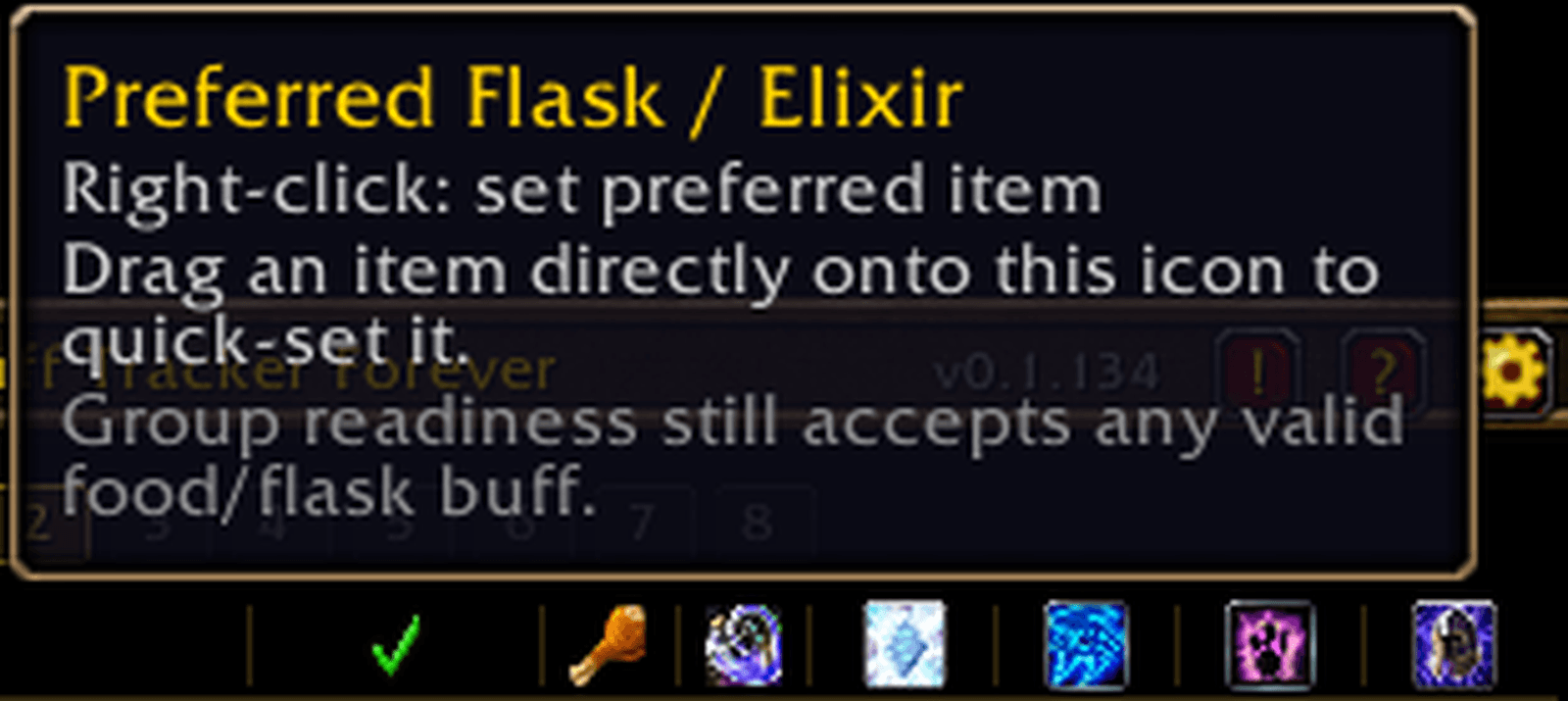
You can choose a Preferred Food and Preferred Flask / Elixir in Settings.
These are personal shortcuts only. Your preferred consumable does not become a requirement for everybody else.
Any valid detected food or flask/elixir buff can still satisfy another player's readiness check.
The Food and Flask header icons act as quick-use buttons:
- Left-click uses your preferred item.
- Right-click opens its quick configuration.
- You can also drag an item directly onto the header icon to configure it.
Item validation prevents unrelated equipment, potions, reagents or other items from accidentally being assigned to these slots.
Party and raid support
In a normal party, your players appear under Group 1.
In raids, the tracker exposes All and 1–8 group selectors.
Empty groups remain disabled, populated groups can be selected individually, and multiple groups can be displayed together.
Selecting additional raid groups does not force the window to grow. The roster remains inside the player area and becomes scrollable only when necessary.
Buff expectations still consider the entire raid roster, regardless of which groups you currently choose to display.
Durability and Auto Repair
World of Warcraft only exposes reliable equipped durability information for your own character, so Party Buff Tracker Forever does not fabricate durability values for other players.
Your durability percentage is displayed compactly in the bottom-left footer of the main window, alongside any currently detected Active Auras.
Click the durability hammer to access the Repair control and Auto Repair option.
When Auto Repair is enabled, Party Buff Tracker Forever automatically repairs your equipped items using your own gold whenever you open a repair-capable merchant.
You still interact with the merchant normally; the addon simply performs the repair once the merchant is available.
Customizable without being complicated
The tracker can be resized and scaled to fit anything from a tiny party UI to a larger raid setup.
You can customize:
- Window scale
- Width and height
- Background opacity
- Border opacity
- Border thickness
- Background color
- Border color
- Window locking
- Title visibility
- Minimap button visibility
- Show-only-while-grouped behavior
When the main window is locked, its resize anchor is hidden as well.
Settings are saved between sessions.
Built-in help legend
A small ? button is available beside the close button on both the main window and Settings.
The legend explains the meaning of:
- Ready
- Not Ready
- Waiting
- OK
- AFK
- Dead
- Offline
- Buff duration colors
- Missing
X - Unavailable
- - Paladin received/expected values such as
1/2
Slash commands
/pbtf/partybufftracker/pbtf settings/pbtf show/pbtf hide
Legacy /wnrf and /whosnotready commands are also retained for users upgrading from older versions.
The Party Buff Tracker Forever Team