Movable Windows Forever
- By
Movable Windows Forever is a lightweight quality-of-life addon for World of Warcraft: Forever that lets you reposition Blizzard windows that Edit Mode does not normally allow you to move.
Description
Movable Windows Forever
Movable Windows Forever is a lightweight quality-of-life addon for World of Warcraft: Forever that lets you reposition Blizzard interface windows that cannot normally be freely placed through the standard UI.
Character window in the wrong place? Merchant covering something important? Want your Bank, Mail, Trainer, Professions window, or Party / Raid Manager somewhere else?
Movable Windows Forever gives those panels positioning control without turning your UI into a complicated layout project.
For most supported windows, simply drag the normal title area, place the window where you want it, and the addon remembers the position for you.
No coordinates to enter.
No profiles to configure.
No separate layout editor.
Move the windows Blizzard normally positions for you
Blizzard's standard UI handles many HUD elements, but a large number of traditional interface panels still use fixed or automatic placement.
Movable Windows Forever extends that flexibility to many of those windows.
Supported panels include:
- Character
- Merchant
- Spellbook
- Quest Log
- Quest and Gossip dialogue
- Bank
- Trainer
- Auction House
- Professions / Trade Skills
- Guild Bank
- Social
- Inspect
- Party / Raid Manager
- and other compatible Blizzard panels
Support is built around the Blizzard frames used by WoW: Forever, including alternate frame implementations where appropriate.
Drag and place
Using the addon is intentionally simple.
Open a supported Blizzard window and drag its normal title area or movable anchor, depending on the panel.
Once moved, its position is saved automatically.
The next time that window opens, Movable Windows Forever restores it to your chosen location.
There is no separate positioning mode you need to activate every time you want to move something.
Party / Raid Manager support
The Blizzard Party / Raid Manager requires different handling from normal interface windows because it is normally attached to the side of the screen.
Movable Windows Forever allows it to be repositioned while preserving its normal Blizzard controls and functionality.
Its collapse / expand control is adapted so the manager remains usable after being moved away from its normal screen-edge position.
Individual window controls
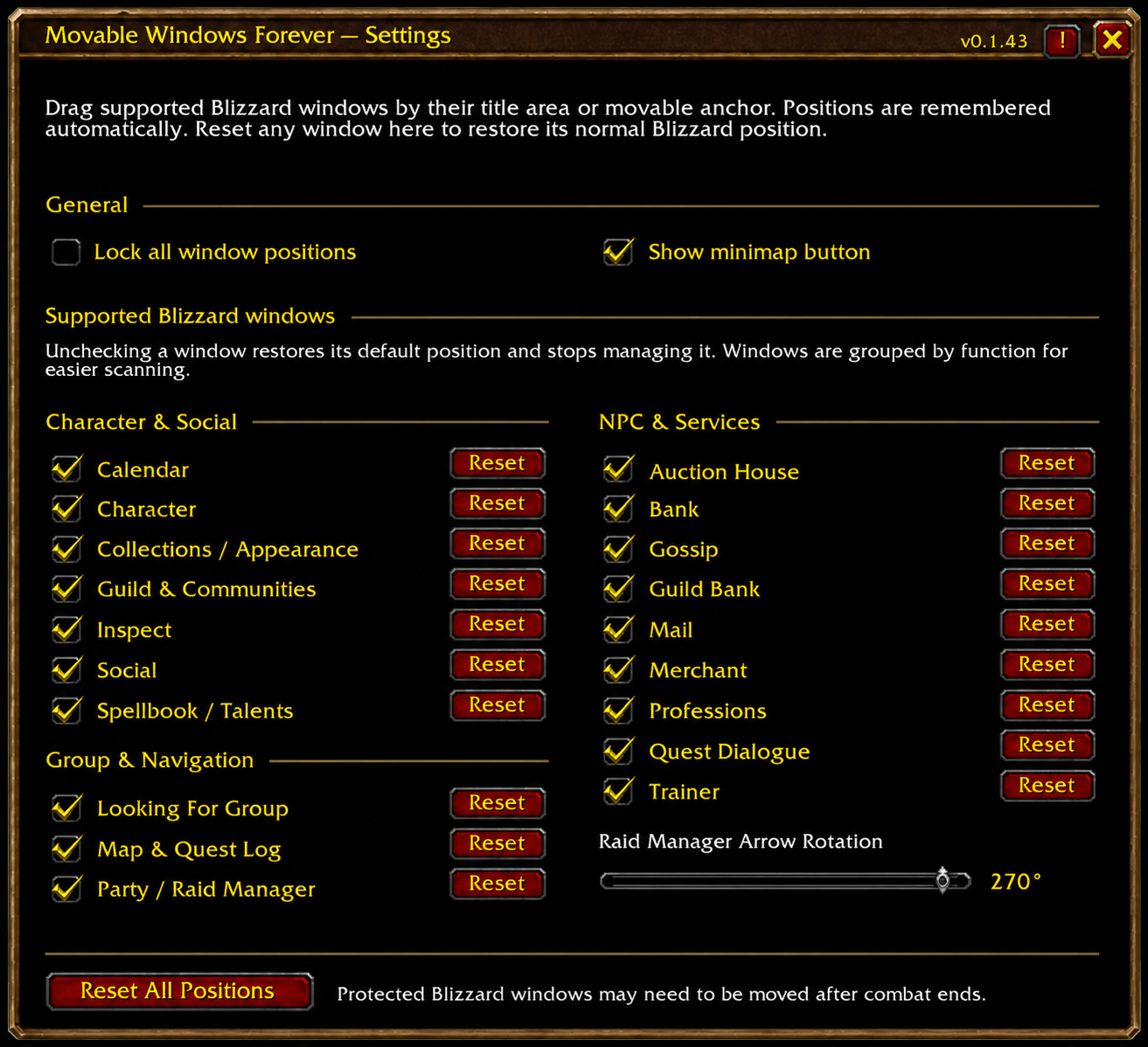
The addon Settings page gives you control over which Blizzard windows Movable Windows Forever should manage.
Each supported window can be enabled or disabled independently.
If you prefer Blizzard's normal positioning for a particular panel, simply disable movement for that window while leaving the others enabled.
Reset whenever you want
Changed your mind about a position?
Each supported window has its own Reset button in Settings.
Resetting a window clears its saved position and returns it to its normal Blizzard placement behavior.
There is also a Reset All Positions button for quickly clearing all saved window locations.
Lock your layout
Once everything is positioned the way you want, enable Lock Positions.
This prevents accidental dragging while keeping all of your saved locations intact.
Unlock the layout whenever you want to make another adjustment.
Designed to stay out of the way
Movable Windows Forever is intentionally focused on one job:
making Blizzard windows movable.
It does not replace your interface with a new layout system and does not require profiles, coordinates, or extensive configuration.
Most supported windows simply gain positioning control.
Some Blizzard panels, such as the Party / Raid Manager, receive additional handling where necessary so they can be moved while retaining their normal functionality.
The addon also handles protected-frame situations conservatively to avoid unnecessary interference with combat restrictions.
Settings
Open the addon settings through:
Options → AddOns → Movable Windows Forever
From there you can:
- enable or disable individual supported windows
- lock or unlock saved positions
- reset individual window positions
- reset all saved positions
Slash commands
/mwf
Opens Movable Windows Forever settings.
/mwf reset
Resets all saved window positions.
Lightweight by design
Movable Windows Forever does not constantly scan or rebuild your interface.
It only manages the Blizzard windows you choose and remembers where you placed them.
The Movable Windows Forever Team