Oak LFG Sorter: Forever
- By
A compact, sortable group finder for Classic Forever with player and group filters, class tooltips, whispers, and invites.
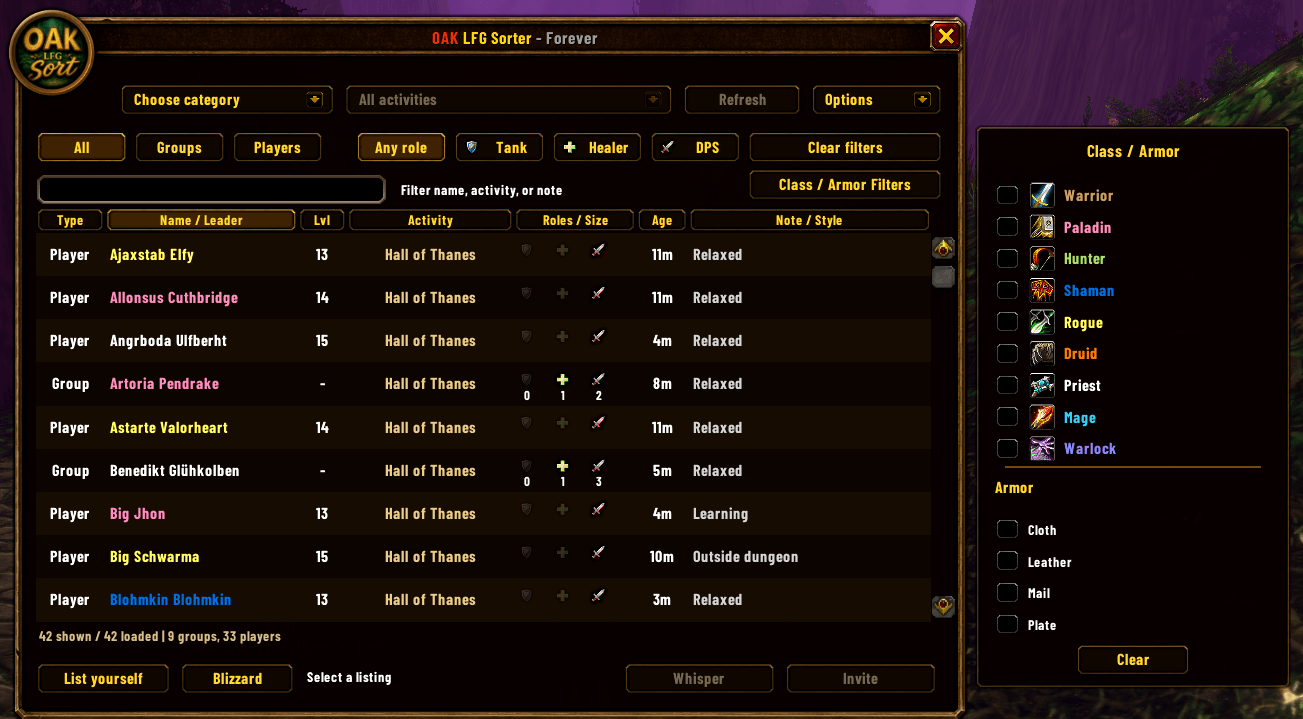
Description
Oak LFG Sorter: Forever
Gather your allies. Answer the call.
The drums sound beyond Orgrimmar’s gates. Beneath Ashenvale, ancient evil stirs in Blackfathom Deeps. In the shadow of Silverpine, the halls of Shadowfang Keep await another band of souls bold enough to enter.
But even the fiercest warrior needs companions, and the spirits cannot find your healer for you.
Oak LFG Sorter: Forever helps you gather a worthy party through a compact, sortable window built for WoW Forever’s group finder. Whether you seek a place beside fellow adventurers or allies to fill your own ranks, Oak brings the listings into order.
Gather Your Warband
- Find your party: Browse groups and individual adventurers, together or separately.
- Choose your allies: Narrow the listings by role, class, armor type, activity, or text.
- Know your companions: Inspect group tooltips for member names, classes, levels, and roles.
- Send word swiftly: Save a custom whisper and double-click a group to send it to their leader.
- Fill your ranks: Double-click an eligible player listing to extend an invitation.
- Keep the call close: Open Oak through its minimap button or your chosen keybinding.
Walk Your Own Path
Seek companions who welcome newcomers, adjust the window’s scale and position, and sort the listings to suit your journey. Blizzard’s listing tools remain within reach when it is time to put out your own call.
Built specifically for WoW Forever’s shared player-and-group listings, where a whispered greeting begins the adventure.
May the spirits guide your path, and may your healer have mana.
Usage
- Open Oak with the minimap button,
/sorter, or your assigned keybinding. - Choose a category and activity, then filter the listings to find your party.
- Double-click a group to whisper its leader or a player to invite them.
- Set your message under Options → Custom whisper message to send it automatically.
- Select List yourself to create or edit your listing through Blizzard’s tools.
Oak LFG Sorter: Forever Team

Owner