DOBE-Bars
- By
Custom action bars for WoW Forever with drag-and-drop layouts, grid snapping, nine UI themes, keybindings, and profile import/export.
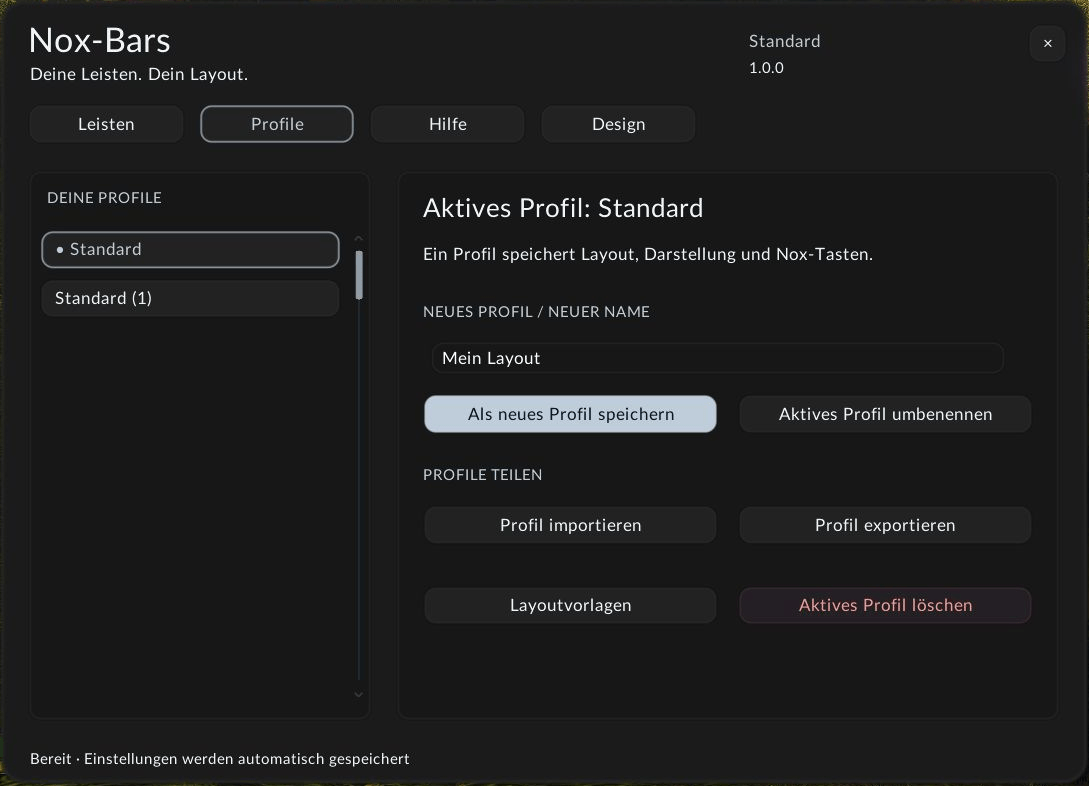
Create and share your Nox-Bars layout with other players. Export a profile as text, send it to a friend, then import it as a separate profile. Layout settings, colors, rules and bindings created in Nox-Bars travel with the profile.
Description
DOBE-Bars
Your bars. Your layout. DOBE-Bars is an independent action-bar addon for WoW Forever with a clean, readable interface and layouts you can shape by dragging.
Make room for your playstyle
- Ten configurable action bars: choose how many buttons are visible on each bar, independently of buttons per row.
- Drag bars into place with an optional grid, snapping and alignment to the screen's center lines.
- Adjust button size, spacing, growth direction and labels. Background opacity changes the surrounding artwork while keeping ability icons visible.
- Assign keys by mouseover: hover over an ability button and press the desired key. Keyboard combinations, mouse buttons and mouse wheel are supported.
- Manage the client's available pet, stance, bag, micro-menu, experience/reputation and special-action bars.
- Configure visibility, mouseover fading, action pages and modifier rules.
Mouseover keybinding — new in 1.1.0
Click Mouseover keys (Mouseover-Tasten in German) in the bar settings or type /dobebars bind. Hover over the ability button you want to bind, then press your key; no click on the ability is needed. The top panel shows the selected bar, button and current bindings. Shift, Ctrl and Alt combinations are supported, along with mouse buttons and the mouse wheel.
Use Delete/Backspace to clear that button's custom DOBE bindings. Press Esc or click Done (Fertig in German) to finish. Abilities are not activated while assigning keys, and combat ends the binding mode. Your custom bindings are saved in the active profile and included in profile import/export.
Share your settings: profile import & export
Create, copy, rename and switch profiles. Export a DOBE-Bars profile as text and import it on another character or share it with a friend. Profile transfers include layout settings, colors and bindings created through DOBE-Bars; they do not transfer your character's spells or action-slot contents.
To share: open Profiles, click Export profile and press Ctrl+C. Send the text to another player. They open Import profile, paste with Ctrl+V and click Import. In German these controls are Profile, Profil exportieren, Profil importieren and Importieren. DOBE-Bars creates a separate profile and keeps existing profiles intact.
Choose from nine complete interface themes: Turquoise, Blue, Violet, Green, Gold, Orange, Red, Pink and Graphite. The selected color is saved with your profile.
German or English — new in 1.2.0
Choose Deutsch or English under Design → Language. The addon reloads its interface and remembers your choice. Menus, bar names, layout and keybinding tools, help, messages, errors and profile dialogs are translated. Your profile names and shared settings keep their original data.
Shared DOBE design
Clear Lato typography, consistent controls and nine color themes match the DOBE-UI menu style. Adjust Design → Menu opacity independently of your bar artwork. Menu text and ability icons stay visible. Your menu opacity is saved and shared through profile export/import. DOBE-UI is optional.
Getting started
- Install DOBE-Bars in your WoW Forever client's
Interface/AddOnsdirectory. The addon folder is namedNoxBars. - Disable other action-bar addons, including Bartender4, before enabling DOBE-Bars.
- Click the minimap icon or type
/dobebarsto open the menu. - Select a bar, set the visible button count (Sichtbare Buttons), then choose buttons per row (Buttons pro Zeile) for its arrangement.
- Use the move mode to drag your bars and the Profiles tab to save or transfer your setup.
Layout and binding changes are applied outside combat. DOBE-Bars targets WoW Forever 1.60.1 (Interface 16001).
Feedback
Comments are open. Share your ideas or report a problem below; include your addon version, class, steps to reproduce and any Lua error message so the issue can be tracked.
Deutsch
Deine Leisten. Dein Layout. DOBE-Bars gibt dir zehn anpassbare Aktionsleisten, die du mit der Maus verschiebst. Raster, Einrasten und die Bildschirm-Mittellinien helfen beim Ausrichten.
Sichtbare Buttons bestimmt die Anzahl pro Leiste; Buttons pro Zeile regelt unabhängig davon die Anordnung. Größe, Abstand, Beschriftungen und Rahmen-Deckkraft sind separat einstellbar. Bei 0 % Rahmen-Deckkraft bleiben deine Fertigkeiten sichtbar.
Neun Farbthemen, Tastatur-/Mausbelegungen und Profile mit Import und Export gehören dazu. Verfügbare Begleiter-, Haltungs-, Taschen-, Mikromenü-, Erfahrungs-/Ruf- und Sonderleisten lassen sich ebenfalls verwalten.
Mouseover-Tastenbelegung — neu in 1.1.0
Klicke im Leistenmenü auf Mouseover-Tasten oder gib /dobebars bind ein. Fahre mit der Maus über den gewünschten Fertigkeitenbutton und drücke die Taste — du musst die Fertigkeit dafür nicht anklicken. Die obere Anzeige zeigt Leiste, Button und aktuelle Belegungen. Auch Kombinationen mit Shift, Strg und Alt, Maustasten und Mausrad werden unterstützt.
Entf/Rücktaste entfernt die eigenen DOBE-Belegungen dieses Buttons. Mit Esc oder Fertig beendest du den Modus. Während des Belegens werden keine Fertigkeiten ausgelöst; Kampfbeginn beendet den Modus automatisch. Deine Belegungen werden im aktiven Profil gespeichert und beim Profilimport/-export mit übertragen.
Deutsch oder Englisch — neu in 1.2.0
Unter Design → Sprache zwischen Deutsch und English wählen. Das Addon lädt die Oberfläche neu und merkt sich deine Auswahl. Menüs, Leistenbezeichnungen, Layout-/Tastenwerkzeuge, Hilfe, Meldungen, Fehler und Profil-Dialoge sind übersetzt. Deine Profilnamen und geteilten Einstellungen behalten ihre ursprünglichen Daten.
Einheitlicher DOBE-Stil
Klare Lato-Schrift, einheitliche Bedienelemente und neun Farbthemen passen zum Menü von DOBE-UI. Unter Design → Menü-Deckkraft stellst du die Menüflächen unabhängig von der Leisten-Deckkraft ein. Schrift und Fertigkeitsicons bleiben sichtbar. Die Menü-Deckkraft wird im Profil gespeichert und beim Import/Export geteilt. DOBE-UI ist optional.
Einstellungen mit anderen Spielern teilen
Unter Profile → Profil exportieren kopierst du deinen Profiltext mit Strg+C. Der andere Spieler öffnet Profil importieren, fügt ihn mit Strg+V ein und klickt Importieren. Layout, Farben, Regeln und DOBE-Tastenbelegungen werden als neues Profil gespeichert; bestehende Profile bleiben erhalten.
Öffne das Menü über das Minimap-Symbol oder /dobebars. Deaktiviere andere Leistenaddons, insbesondere Bartender4. DOBE-Bars ist für WoW Forever 1.60.1 gedacht. Fragen, Wünsche und Fehlermeldungen kannst du direkt in den Kommentaren hinterlassen.
DOBE-Bars is the new name of Nox-Bars. Existing profiles remain compatible. Open the menu with /dobebars or /dobe; legacy /nox and /noxbars commands still work. When DOBE-UI is active, it owns XP/reputation and unit frames. Layout mode moves action and ability bars only.
DOBE-Bars ist der neue Name von Nox-Bars. Deine bisherigen Profile bleiben kompatibel. Menü öffnen: /dobebars oder /dobe. Bisherige Befehle bleiben erhalten. Bei aktivem DOBE-UI übernimmt dieses EP/Ruf und Einheitenrahmen. Im Verschiebemodus werden nur Aktions- und Fähigkeitsleisten bewegt.
DOBE-Bars Team