promotional bannermobile promotional banner

NameplateQuestInfo

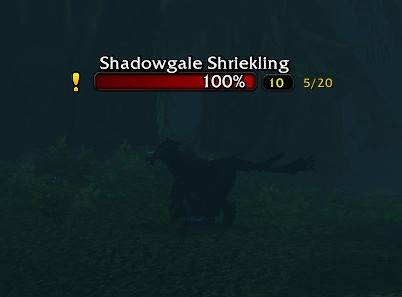
NameplateQuestInfo helps you spot quest mobs in WoW Forever Beta. It automatically adds a yellow quest marker to the left of their nameplates and shows your objective progress, such as **3/10**, on the right for kill and quest-item objectives.
ShowMe.jpg

ShowMe.jpg

Description

NameplateQuestInfo

NameplateQuestInfo helps you spot quest mobs in WoW Forever Beta. It automatically adds a yellow quest marker to the left of their nameplates and shows your objective progress, such as 3/10, on the right for kill and quest-item objectives.

Getting started

Install NameplateQuestInfo in your Interface/AddOns folder and enable it in the AddOns menu. Quest markers and progress appear automatically when the addon loads. No commands or configuration are needed.

Nameplates must be visible for NameplateQuestInfo to display markers. Enable friendly nameplates when looking for friendly quest mobs.

Disable the addon in the AddOns menu to turn off its display. NameplateQuestInfo works on its own and does not require any other addons.

  • MiniExpBar … minimal experience bar
  • TweakMe … hide chat buttons and more
  • HideMe … hide bag bar, micro menu and more
  • MiniStats … display gold and free bag space below the mini experience bar

NameplateQuestInfo Team

profile avatar
  • 5
    Projects
  • 87
    Downloads

More from Katniss07View all

  • MiniStats project image

    MiniStats

    MiniStats displays your gold, silver, copper, and free bag slots in a transparent bar below the minimap. Keep track of your money and storage space wherever you go.

    • 12
    • October 14, 2026
  • TweakMe project image

    TweakMe

    TweakMe adds simple quality-of-life tweaks to WoW Forever Beta: customize your chat layout, repair automatically and sell grey items with less clicking.

    • 5
    • October 12, 2026
  • HideMe project image

    HideMe

    Enjoy a cleaner interface with **HideMe** for the **WoW Forever Beta**. Hide the UI elements you do not need and keep your attention on the game.

    • 17
    • October 12, 2026
  • MiniExpBar project image

    MiniExpBar

    Keep your next level in sight without cluttering your screen. MiniExpBar adds a compact experience bar beneath your minimap, showing your leveling progress and rested XP at a glance.

    • 28
    • October 12, 2026
  • MiniStats project image

    MiniStats

    MiniStats displays your gold, silver, copper, and free bag slots in a transparent bar below the minimap. Keep track of your money and storage space wherever you go.

    • 12
    • October 14, 2026
  • TweakMe project image

    TweakMe

    TweakMe adds simple quality-of-life tweaks to WoW Forever Beta: customize your chat layout, repair automatically and sell grey items with less clicking.

    • 5
    • October 12, 2026
  • HideMe project image

    HideMe

    Enjoy a cleaner interface with **HideMe** for the **WoW Forever Beta**. Hide the UI elements you do not need and keep your attention on the game.

    • 17
    • October 12, 2026
  • MiniExpBar project image

    MiniExpBar

    Keep your next level in sight without cluttering your screen. MiniExpBar adds a compact experience bar beneath your minimap, showing your leveling progress and rested XP at a glance.

    • 28
    • October 12, 2026