MiniExpBar
- By
Keep your next level in sight without cluttering your screen. MiniExpBar adds a compact experience bar beneath your minimap, showing your leveling progress and rested XP at a glance.
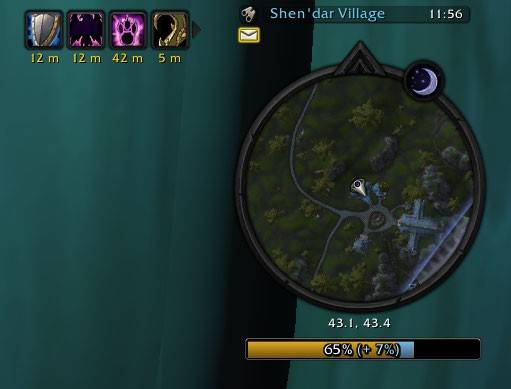
MiniExpBar.jpg
Description
MiniExpBar
Keep your next level in sight without cluttering your screen. MiniExpBar adds a compact experience bar beneath your minimap, showing your leveling progress and rested XP at a glance.
Made for WoW Forever Beta, it works as soon as you enable it. No setup or additional addons are needed.
Features
- Easy-to-read progress: A gold bar and centered percentage show how far you are toward your next level.
- Rested XP at a glance: A light blue section shows your rested bonus, with its percentage displayed beside your progress.
- Smooth XP gains: Newly earned experience briefly lights up as the bar fills.
- A compact look: A dark background and subtle border fit neatly beneath the minimap. The bar automatically matches the minimap's width.
- Place it where you like: Move the bar anywhere on your screen. Each character remembers their own position.
- Hidden at max level: The bar disappears automatically when you reach the level cap.
How to use
The bar appears below your minimap by default and updates as you earn experience.
For example, 45% (+ 15%) means you are 45% of the way to your next level and have a rested XP bonus equal to 15% of a full level.
To move the bar, hold the left mouse button on it and drag it to your preferred spot.
To return it to its default position beneath the minimap, type:
/miniexpbar resetInstallation
- Place the
MiniExpBarfolder in your game'sInterface/AddOnsfolder. - Restart the game.
- Enable MiniExpBar in the addon list on the character selection screen.
Credits
The bundled Smooth bar texture comes from TidyPlates_ThreatPlates.
- NameplateQuestInfo … mark quest-objectives in nameplates
- TweakMe … hide chat buttons and more
- HideMe … hide bag bar, micro menu and more
- MiniStats … display gold and free bag space below the mini experience bar
MiniExpBar Team