Mythic Copilot
- By
Mythic Copilot is an all-in-one Mythic+ companion for WoW Midnight. Plan dungeon routes with built-in maps, organize pulls, add personal and group strategy notes, track your progress with a customizable HUD
preparationMCP.png
guideMCP.png
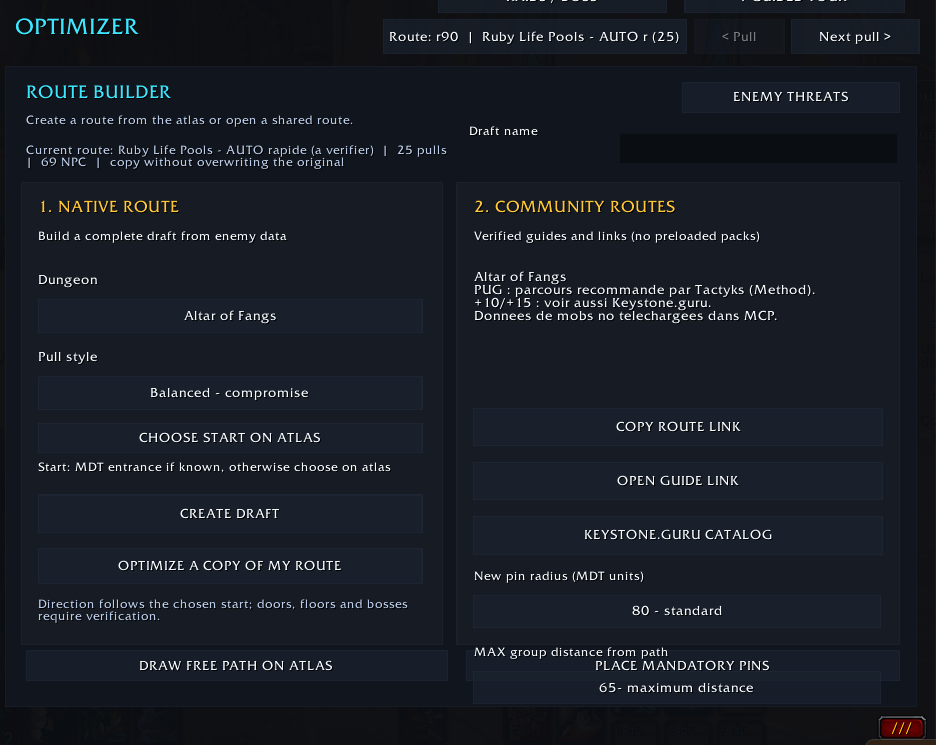
optimiseurMCP.png
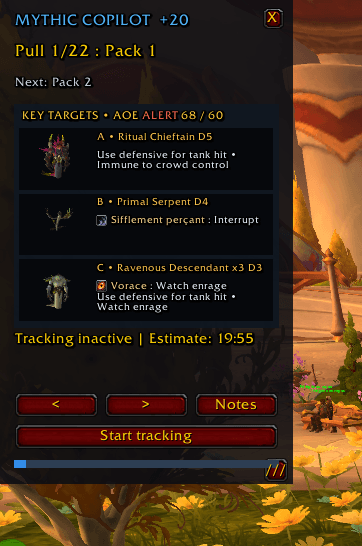
StratégieMCP.png
Description
Mythic Copilot
Plan smarter routes. Keep your strategy visible. Learn from every Mythic+ run.
Mythic Copilot is a route-planning and dungeon-assistance addon for World of Warcraft Retail: Midnight.
It combines an integrated dungeon atlas, pull-by-pull strategy notes, a configurable in-game HUD, route-building tools, and performance estimates in one interface.
Whether you are planning pulls as a tank or following a strategy as a healer or DPS, the goal is to keep useful information close at hand without turning your screen into a second dashboard.
Current release: 1.6.4 Beta. The in-game interface is currently in French.
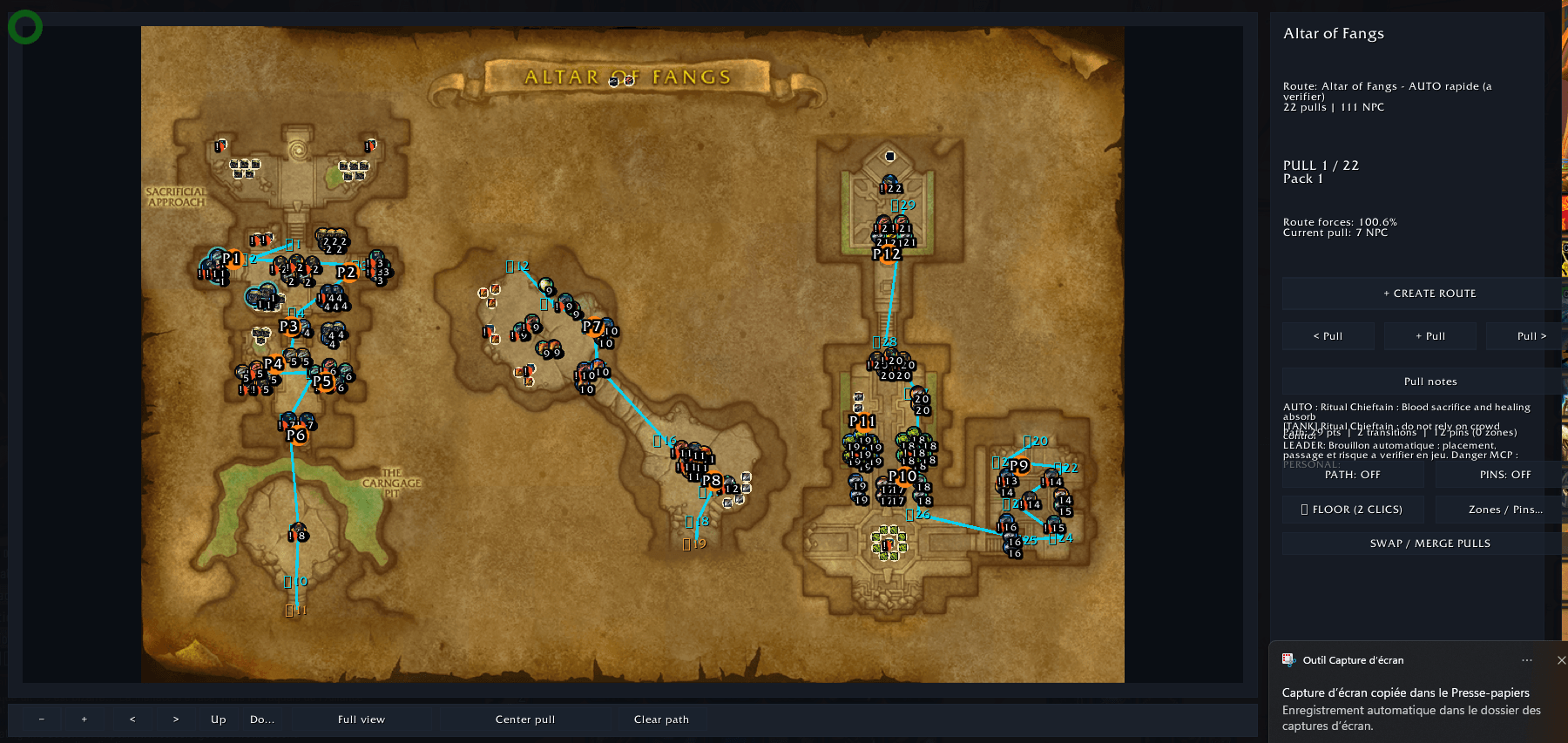
Built-in Midnight Season 2 Dungeon Atlas
Browse eight integrated dungeon maps with enemy locations and relevant atlas data:
-
Altar of Fangs
-
Murder Row
-
Den of Nalorakk
-
The Blinding Vale
-
Voidscar Arena
-
King's Rest
-
Temple of Sethraliss
-
Ruby Life Pools
Create a native route by clicking enemies on the map and assigning them to numbered, color-coded pulls.
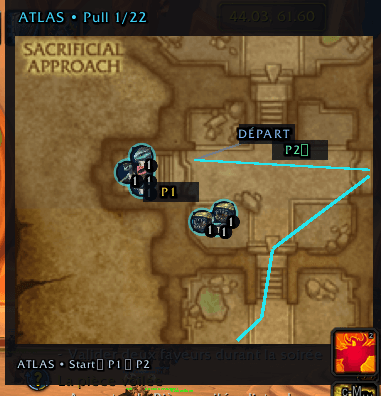
Navigate between pulls and preview the relevant area in the compact HUD.
Map backgrounds and enemy positions are included in the addon. Mythic Dungeon Tools is not required to use the native atlas.
Plan and Manage Your Routes
-
Create, save, select, and edit multiple dungeon routes.
-
Assign enemies to pulls directly from the map.
-
Switch between saved routes and navigate to the previous or next pull from the main hub.
-
Import compatible MDT2 strings or the selected MDT preset when Mythic Dungeon Tools is installed.
-
Browse community route references and strategy guides.
-
Generate native draft routes using Prudent, Balanced, or Fast planning profiles.
-
Create optimized copies without overwriting your original route.
Important: Automatically generated routes are unverified drafts. They use enemy positions and theoretical forces, but cannot reliably validate doors, skips, elevation, boss order or actual path accessibility.
The community library contains route links, not preinstalled third-party route exports.
Pull-by-Pull Strategy and Personal Notes
Each pull supports different layers of information:
Leader Strategy
Shared instructions for the group, including pull order, priority targets, interrupts and dangerous mechanics.
Personal Notes
Private reminders associated with your character and specialization. These notes remain separate from the leader's strategy.
Role-Specific Notes
Additional instructions for tanks, healers and damage dealers.
Two display modes are available:
-
Separate Mode: leader and personal notes appear in distinct sections.
-
Merged Mode: both note layers appear in a compact combined panel.
Select a pull in the hub or atlas to access its associated instructions.
Live HUD and Compact Dungeon Map
Mythic Copilot includes a movable in-game HUD displaying relevant information about your selected route.
Features include:
-
Current pull and route progression.
-
Pull-specific strategy notes.
-
Compact dungeon map.
-
Color-coded enemies and numbered pulls.
-
Timing projections.
-
Manual pull navigation.
-
Adjustable interface scale and opacity.
Five profiles are available:
Tank, Healer, DPS, Minimal and Advanced.
Minimap Launcher
A compact, draggable minimap button provides quick access.
-
Left-click: Open or close Mythic Copilot.
-
Right-click: Toggle the HUD.
-
Middle-click: Open the dungeon atlas.
Manual navigation remains available when automatic progress detection cannot identify the current pull.
Experimental Route Builder and Optimizer
Mythic Copilot includes a native route planner that can build dungeon route drafts from its integrated enemy atlas.
Choose between three planning approaches:
-
Prudent: favors safer theoretical pull groupings.
-
Balanced: aims for a compromise between efficiency and risk.
-
Fast: prioritizes more aggressive route proposals.
The planner uses estimated enemy forces, proximity and risk to assemble or reorganize pulls.
It can create an independent copy of your current route so the original is preserved.
These proposals must be reviewed before use. A theoretical 100% enemy-forces total does not guarantee a physically accessible or playable route.
Timing Simulation
The experimental simulator evaluates three main criteria:
Time — estimated combat and travel durations.
Risk — theoretical pull difficulty.
Efficiency — route structure and enemy-forces coverage.
It can compare route variants and estimate theoretical DPS requirements.
Default values are configurable assumptions, not verified dungeon benchmarks. Timing estimates should not be treated as guaranteed completion predictions.
Run History and Performance Analysis
Mythic Copilot includes tools to review completed runs and refine future preparation.
-
Run checkpoint tracking.
-
Manual pull completion.
-
Local run history.
-
Segment time comparisons.
-
Basic performance statistics.
-
Route-specific timing adjustments based on completed runs.
-
Simple post-run recommendations.
Historical models become more useful when sufficient reliable run data has been recorded.
Group Strategy Sharing
Group leaders can prepare common strategy information and share routes with other players using Mythic Copilot.
Receiving players must explicitly accept an incoming route.
Optional chat messages can be configured for pull selection when World of Warcraft permits them.
Mythic Copilot does not bypass Blizzard's addon communication or protected combat-data restrictions.
Built-in Diagnostics
A dedicated support panel provides copyable technical information.
Type:
/mcp diag
The diagnostic report can include:
-
Addon and game version.
-
Loaded modules and available APIs.
-
Selected dungeon and route.
-
Pull and enemy counts.
-
Atlas and mini-map state.
-
Route completeness.
-
Recent diagnostic events.
-
Captured addon errors.
No report is automatically transmitted.
Personal notes and player identities are intentionally excluded from the normal diagnostic export, but users should always review reports before sharing them.
Getting Started
-
Install the
MythicCopilotfolder inWorld of Warcraft/_retail_/Interface/AddOns/. -
Log in or type
/reload. -
Use
/mcpor the minimap button to open the main interface. -
Select a dungeon.
-
Create a native route or import an MDT route.
-
Open Atlas & Mobs and organize the pulls.
-
Add strategy notes.
-
Configure your HUD profile.
-
Follow the route using the pull navigation controls.
Useful Commands
| Command | Action |
|---|---|
/mcp |
Toggle the main window |
/mcp donjons |
Open dungeon browser |
/mcp routes |
Open saved routes |
/mcp atlas |
Open integrated atlas |
/mcp import |
Import MDT2 route |
/mcp mdtcurrent |
Import selected MDT preset |
/mcp hud |
Toggle HUD |
/mcp next |
Next pull |
/mcp prev |
Previous pull |
/mcp sim |
Run timing simulation |
/mcp diag |
Copyable diagnostic report |
/mcp help |
Full command list |
Compatibility
-
World of Warcraft Retail — Midnight 12.1.0.
-
Interface version: 120100.
-
No mandatory external program, account or server.
-
Mythic Dungeon Tools is optional.
-
Built-in dungeon data is prepared for Midnight Season 2.
Current Beta Limitations
Mythic Copilot is actively developed and remains in beta.
-
Generated routes require manual verification.
-
Dungeon floors, enemy positions and forces may need corrections.
-
Automatic pull progression is not guaranteed.
-
Manual checkpoint navigation remains available.
-
Timing and risk calculations are experimental.
-
Visual compatibility and client-specific edge cases are still being tested.
-
The current in-game interface is in French.
If you encounter a problem, include the addon version, steps to reproduce and a reviewed /mcp diag report.
Credits and Licensing
Mythic Copilot includes adapted dungeon atlas data and map assets from Mythic Dungeon Tools 6.3.5, developed by Nnoggie and contributors.
Original project: https://github.com/Nnoggie/MythicDungeonTools
Redistributed source and derivative map assets are supplied under GNU GPL version 2, with attribution in DATA_ATTRIBUTION.md and license terms in LICENSE.
Mythic Copilot is an independent community addon. It is not affiliated with or endorsed by Blizzard Entertainment, Method, Tactyks or Keystone.guru.
En bref — Français
Mythic Copilot est un assistant de préparation et de suivi des clés Mythique+ pour WoW Retail.
Il intègre les huit cartes de Midnight saison 2, un éditeur de routes avec sélection des monstres, des notes stratégiques par pull (collectives, privées et par rôle), un mini-HUD et un constructeur de brouillons de routes.
L'interface en jeu est actuellement en français.
La génération de routes et les prévisions sont expérimentales : vérifiez toujours les itinéraires et les forces avant de lancer une clé.
Mythic Copilot Team