Munin.CraftValue
- By
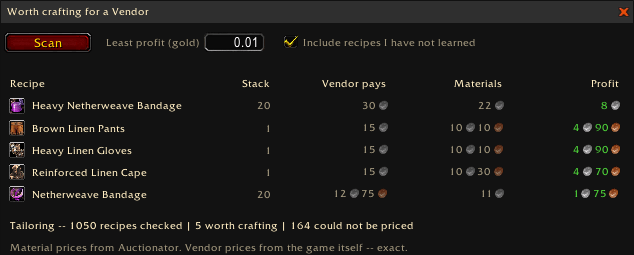
Craft and sell straight to a vendor for profit! Find which recipes earn, even if you haven't learned them yet.
1 b.png
3 b.png
4 b.png
Description
CraftValue
For Retail and WoW Forever!
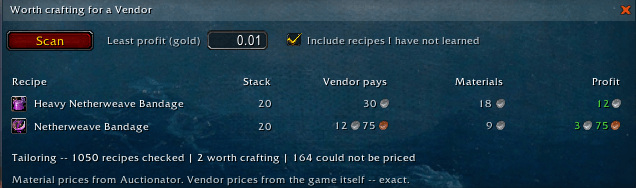
Some things are worth more to a vendor than they cost to make. Scan a profession and CraftValue lists every one of these items, sorted by what you can earn.
There is no buyer to find, no deposit, undercutting, or auction house cut. A vendor buys every single one at a price that never moves — so the only question is whether your materials cost less than that, and that question has a different answer every week as prices shift. CraftValue answers it for a whole profession at once, instead of you checking recipes one at a time.
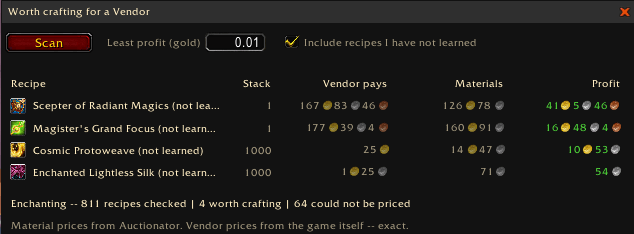
Includes recipes for your profession that you haven't learned yet, so you can discover new things to make gold from.
Features
- Scan a whole profession at once — open a profession and the list is there, every recipe priced and sorted by profit.
- Vendor prices are exact. They come directly from the game itself and don't vary day to day.
- Your materials, at today's prices — read from Auctionator or TradeSkillMaster, whichever you already use. Each material is priced at the cheaper of the auction house and the vendor who sells it, because sometimes vendor-sold ingredients are cheaper from the auction house.
- Set the least profit worth your time. Only crafts clearing it are listed. Zero is a real setting — it shows everything that does not lose money, which is exactly what you want while leveling a profession.
- Include recipes you have not learned, to see what would be worth learning for some easy gold.
- Opens and closes with the profession window, so the answer is there right away. Both behaviours can be turned off, and the minimap button brings the list back any time.
- Click a row to jump straight to that recipe in the profession window.
- A line on the item tooltip when something you can craft is worth more to a vendor than it costs to make. Items that are not worth crafting don't show the tooltip line.
- A stack-size column, because crafting a hundred of something that stacks to one is a very different experience from one that stacks to two hundred.
- Every figure says where it came from. The line under the list names whichever price addon answered, so you can judge a number better.
- Never shows a profit when information is missing. If even one material has no price, it will tell you.
- Matches your interface. With Munin.StyleLib installed the list takes your chosen style; without it, it draws in the game's own colors.
- For Retail and WoW Forever.
Usage
- Open a profession and the list appears on its own, scanning immediately.
- The minimap button opens it any time; right-click it for settings.
- Options live in Esc → Options → AddOns → Munin.CraftValue: which addon prices your materials, the tooltip line, opening and closing with the profession window, and the minimap button.
- Slash commands:
/craftvalue— show or hide the list/craftvalue scan— scan the open profession/craftvalue recheck— confirm every saved vendor price/craftvalue excluded— list the items you've marked as refused/craftvalue included— put them all back
Notes
CraftValue uses the reagent prices your auction house scanning addon last saw. What it cannot tell is how many are listed at that price, because the APIs don't give that information — so a craft that pays well for ten may not pay at all for five thousand. Buying in quantity moves a price against you, and the list cannot see that happening beforehand. Treat a tempting number as a reason to look, and buy your reagents at the price you want.
Material prices are only up to date from the last time your auction house price addon scanned. Vendor prices are exact and fetched directly from WoW; everything on the reagent side belongs to TSM or Auctionator's reading of a moving market.
Enchanting recipes that produce an item are priced normally. Enchants that use Enchanting Vellum are not — the game gives no output item for them for CraftValue to read.
CraftValue cannot guarantee a price stays the same. Please look at the live prices in the auction house before you spend your gold. Take special care with items that come in various qualities, the lowest quality is not always the cheapest.
ATTENTION! A few items come with a vendorsell price, but a vendor will not actually accept them - this is presumably a bug in WoW. One example is the Faded Fortune Card from Inscription. I have not yet found a way to work around this, so take care with these kind of items. Feel free to comment if you discover any other items that behave in this way.
CraftValue notices when a vendor unexpectedly says no in this manner. If an item is ever refused at the counter, CraftValue asks whether to leave it off the list for good — right-click any suggestion row to do the same yourself.
Have fun making gold!
Munin.CraftValue Team