MrTadpoleEggQOL_Forever
- By
Party tools, configurable alerts, cooldown voice notifications and 61 optional WoW settings with original-value backup and restore.
# MrTadpoleEggQOL
## English
Party tools, configurable alerts and optional game settings in one standalone addon. Greet your group, notice whispers and name mentions, hear selected cooldown recoveries and manage settings with a way to restore their original values.
**Version:** 2.1.8 · **Target:** WoW Retail 12.1.5 · **Open:** `/tqol` or the minimap icon. No MedusaTools, OneFUtilities, NaowhQOL or external libraries are required.
### 01. One home for your QOL
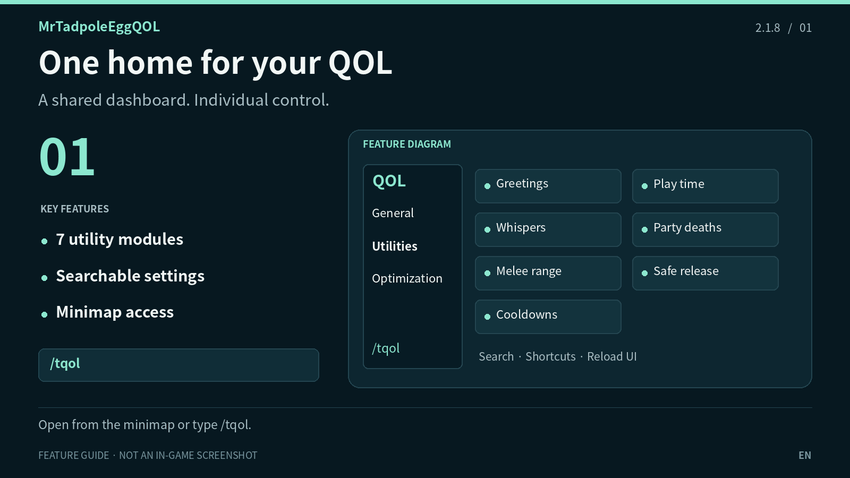
Use a searchable dashboard with General, Utilities and Optimization sections. Open it from the tadpole-egg minimap icon or `/tqol`, and drag the icon to save its position. Modules can be enabled individually. Addon text supports Korean and English and follows WoW's text language; matching native setting names use the game's translations.
### 02. Party greetings & quick leave
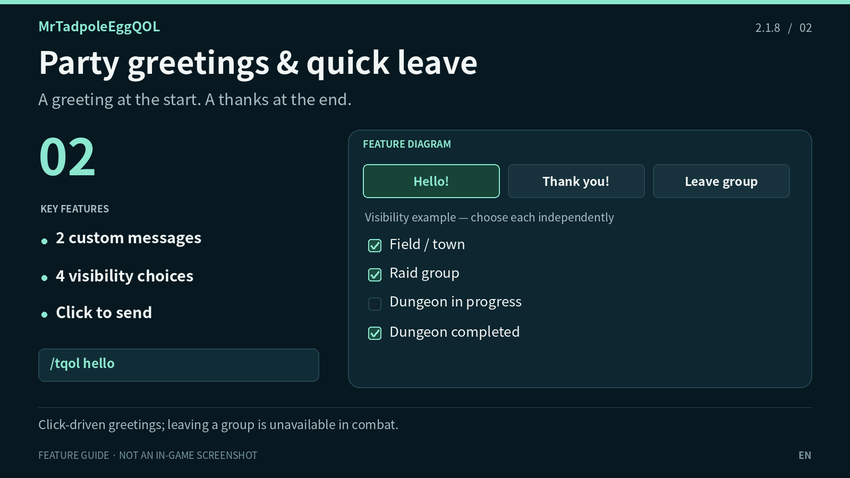
Keep two custom greeting buttons and a Leave Group button on screen. Clicking a greeting sends it to party, raid or instance chat automatically. Set button size, spacing, opacity, background/text colors and position lock.
Choose visibility separately for field/town, raid groups, 5-player dungeons in progress and completed dungeons. Hide in Combat is a separate option. Standard dungeon completion follows the final journal boss; Mythic+ follows run completion, including enemy forces. Unknown completion follows the in-progress choice. Leaving a party or raid is immediate, without an extra confirmation, and unavailable in combat.
### 03. Play-time alert styling
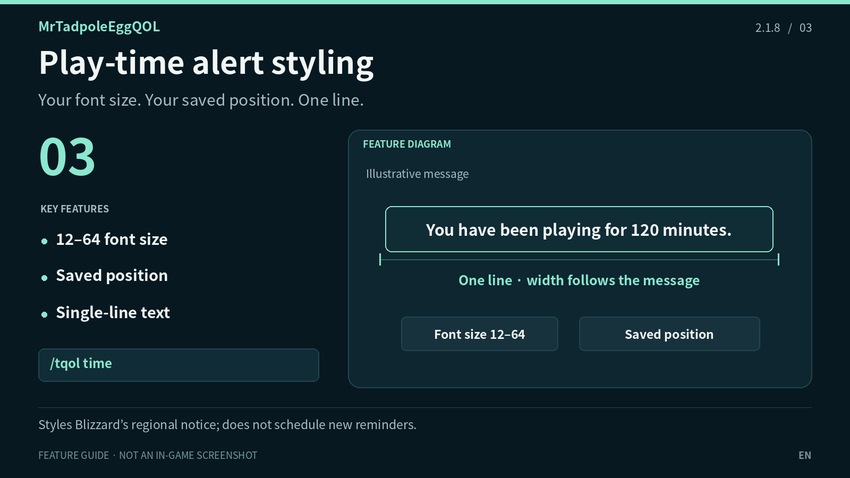
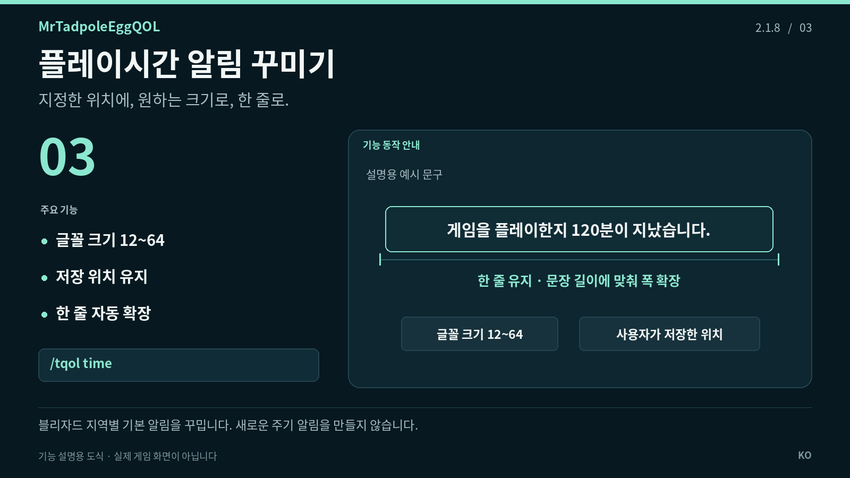
Change the position and font size of Blizzard's native play-time notice. Select font size 12–64, preview and move the notice, then lock it. Text stays on one line and expands horizontally without reducing the selected font size. Disabling restores the native appearance.
This styles a regional game notice; it does not create a custom reminder schedule. Clients without the native notice can use the preview only. Very long text may extend beyond the screen.
### 04. Whispers & name mentions
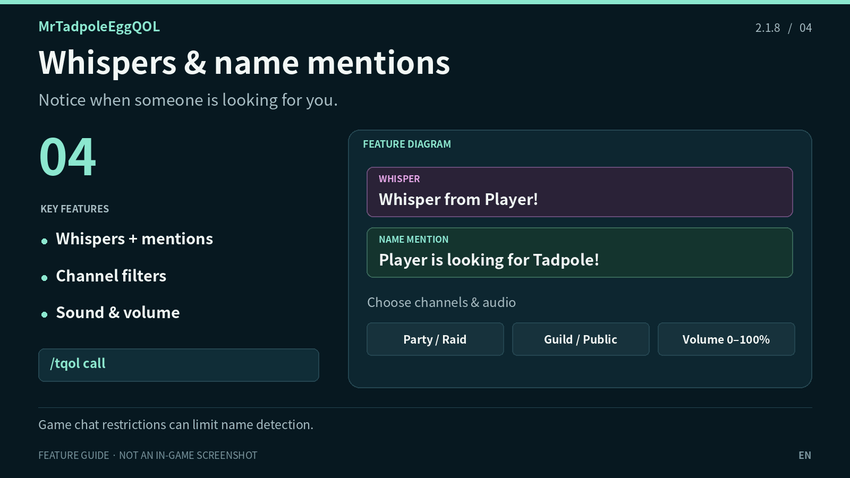
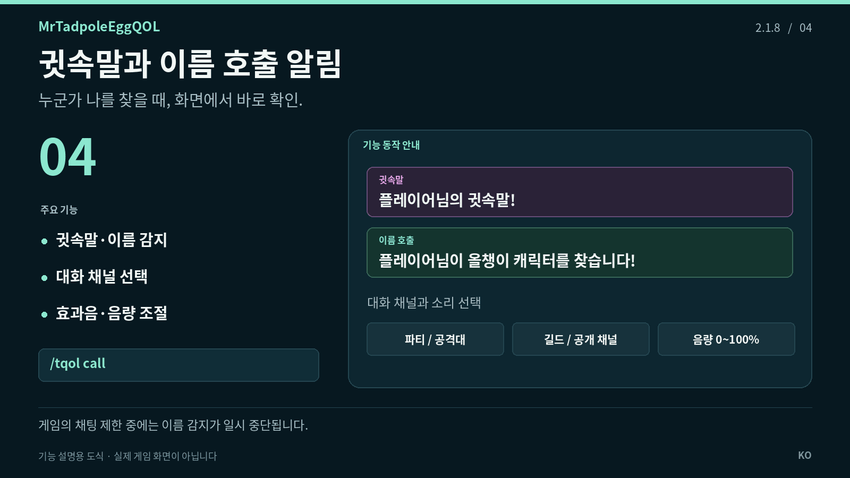
Show visible whisper and character-name mention alerts. Choose first-whisper-only notifications per sender, register multiple character names and select party/instance, raid, guild/officer, say, yell or public channels.
Choose one of six game sound options, select Master, Sound Effects or Dialog playback and adjust alert volume from 0–100%. Font size and a test are available. During chat restrictions, whispers become anonymous arrival notices and name scanning pauses.
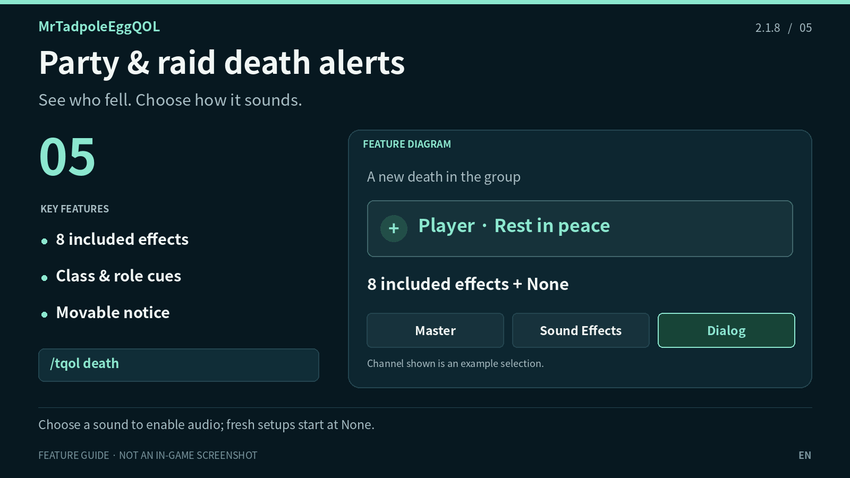
### 05. Party & raid death alerts
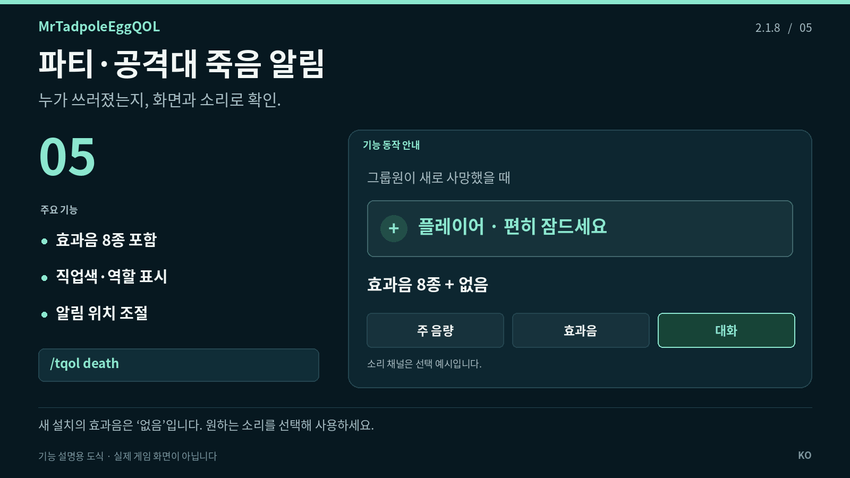
Show new group deaths with class-colored names and role icons when available. Include or exclude your own death and raid members. Customize the message, font, color, duration and position.
Eight effects are included: four male voices, one female voice, bell, pixel and spring. Select Master, Sound Effects or Dialog playback. Sound starts at None on a fresh setup: choose and preview an effect to enable it. Already-dead members are not re-announced when joining.
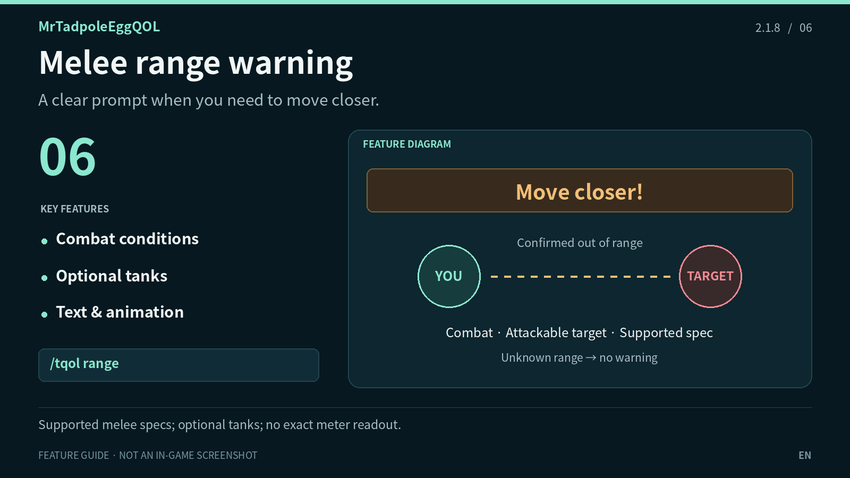
### 06. Melee range warning
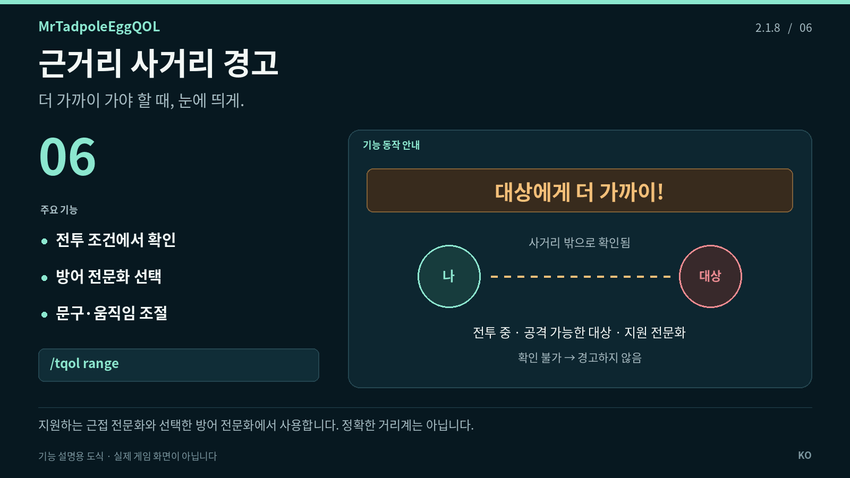
Warn when your attackable target is confirmed out of melee range during combat on a supported melee specialization. Optionally include supported tanks. Customize warning text, font size, color, position and animation.
Disabled by default. Unknown or restricted range results do not produce a warning. It is not an exact distance meter.
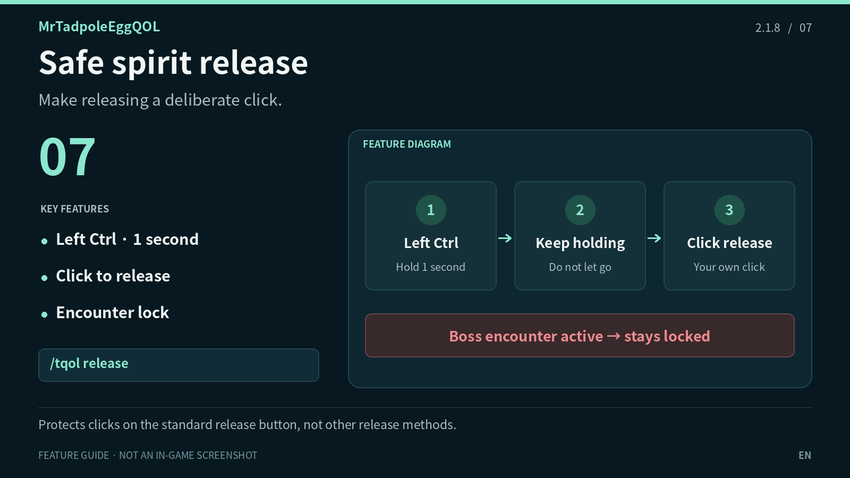
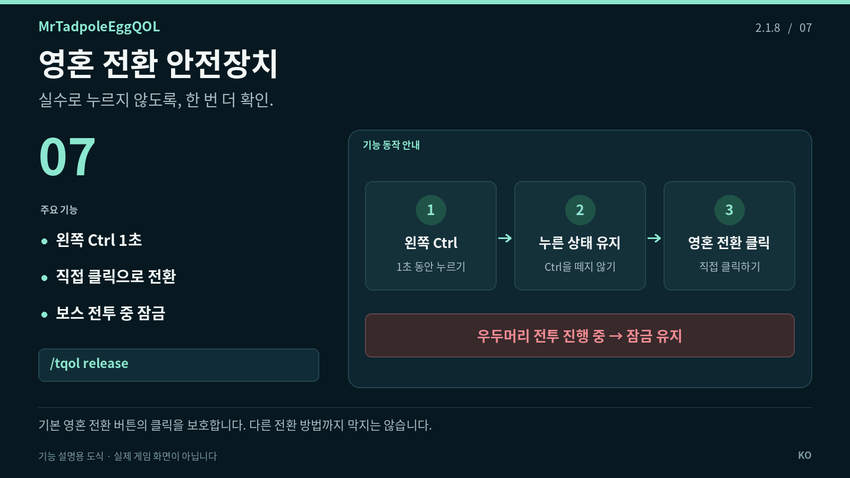
### 07. Safe spirit release
Protect the normal Release Spirit button from accidental clicks. Hold Left Ctrl for one second, keep holding it, then click the release button. Letting go locks it again, and the guard stays locked during a boss encounter. An option limits protection to raid groups.
Disabled by default. It does not release automatically. Soulstone, resurrection and death recap remain available. Commands and other addons that release your spirit are outside this button-click protection.
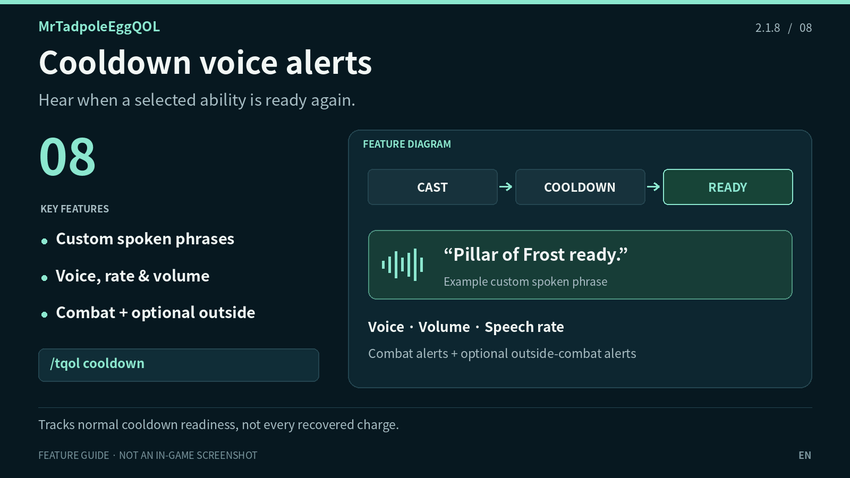
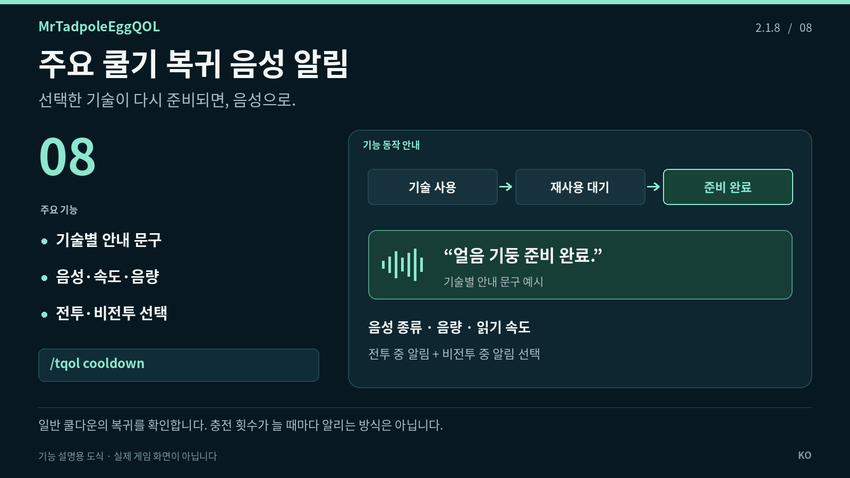
### 08. Cooldown voice alerts
Announce selected ability recoveries with WoW's text-to-speech voices. Enable the module, select learned abilities or add them by name/spell ID, and customize the spoken phrase. Adjust voice, volume and speech rate; Test Voice and Check Status help with setup.
Disabled by default. Combat alerts are allowed when enabled; Also Announce Outside Combat adds non-combat alerts. Tracking follows observed casts and normal-cooldown readiness, not every recovered charge. It depends on available game information and voices. Other-language clients can add learned spells by local name or ID.
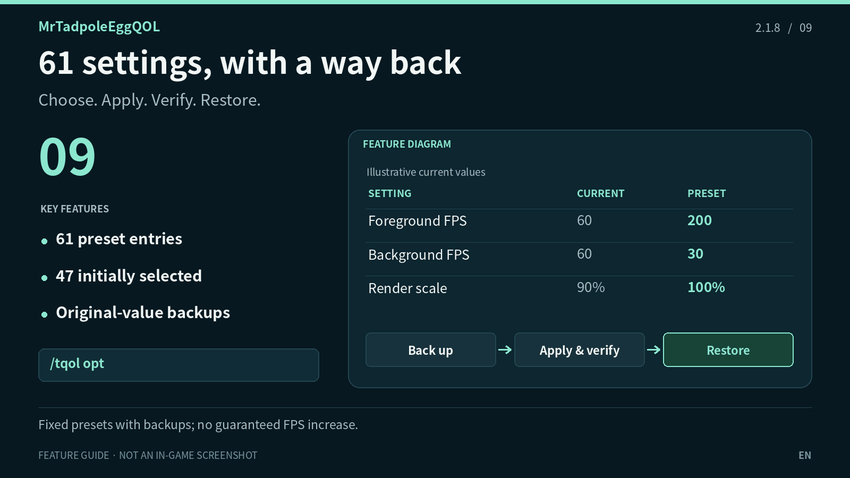
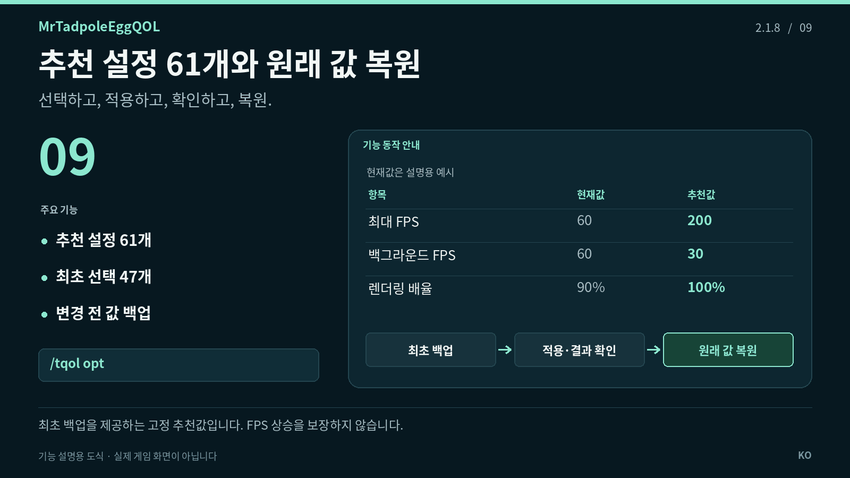
### 09. 61 settings, with a way back
Review 61 optional preset settings for graphics, raid graphics, FPS limits, visual effects and other game options. The initial selection covers 47 graphics/FPS-related entries. Select individual items or all 61, then explicitly apply them.
Readable current/recommended values, first-change backups, Restore Selected, Restore All and Copy Report help you manage changes. Unsupported or locked settings are skipped; unconfirmed restores keep their backup records. This is a fixed preset tool, not automatic PC tuning or a guaranteed FPS boost. Changes are unavailable in combat. Restore before removal to undo them; graphics API changes may require a full restart.
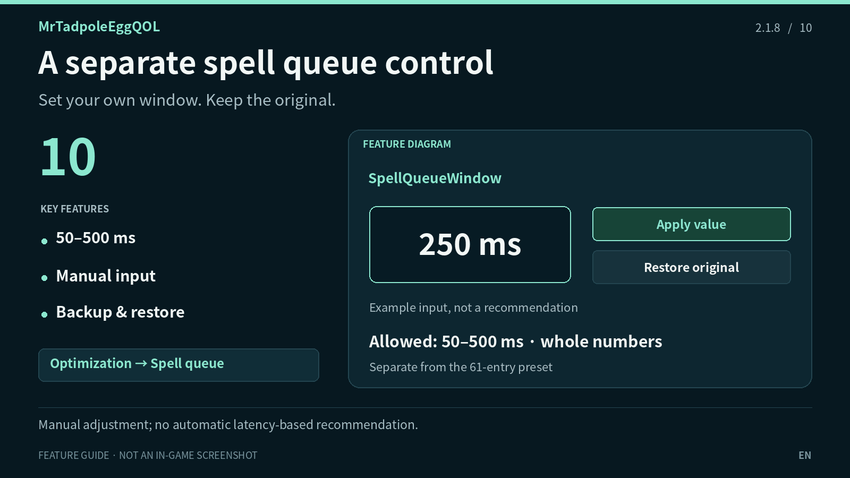
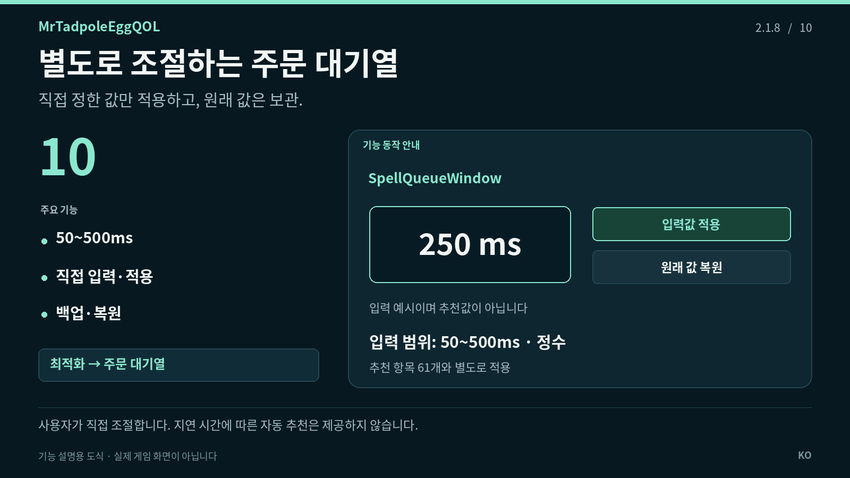
### 10. A separate spell queue control
Set SpellQueueWindow separately using an integer from 50 to 500 ms. Apply only the value you enter and restore its original value from the same page or Restore All. No queue value is silently added to the 61-entry preset, and no universal or latency-based recommendation is supplied.
## Install & start
1. Place the `MrTadpoleEggQOL` folder inside `_retail_/Interface/AddOns/` and enable it in game.
2. Open `/tqol`, choose the utilities you want and test their alerts.
3. Review optimization selections and click Apply only when you want to change them.
4. Keep SavedVariables when updating to retain preferences and backups.
Range, safe release and cooldown speech start disabled. Death effects start at None. For cooldown speech, enable both the module and an ability; Test Voice by itself does not enable tracking.
## Commands & support
- `/tqol` — Open or close settings
- `/tqol cooldown` — Cooldown voice and status
- `/tqol opt` — Optimization and Spell Queue in the sidebar
- `/tqol minimap` — Show or hide the minimap icon
If keeping original addons, disable overlapping functions to avoid duplicate alerts. For reports, include addon/game versions, reproduction steps and the complete error. Add Copy Report for optimization issues, or the ability name/ID and Check Status for cooldown issues.
## Credits
Author: 올챙이알아저씨 (MrTadpoleEgg). Feature references: MedusaTools 1.0.1 / HelloParty / MedusaTimeAlert / WhisperCallme (original credits: 올챙이알, Peniar, 일층). Selected feature logic/data, eight death sounds and three role icons: OneFUtilities 1.92.013 by 일층. The 61 preset values are based on the supplied NaowhQOL 20260721.01 optimization table. This is not an official NaowhQOL release.
**Image disclosure:** the cover is AI-generated branding artwork. Feature images are explanatory diagrams based on the addon source, not in-game screenshots.
# MrTadpoleEggQOL
## 한국어
파티 인사·각종 알림·쿨기 음성·와우 설정을 한곳에서 관리하는 독립 편의 기능 애드온입니다. 필요한 모듈을 골라 쓰고, 변경한 설정은 백업한 원래 값으로 되돌릴 수 있습니다.
**버전:** 2.1.8 · **대상:** 와우 리테일 12.1.5 · **설정:** `/tqol` 또는 미니맵 아이콘. MedusaTools, OneFUtilities, NaowhQOL과 외부 라이브러리는 필수 설치 항목이 아닙니다.
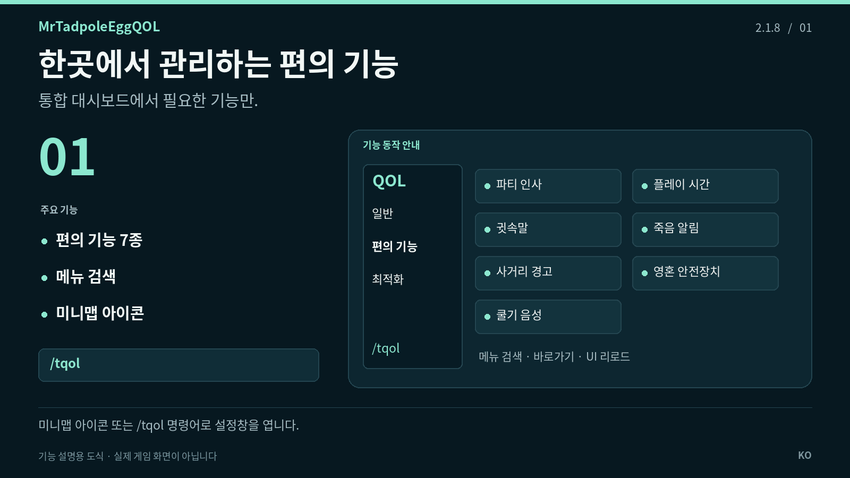
### 01. 한곳에서 관리하는 편의 기능
일반·편의 기능·최적화 메뉴와 검색을 갖춘 통합 대시보드를 제공합니다. 올챙이알 미니맵 아이콘이나 `/tqol`로 열고, 아이콘을 미니맵 둘레로 옮기면 위치가 저장됩니다. 각 편의 기능을 따로 켜고 끌 수 있습니다. 애드온 문구는 와우 텍스트 언어에 따라 한국어·영어로 표시하며, 대응되는 기본 설정명은 게임의 번역을 사용합니다.
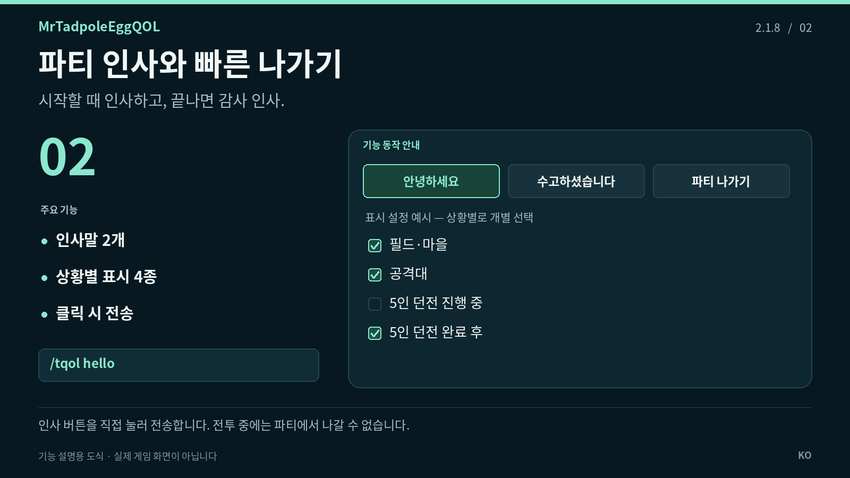
### 02. 파티 인사와 빠른 나가기
인사말 버튼 2개와 파티 나가기 버튼을 화면에 배치합니다. 직접 클릭할 때만 메시지를 전송하고 파티·공격대·인스턴스 채널은 자동으로 선택합니다. 버튼 크기·간격·불투명도·배경색·글자색과 위치 잠금을 조절할 수 있습니다.
필드·마을, 공격대, 5인 던전 진행 중, 던전 완료 후의 표시를 각각 선택하며 전투 중 숨기기는 별도로 설정합니다. 일반 던전은 도감 기준 최종 보스 처치, 쐐기는 적 병력을 포함한 던전 완료를 기준으로 합니다. 완료를 확인하지 못하면 진행 중 선택을 따릅니다. 파티·공격대 탈퇴는 추가 확인 없이 즉시 실행하며 전투 중에는 사용할 수 없습니다.
### 03. 플레이시간 알림 꾸미기
블리자드 기본 플레이시간 알림의 위치와 글꼴 크기를 변경합니다. 크기 12~64, 미리보기, 위치 이동·잠금을 지원합니다. 문장을 한 줄로 유지하고 선택한 글꼴 크기 그대로 가로 폭을 늘립니다. 기능을 끄면 기본 모양으로 복원합니다.
지역별 기본 알림을 꾸미는 기능이며 새로운 주기 알림을 생성하지 않습니다. 기본 알림이 없는 클라이언트에서는 미리보기만 사용할 수 있습니다. 너무 긴 문장은 화면 밖으로 나갈 수 있습니다.
### 04. 귓속말과 이름 호출 알림
귓속말 도착과 등록된 캐릭터 이름 호출을 화면에 표시합니다. 상대별 첫 귓속말만 알리기, 여러 캐릭터 이름 등록, 파티·인스턴스·공격대·길드·일반·외치기·공개 채널 선택을 지원합니다.
게임 효과음 6종과 주 음량·효과음·대화 재생 채널, 알림 음량 0~100%, 글꼴 크기와 테스트를 제공합니다. 게임의 채팅 제한 중에는 귓속말 도착만 익명으로 알리고 이름 감지는 멈춥니다.
### 05. 파티·공격대 죽음 알림
새로 사망한 그룹원을 표시하며 확인 가능한 정보에 따라 직업 색상과 역할 아이콘을 함께 보여줍니다. 자신·공격대원 포함 여부, 문구·글꼴·색상·표시 시간·위치를 조절합니다.
남성 음성 4종, 여성 음성 1종, 종소리·픽셀·스프링 등 효과음 8종을 포함합니다. 주 음량·효과음·대화 채널로 재생할 수 있습니다. 새 설치는 효과음 ‘없음’으로 시작하므로 원하는 소리를 선택해 주세요. 합류할 때 이미 사망한 사람은 다시 알리지 않습니다.
### 06. 근거리 사거리 경고
지원하는 근접 전문화가 전투 중 공격 가능한 대상을 잡고 있을 때, 근접 사거리 밖으로 확인되면 경고합니다. 지원하는 방어 전문화도 선택할 수 있습니다. 경고 문구·크기·색상·위치와 움직임 효과를 조절합니다.
기본값은 꺼짐입니다. 사거리를 확인할 수 없거나 정보가 제한되면 경고하지 않으며, 정확한 미터 수를 표시하는 거리계는 아닙니다.
### 07. 영혼 전환 안전장치
기본 영혼 전환 버튼을 실수로 누르지 않도록 보호합니다. 왼쪽 Ctrl을 1초 동안 누른 뒤 누른 상태를 유지하며 영혼 전환 버튼을 클릭합니다. Ctrl을 떼면 다시 잠기고, 우두머리 전투 중에는 잠금을 유지합니다. 공격대에서만 사용할지도 선택합니다.
기본값은 꺼짐입니다. 자동 영혼 전환은 하지 않으며 영혼석·부활·죽음 요약은 사용할 수 있습니다. 명령어나 다른 애드온을 통한 전환은 이 버튼 클릭 보호 범위 밖입니다.
### 08. 주요 쿨기 복귀 음성 알림
선택한 기술이 다시 준비되면 와우 TTS 음성으로 알려줍니다. 기능을 켜고 배운 기술을 선택하거나 이름·ID로 추가하세요. 기술별 안내 문구, 음성 종류·음량·읽기 속도를 바꿀 수 있으며 음성 테스트와 상태 확인을 제공합니다.
기본값은 꺼짐입니다. 활성화하면 전투 중 알림을 허용하며 ‘비전투 중에도 알림’을 켜면 양쪽에서 알립니다. 시전과 일반 쿨다운의 복귀를 확인하며 모든 충전 회복을 알리지는 않습니다. 게임이 제공하는 정보와 음성에 의존합니다. 다른 언어에서는 현지화된 주문명이나 ID로 기술을 추가할 수 있습니다.
### 09. 추천 설정 61개와 원래 값 복원
그래픽·공격대 그래픽·FPS 제한·화면 효과 등 추천 설정 61개를 제공합니다. 처음에는 그래픽·FPS 관련 47개가 선택됩니다. 원하는 항목이나 전체를 선택한 뒤 직접 적용합니다.
현재값·추천값 비교, 최초 변경 전 백업, 선택 복원·전체 복원·결과 복사를 지원합니다. 미지원·잠긴 설정은 건너뛰고 복원되지 않은 항목의 기록은 보관합니다. PC별 자동 튜닝이나 FPS 상승을 보장하는 기능은 아닙니다. 전투 중에는 변경하지 않습니다. 삭제 전 원래 값으로 되돌리려면 전체 복원을 사용하세요. 그래픽 API 변경은 게임 재시작이 필요할 수 있습니다.
### 10. 별도로 조절하는 주문 대기열
주문 대기열은 50~500ms 정수로 별도 입력·적용하며 원래 값으로 복원할 수 있습니다. 추천 항목 61개에 임의의 대기열 값을 추가하지 않습니다. 지연 시간을 자동 측정하거나 모든 환경에 맞는 단일 값을 추천하지 않습니다.
## 설치와 시작
1. `MrTadpoleEggQOL` 폴더를 `_retail_/Interface/AddOns/`에 넣고 게임에서 활성화합니다.
2. `/tqol`을 열어 사용할 편의 기능을 켜고 알림을 테스트합니다.
3. 최적화 항목은 확인한 뒤 적용을 눌렀을 때만 변경됩니다.
4. 업데이트할 때 SavedVariables를 유지하면 설정과 백업을 보존할 수 있습니다.
사거리·영혼 안전장치·쿨기 음성은 꺼진 상태로 시작합니다. 죽음 효과음은 ‘없음’으로 시작합니다. 쿨기 음성은 기능과 해당 기술을 모두 켜야 하며, 음성 테스트만으로 추적이 켜지지는 않습니다.
## 명령어와 오류 제보
- `/tqol` — 설정창 열기·닫기
- `/tqol cooldown` — 쿨기 음성·상태 확인
- `/tqol opt` — 최적화·주문 대기열
- `/tqol minimap` — 미니맵 아이콘 표시·숨기기
원본 애드온을 함께 쓰면 겹치는 기능을 꺼 중복 알림을 피하세요. 제보 시 애드온·게임 버전, 재현 과정과 오류 전문을 알려 주세요. 최적화는 결과 복사, 쿨기 음성은 주문명·ID와 상태 확인 결과가 도움이 됩니다.
## 제작 및 출처
제작: 올챙이알아저씨 (MrTadpoleEgg). 기능 참고: MedusaTools 1.0.1 / HelloParty / MedusaTimeAlert / WhisperCallme (원본 표기: 올챙이알, Peniar, 일층). 선택 기능 로직·데이터, 사망 효과음 8개와 역할 아이콘 3개: 일층님의 OneFUtilities 1.92.013. 추천 설정 61개: 제공된 NaowhQOL 20260721.01 최적화 표 기반. NaowhQOL의 공식 배포판은 아닙니다.
**이미지 안내:** 대표 배너는 AI로 만든 브랜드 일러스트입니다. 기능별 이미지는 애드온 코드를 바탕으로 만든 설명용 도식이며 실제 게임 캡처가 아닙니다.
MrTadpoleEggQOL_Forever Team