Modern Fishing
- By
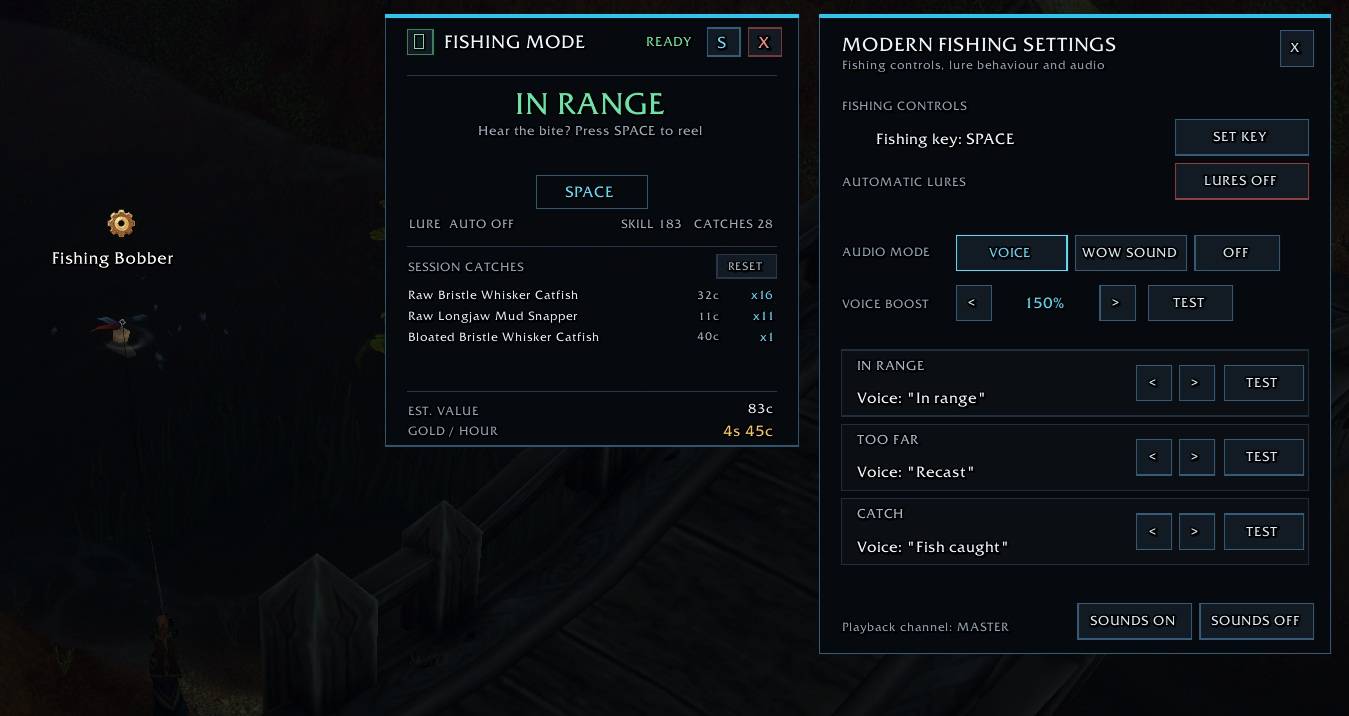
Modern Fishing streamlines fishing in WoW Forever with smart casting controls, optional lure management, range audio cues, and customizable keybinds.
MF_Screen.jpg
Description
Modern Fishing
Modern Fishing is a quality-of-life fishing addon for **WoW Forever**, designed to make fishing smoother, faster, and easier to use without turning it into a fully automated system.
The addon focuses on simple controls, clear audio feedback, lure management, and a compact interface that stays out of the way while fishing.
Features
One-button fishing
Assign a fishing key of your choice and use it as your main fishing control.
You are not locked to the default `SPACE` key and can choose the key that feels most comfortable for your setup.
Smart fishing flow
Modern Fishing helps streamline the normal fishing loop by handling the different fishing states and giving clear feedback while you fish.
The addon keeps track of:
- Casting
- Active fishing state
- Bobber interaction
- Successful catches
- Starting a new cast
Audio range feedback
The addon can tell you whether your fishing bobber is within interaction range.
Available voice cues include:
- `IN RANGE`
- `TOO FAR`
- `FISH CAUGHT`
This makes it much easier to fish without constantly checking the screen.
Enhanced fishing audio
Modern Fishing can temporarily increase relevant game audio while Fishing Mode is active, making fishing sounds easier to hear.
When Fishing Mode is disabled, your original sound settings are restored.
Optional automatic lure management
Modern Fishing can automatically use suitable fishing lures from your bags.
If you do not need or want a lure, simply disable:
Automatic Lures
The addon will then leave your existing lure state untouched, even when compatible lures are available in your bags.
Customizable fishing key
The fishing button can be changed directly from the addon settings.
Examples:
- `SPACE`
- `F`
- `G`
- `SHIFT-F`
- or another supported key combination
Movable interface
The Modern Fishing interface can be freely moved to your preferred location. Your chosen UI position is saved between sessions.
Minimap button
A dedicated fishing-themed minimap button provides quick access to Modern Fishing.
- **Left-click:** Show or hide the Modern Fishing window
- **Right-click:** Enable or disable Fishing Mode
- **Drag:** Reposition the minimap button
Persistent settings
Modern Fishing remembers your configuration, including:
- UI position
- Minimap button position
- Fishing key
- Automatic lure setting
- Audio settings
- Voice boost settings
- Range cue preferences
A Forever-compatible fallback system is included to keep settings persistent even on clients where normal SavedVariables do not always reload correctly.
Fishing Mode
Modern Fishing does **not** automatically enable Fishing Mode when you log in or reload the UI.
Fishing Mode starts disabled by default so that the addon never changes your controls or sound settings unless you explicitly enable it.
You can enable it through the Modern Fishing interface or via the minimap button.
Slash Commands
Use:
`/mf`
to access Modern Fishing commands and help.
Useful commands include:
`/mf key <key>`
Change the fishing key.
Example:
`/mf key F`
`/mf reset`
Reset the Modern Fishing interface to its default position.
`/mf storage`
Display SavedVariables diagnostics. This is mainly intended for troubleshooting.
Important
Modern Fishing is designed as a **quality-of-life addon**, not a bot.
Fishing actions still require normal player input and respect WoW's protected-action and hardware-input restrictions.
Compatibility
Designed specifically for:
**World of Warcraft: Forever**
The addon may also work on related Classic-based clients, but Forever is the primary supported version.
Modern Fishing Team