MobSpot
- By
Alerts you when a mob on your list is close by. Add mobs with one key, by name or NPC ID, and get a sound, an on-screen alert and a marker over the mob.
1.png
Description
Never miss the mob you're hunting
MobSpot keeps a list of the mobs you're looking for and alerts you the moment one of them is close by. Put a rare or a quest mob on the list and go about your business. Made for WoW Forever.
Add mobs your way
- One key: target a mob and press Track/Untrack Target to put it on the list. Press it again to take it off.
- By name or NPC ID: type it on the options page, handy for a rare you haven't met yet.
- Every rare, automatically: turn on Scan rares automatically and any rare close by alerts you too, no list needed.
- The list is shared by all your characters.
Spotted as soon as it shows
- A listed mob is spotted the moment its nameplate shows. The scan radius is your nameplate distance, 30 to 100 yards, set with a slider.
- Rares the game marks on the map or minimap are spotted too, and the alert says how many yards away they are.
- MobSpot can turn enemy nameplates on for you, and keeps them the way you set them.
An alert you won't miss
- The mob's name and how close it is, big at the top of the screen.
- A sound that plays even with sound effects turned down: a dozen game alerts, or any sound your other addons share.
- A chat line and a flash of the screen edges.
- You pick how soon the same mob can alert again.
A marker over the mob
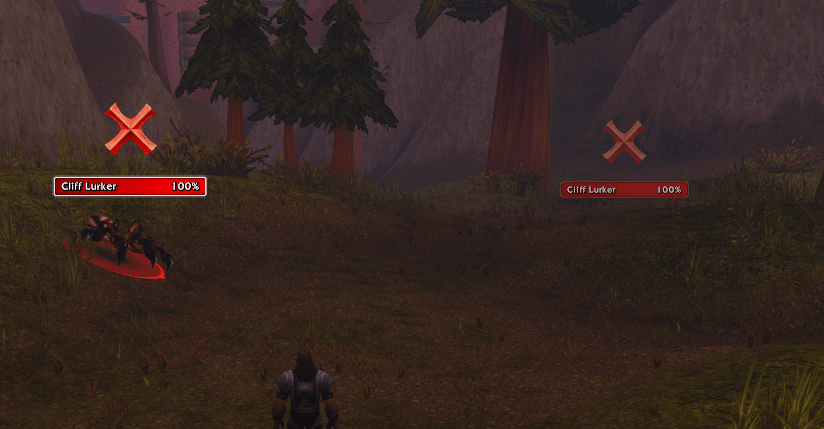
A skull over its nameplate, so you can pick it out of a crowd. Or a red cross, star, moon, green arrow, map pin, quest mark, treasure chest and more, in any size, bobbing, pulsing, spinning or still. Only you see it.
Good to know
- /ms or the minimap button opens the options.
- Only mobs: the game doesn't let addons see herbs, ore or other things you gather.
- Mobs are spotted no further out than nameplates or map markers show. There's no marker in dungeons and raids.
Feedback and bug reports are welcome in the comments.
MobSpot Team