Minimap Bags
- By
Your minimap, clear again: addon buttons tucked into named bags, each opening to the ones you need.
minimap-bags.png
bag-open.png
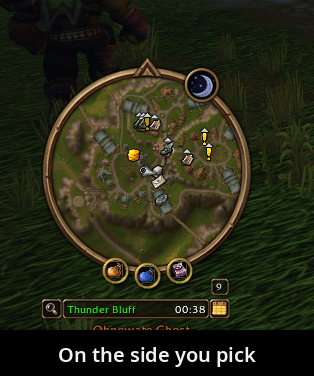
bags-bottom.png
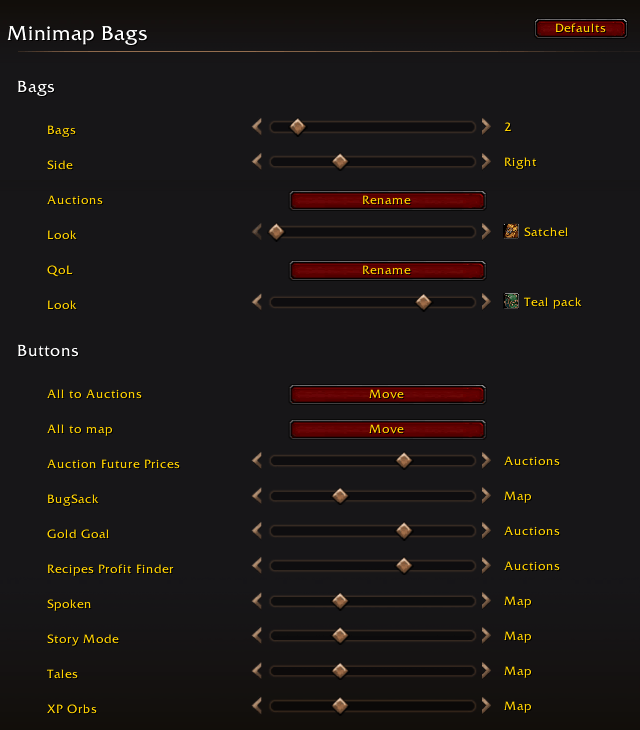
options.png
Description
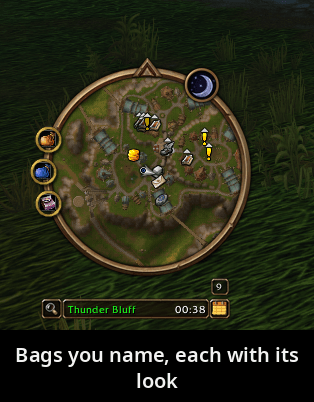
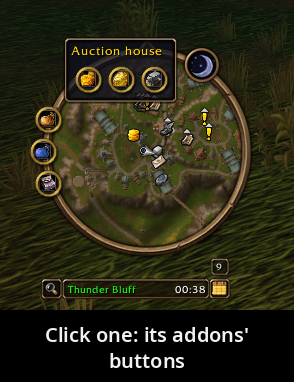
Too many addon buttons around the minimap? Put them in bags. Each bag is a button on the edge of the map; click it to open a panel with its addons' buttons, which work as before.

Why Minimap Bags
Other button collectors put every addon button in one bar or one menu. Minimap Bags gives you several bags:
- One per kind of addon: auction house in one, quests in another, tools in a third
- Each with its own name and look, so you know which is which at a glance
- Each button goes where you pick, stays on the map, or hides
- Controller friendly: its options are the game's own sliders and buttons
How it works
In Options (Esc > Options > AddOns > Minimap Bags):
- Bags: how many (1 to 10; removing one removes the last bag, and its buttons go back on the map), the side of the map they line up on
- Each bag: its name and its look (sacks, packs, boxes, in many colors)
- Buttons: All to bag and All to map move every button at once (hidden ones stay hidden), then a slider per addon button: Hidden, Map, or one of the bags
- A new bag's rows show at once; a removed bag's rows and All to moves show in the rows once the page is opened again
The bags:
- Show only while they hold a button
- Open toward the middle of the screen; a click elsewhere closes them
- Line up on the side of the map you pick, round or square map
- Drag one to move it around the map
It's a simple tool with no dependencies:
- Every button stays on the map until you pick a bag for it
- Hidden only hides a button's icon: its addon keeps running
- Buttons that can't be dragged around the map (such as map pins) stay on the map
- Commands: /mbag
Minimap Bags Team