MDT Route Library
- By
Community Mythic+ routes inside Mythic Dungeon Tools. No alt-tab, no export strings, no copy-paste.
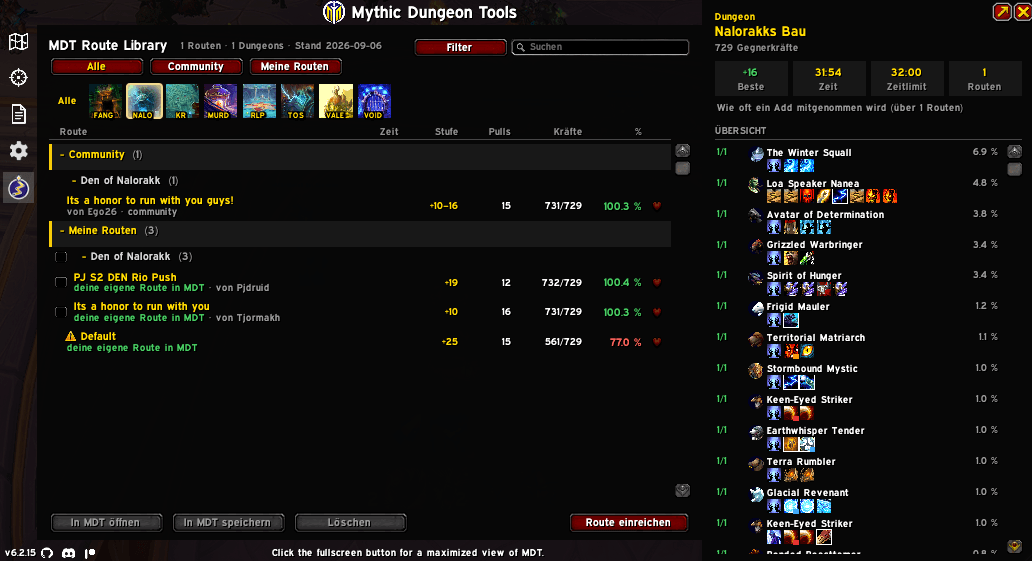
Route list with your own routes, key level, pulls and forces at a glance
Description

Getting a route into your game today means leaving it. Open a website, find a route, copy an export string, alt-tab back, paste it into MDT. Every time, for every dungeon.
MDT Route Library puts the route catalogue where you actually need it: inside the Mythic Dungeon Tools window. Click the icon in MDT's sidebar, look through routes, pick one, and it's on the map. No browser, no strings, no clipboard.
This is not another MDT
It does not plan routes, draw maps or replace anything MDT does. MDT stays the tool you build and view routes with. This addon is the catalogue in front of it: it finds the route, MDT shows it.
What you get
A browsable library, grouped by dungeon. Search by name, author or dungeon. Filter by key level, pull count or enemy forces. Mark favourites and they move to their own section at the top.
The numbers before you commit. Every route shows what it actually gathers against what the dungeon needs, as a percentage. Routes that fall short are flagged, so you find out here rather than at the last boss.
The whole pull, not just a line on a map. Each pull is broken down into the enemies it contains, with a running enemy forces percentage next to it.
Enemy details on hover. A 3D model, level, creature type, health and enemy forces, plus every ability the enemy has. Interruptible abilities are outlined, dispel types are colour coded, and the tooltip names the classes that can remove each one.
It leaves your MDT alone
Nothing is written into your preset list when the addon loads. A route only gets there when you ask for it:
- "Show on map" uses a single preview slot per dungeon that gets overwritten the next time.
- "Save to MDT" makes a permanent copy that becomes an ordinary preset of yours. The addon never touches it again.
Your own presets are never modified or deleted by the addon. They do show up in the list though, with the same enemy forces percentage as everything else, so you can finally see which of your old routes still hold up.
Where the routes come from
The library is community built and just getting started, so it is thin right now. Every route in it is credited to its author.
Adding one takes about a minute: build the route in MDT, type /routes submit, copy the code and paste it into a submission on GitHub. Approved routes go out within minutes.
Commands
/routes— open the browser/routes submit— pack the route currently open in MDT for submission/routes status— data age and MDT connection/routes cleanup— remove preview presets from MDT
Requirements
Mythic Dungeon Tools. The addon hooks into MDT's public plugin API and adds a section to its window, so it needs nothing else.
Source, issues and route submissions: https://github.com/Ego26/MDTRouteLibrary
Not affiliated with Blizzard Entertainment, and not an official part of Mythic Dungeon Tools.
MDT Route Library Team