Mali Shards
- By
Automatic Soul Shard trimming for WoW Forever. Set your limit once and never spam a macro again.
🔮 MaliShards
Passively trims excess Soul Shards as you play.
Set how many shards to keep. From then on, the keys you press and the clicks you make out of combat quietly trim the extras, one per input, and never below your limit. No spamming a macro after every fight. 💜
✨ Features
- 🎮 Trim as you play. On by default. Your normal key presses and world clicks trim one excess shard each, and your keys and clicks work exactly as usual.
- 🎯 Stops exactly at your limit, however fast the inputs come.
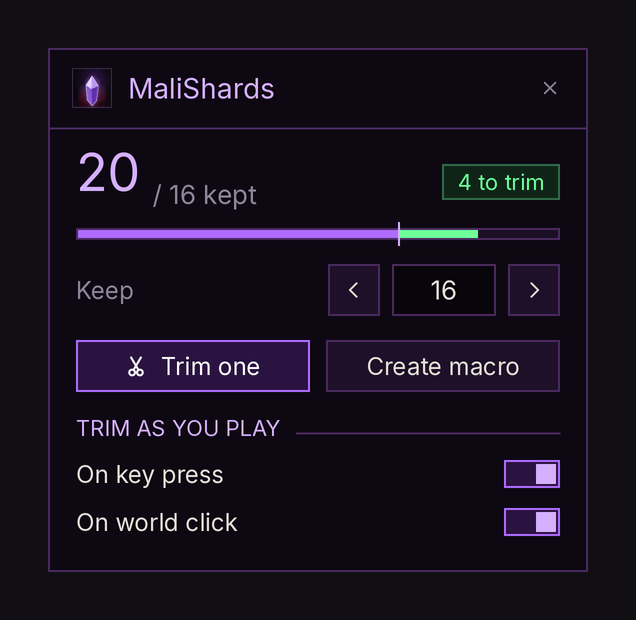
- 📊 See it at a glance. Your shard count, your limit, and a gauge that shows how far over you are.
- 🪄 Manual options too. A Trim one button, a ready-made macro, a keybinding and a right-click on the minimap icon.
- 🖤 Mali Style. A flat Soulstone window that matches the rest of the Mali add-ons.
🤔 Why it's different
WoW only lets an add-on delete an item right after you press a key or click, and only one item per input. That's why most shard managers make you press a button for every single shard.
MaliShards uses the inputs you're already making. Walk to the mailbox, open your bags, mount up, and your shards settle at your limit on their own.
🚀 Getting started
- Install. Use the CurseForge app, or copy the
MaliShardsfolder intoWorld of Warcraft/<your game version>/Interface/AddOns/. - Set your limit. Click the minimap icon (or type
/mshards) and choose how many shards to Keep. It starts at 16. - Play. That's it. Trimming on key press and world click is already on.
Prefer to trim by hand? Switch off Trim as you play and use the Trim one button, the MaliShards macro (made for you on your first login, or anytime with Create macro) or the keybinding under Options › Keybindings › MaliShards.
🛡️ When it won't trim
- In combat
- While you're typing in chat or any text box
- While something is on your cursor
- Below your limit
If the game ever blocks trimming on key presses or clicks, MaliShards switches that option off and tells you. The button, macro and keybinding keep working.
⌨️ Commands
| Command | What it does |
|---|---|
/mshards |
Open or close the window |
/mshards set N |
Keep N shards (0–200) |
/mshards delete |
Trim one excess shard |
/mshards keys |
Turn trimming on key press on or off |
/mshards clicks |
Turn trimming on world click on or off |
/mshards status |
Show your shard count, limit and trimming mode |
/mshards macro |
Create the macro |
/mshards minimap |
Show or hide the minimap icon |
/malishards works too.
💜 Credits
ZiRRuSH · Mali Gnosis · Malignosis
- 🔤 Inter by The Inter Project Authors, the font behind Mali Style. Its license, the SIL Open Font License 1.1, ships in
media/Inter-OFL.txt. - The add-on icon and the icons in
media/iconswere made for the Mali add-ons and fall under MaliShards' MIT License.
MaliShards is a fan-made add-on, not affiliated with or endorsed by Blizzard Entertainment.
📜 License
MIT License. See LICENSE.md for the full terms.
Mali Shards Team