Mali Fishing
- By
A lean WoW Forever fishing addon with one-key cast/catch, auto equip, auto lure, live gold-per-hour stats, tracked catch stats per zone & area, two customizable HUDs, no fluff, low resource and small size.

Screenshot 2026-11-18 174916.png
Screenshot 2026-11-23 004305.png
Description
🎣 MaliFishing
A lean, mean fishing machine for WoW Forever. Cast and reel with one key, see what’s biting, find out what your time on the water is worth, and know what to cook with what you pull up. I built MaliFishing to stay lightweight: the features you’ll actually use, none of the fluff.
⚡ Setup is easy
Have a fishing rod in your inventory, set the keybind for your fishing button, and MaliFishing handles the rest.
💰 Fishing & loot
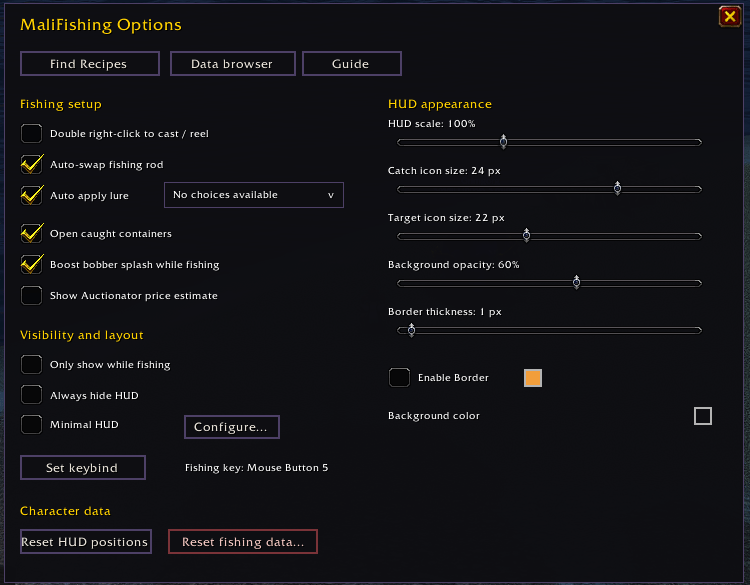
- One-key fishing. Use the same keybind (mouse buttons included) to cast and reel in, or enable double right-click to fish OG muscle memory.
- Automatic rod and lure handling. Auto equip your best usable fishing rod when you press your fishing bind and apply your selected lure if enabled (must have lures in your inventory). Auto restore your previous weapons after 15 seconds of fishing inactivity or when you enter combat. Makes fishing fluid and effortless when you roll up on a spot or pool!
- Fresh-catch container opening. Your next fishing input can open one eligible clam, crate, trunk, or bloated fish. MaliFishing uses the game’s
hasLootflag instead of a hardcoded item list and leaves locked containers and older bag stock alone. - Hear the bobber over the background. An optional splash boost raises sound effects and lowers ambience while your line is out, then restores what it changed without touching music or master volume.
- Vendor and optional Auctionator data reference to see what your time on the water is worth.
📊 Catch stats & value
- Catch odds for everything you pull up. See counts and percentages for every bobber catch, not just fish. Loot from inside containers doesn’t count toward the odds.
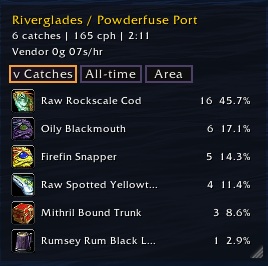
- Live fishing stats. See total catches, catches per hour, elapsed time, and vendor value per hour. With Auctionator, see estimated auction value per hour, marked as partial when some catches don’t have prices.
- Track the catch you came for. Right-click a catch in the breakdown to pin its icon and hourly rate to the HUD. Right-click the pinned row to clear it.
🗂️ Data Browser
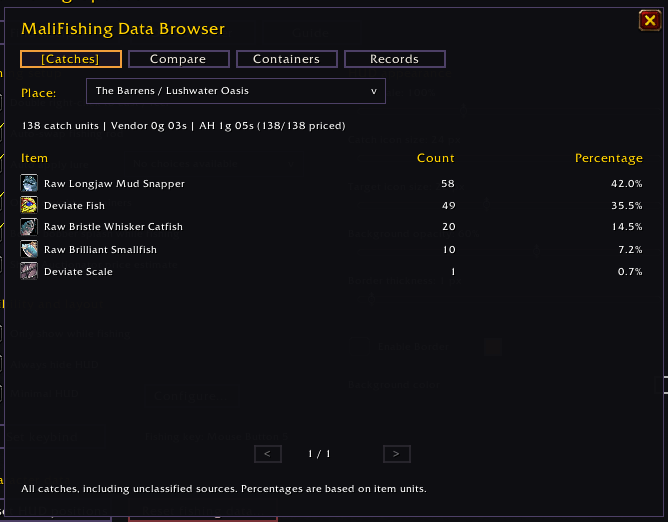
All your history in one place. Open it from Options, the minimap button (Shift + Right-click), or /malifish browser.
- Catches. Pick a place and see every item you’ve caught there with counts and percentages. Zones are grouped, each with an “Entire zone” total at the top and its areas underneath.
- Compare. Pick a catch and see which of your fishing spots gives you the best odds of getting it.
- Containers and Records. Verified container openings and your personal bests.
- All your characters, combined. History, odds and records are account-wide by default, in the HUD too. Tick “Only show history and data for active character” in Options to see just the one you’re on.
- Updates as you fish, so new zones and catches show up right away.
🍳 Recipe Finder
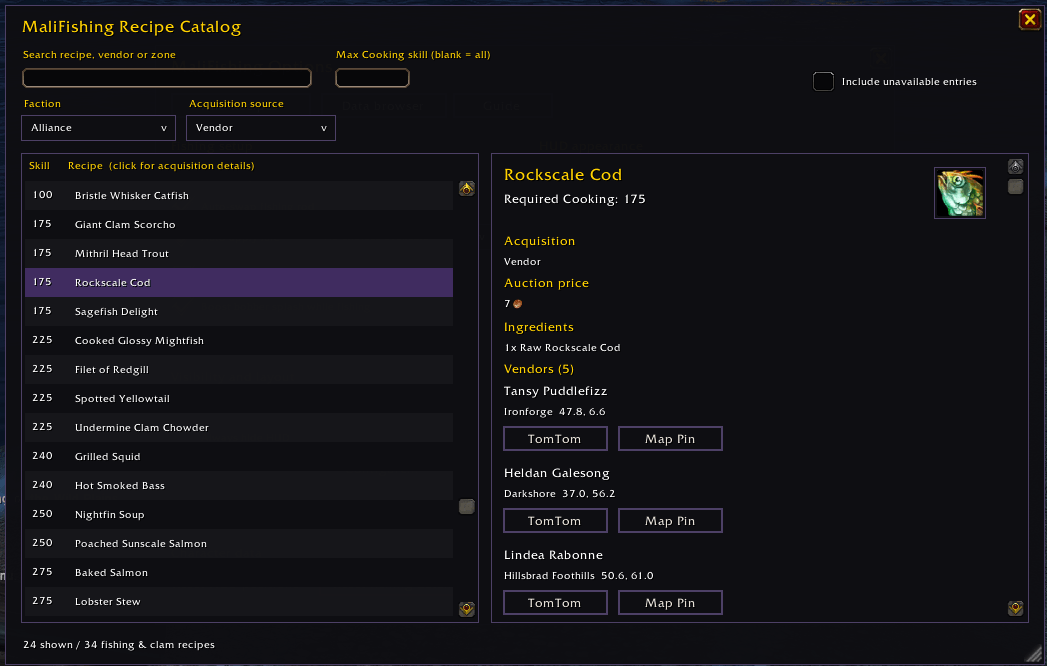
A complete list of the cooking recipes for things you can fish up, fish and clam dishes, built for WoW Forever. Open it from Options or with /malifish recipes.
- Where to get every recipe: vendors, trainers, drops, and quests, filtered by faction.
- TomTom and native Map Pin buttons for every vendor and trainer with known coordinates.
- Ingredients for each dish and the current Auctionator price of the cooked item.
- All cooking recipes (optional): tick "Show all cooking recipes" to add every other cooking recipe to the list (shown in grey), with ingredients, skill-ups and the vendor sell price. Their sources are inferred from game data, so double-check them. The Guide only ever uses the fishing recipes.
- Camp Features: pick "Camp Features" in the source list for campfires, ovens and fishing racks and huts, with their skill levels, Blueprints and ingredients. The Guide points to them at the right skill levels.
- Prices: each recipe shows the Auctionator price and the vendor sell price of the cooked item.
- Search by recipe, ingredient, NPC, or zone. Filter by acquisition source or by the highest Cooking skill you want to see.
- A Fishing Guide source lists the Journeyman trainers, Expert cookbook sellers, the Clamlette Surprise quest giver and the Alterac Swiss vendors, with pins.
- Anything I haven’t confirmed yet is marked Needs Verification. Forever is new and there are still gaps, and I’d rather tell you than guess.
- Hints, not guesses. Where the game data points somewhere (a bind-on-pickup recipe with no vendor price, for example) it says "likely a quest reward or drop" and stays marked Needs Verification. If you've solved one, a comment on CurseForge with the zone, coordinates and mob or NPC name is appreciated.
🧭 Fishing & Cooking Guide
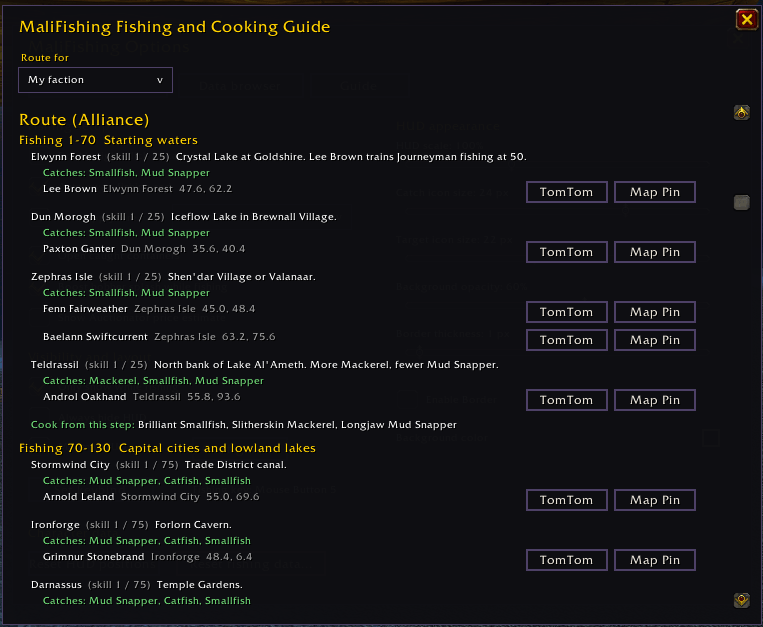
Level Fishing and Cooking together without the guesswork. Open it from Options or with /malifish guide.
- A route from 1 to 300 for both Alliance and Horde, with a toggle. Each step lists the waters to fish and which fish they give, so the fishing always keeps up with the cooking.
- “Where you are now” shows your Fishing and Cooking skill, the route step you’re on, and every dish that still gives a skill-up, color coded orange, yellow, green or grey.
- Every rank and quest broken down: Journeyman, Expert, and Artisan for both professions, including Angler Extreme and Clamlette Surprise.
- TomTom and Map Pin buttons for trainers, book and cookbook sellers, quest givers, and the Angler Extreme fishing spots. Recipe rows jump straight to the Recipe Finder.
🎨 HUD & controls
- Session or all-time, area or zone. Flip the HUD catch breakdown between this session and your full history, for the area you’re in or the whole zone.
- Two HUDs, one shortcut. Use the regular HUD for the full breakdown or the minimal HUD for just the stats you want.
- A minimal HUD you can actually make minimal. Toggle vendor value, Auctionator estimate, catches per hour, and target catch independently.
- Customizable to get both HUDs looking how you want and showing the info you want to see.
- Disable the HUDs all together, no need for the maths to know what you're doing. Just want the functional QoL enhancements of the AddOn? I got you homie, option available for that as well.
- Flavor. 12 color themes (Mali by default, plus warlock Soulstone and more), six editable colors, your own saved color profiles and a text size slider. Open it with the Flavor button in Options or
/malifish flavor. The HUD follows your Flavor by default, or you can color it on its own. Prefer the game font over Inter? One tick box. - A flat, clean look with Inter lettering, line icons and sharp 1px borders.
- Open Options with the minimap button (Right-click) or
/malifish options.
⌨️ Commands
/malifish options: open Options/malifish flavor: open Flavor (themes, colors, text size)/malifish browser: open the Data Browser/malifish recipes: open the Recipe Finder/malifish guide: open the Fishing & Cooking Guide/malifish reset: reset the session
/malifishing works too.
🐛 Found a bug or something off in game? Leave a comment.
💭 Got an idea for feature or functionality improvements? Leave a comment.
The ultimate goal is to make fishing better and hassle free. I intend to make this AddOn do that, selfishly 😈 for myself first and foremost… secondly, I want to share it with my fellow fishermen and women of Azeroth!
💜 Credits
ZiRRuSH · Mali Gnosis · Malignosis
Thanks to:
- 🧭 wago.tools for its game data exports.
- 🔤 Inter by The Inter Project Authors, the font behind Mali Style. Its license, the SIL Open Font License 1.1, ships in
media/Inter-OFL.txt. The bundled copy is converted to TrueType and trimmed to Latin, Greek and Cyrillic.
The add-on icon and the icons in media/icons were made for MaliFishing and fall under its MIT License.
MaliFishing is a fan-made add-on, not affiliated with or endorsed by Blizzard Entertainment.
📜 License
MIT License. See LICENSE.md for the full terms. Use it, change it, share it; just keep the copyright and license notice with it.
Mali Fishing Team