Mailworthy
- By
One click at the mailbox sends everything worth selling to your bank alt. Vendor the rest.
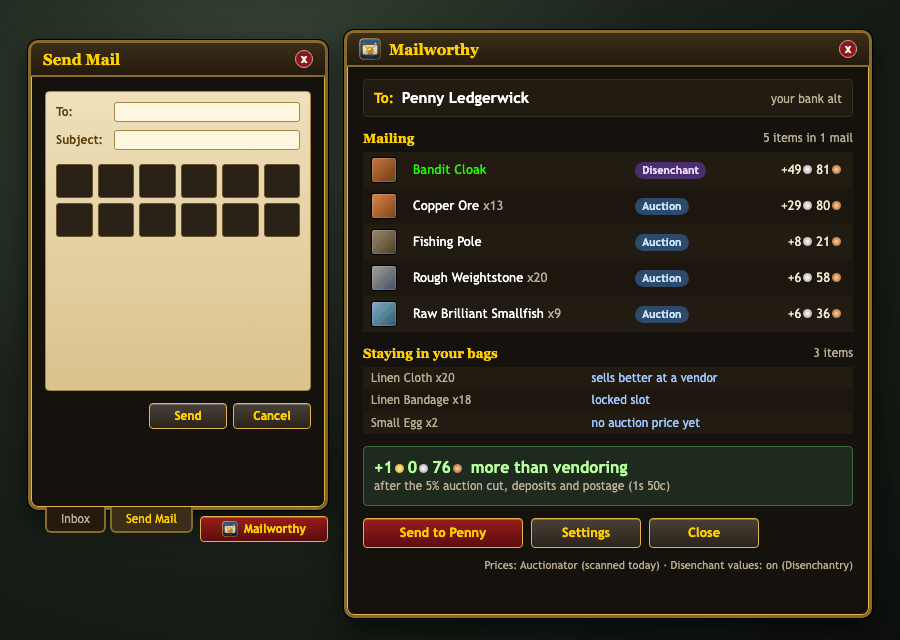
image-1791928085093.png
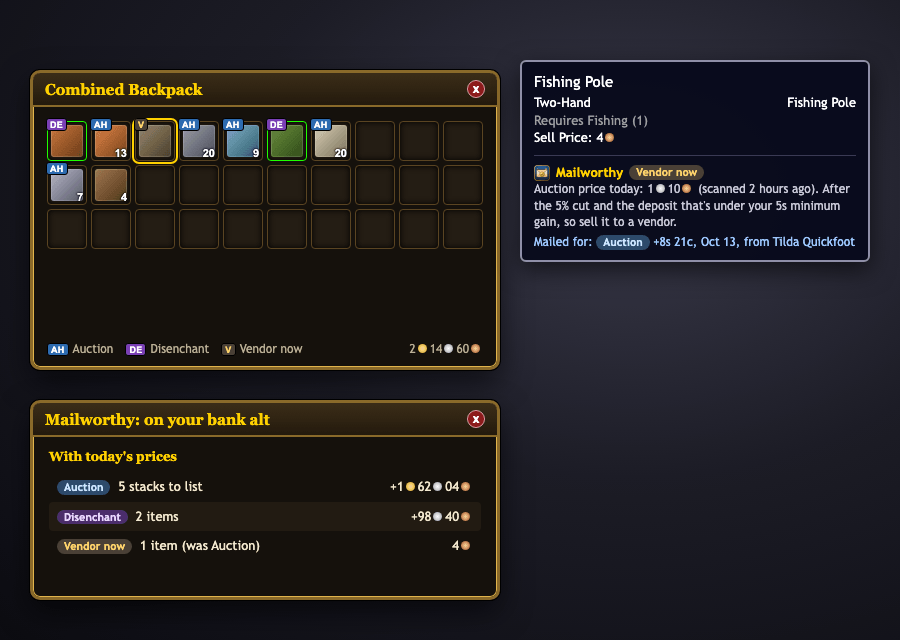
image-1791928091449.png
Description
Mailworthy clears your bags at the mailbox. One click sends everything worth more on the auction house (or worth more disenchanted) to your bank alt, and leaves the rest in your bags for the vendor. No more checking prices item by item, no more dragging twelve items into a mail at a time.
Made for World of Warcraft: Forever. Works with mouse and keyboard, and with a controller.
How it works
- Open any mailbox and click the Mailworthy button under the mail window.
- Check the preview: who it's going to, what will be mailed and why, and what stays in your bags and why.
- Click Send. Mailworthy fills as many mails as it needs (12 items each) and sends them all.
- Sell what's left to the nearest vendor.
The first time, Mailworthy asks you to pick your bank alt. You choose from the characters you've logged into on this realm and faction, so there are no typos.
What gets mailed
For every stack in your bags, Mailworthy compares what you'd get from a vendor with what it's worth on the auction house after the 5% auction cut, the listing deposit and the postage (30 copper per item). An item is mailed when it's clearly worth it: by default at least 5 silver and 25% more than the vendor pays. Both numbers are adjustable.
Mailworthy never mails:
- items you've locked;
- gold.
Optional: Auctionator and Disenchantry
Mailworthy works on its own, and gets smarter with these two addons installed:
- Auctionator (recommended) provides the auction house prices from your own scans. With it, Mailworthy weighs every item's real value and only mails what's worth selling.
- Disenchantry: when it's installed, Mailworthy also compares disenchant value (switched on by default). Gear that's worth more as enchanting materials goes to your bank alt to disenchant, using Auctionator's prices for the materials.
Without Auctionator there are no prices to compare, so Mailworthy keeps it simple: it mails every tradeable white (common) item you haven't locked. Grey junk stays for the vendor.
On your bank alt
When you log in to your bank alt, every item Mailworthy sent shows what it's for, worked out again with today's auction prices on that character:
- a small tag on the bag slot: AH to list on the auction house, DE to disenchant, or V if it's now better sold to a vendor;
- a tooltip line with today's price and why it was mailed in the first place, so you can see when the market has moved;
- a summary of what to list, what to disenchant and what to vendor.
Lock the items you want to keep
- Mouse: Alt+click a bag item to lock or unlock it.
- Controller: press L3 on an item in your bags.
- Locked items glow blue, like quest items, and stay locked wherever you move them, even after sorting your bags. Mailworthy never mails them.
Controller support
Mailworthy works with WoW Forever's controller interface. At a mailbox, switch to Send Mail (R1) and press Triangle (Y). In the Mailworthy window the D-pad moves between buttons, Cross presses and Circle closes it.
Settings
- Minimum gain over the vendor price (silver and percent)
- Include disenchant value
- Auction listing length used for the deposit estimate
- Your bank alt
Open them from the Mailworthy window, or type /mw.
Good to know
- Mail only goes between characters on the same realm and faction, so that's who Mailworthy offers as your bank alt.
- Mailworthy doesn't post auctions. It gets the items to your bank alt; you list them there (Auctionator makes that quick).
- Nothing is sent without your click, nothing happens in combat, and the preview always shows why each item is mailed or kept.
Feedback
Found a bug or an item that went to the wrong place? Leave a comment with the item and what you expected. The preview's "why" column is the first thing to include.
Mailworthy Team