Macromate - Smart macros
- By
Write {healer}, {tank2} or {pi} into a macro and it always points at the right group member, updating as your group changes.
Description
MacroMate - Macros That Follow Your Group
Write a word in curly braces into a macro's template and MacroMate swaps it
for a real player name, then keeps it current as people join, leave or change
roles.
{healer} is always your healer, {tank2} the second tank, {shadow} the first
shadow priest, so a macro like /cast [@{healer}] Intervene never needs
editing again.
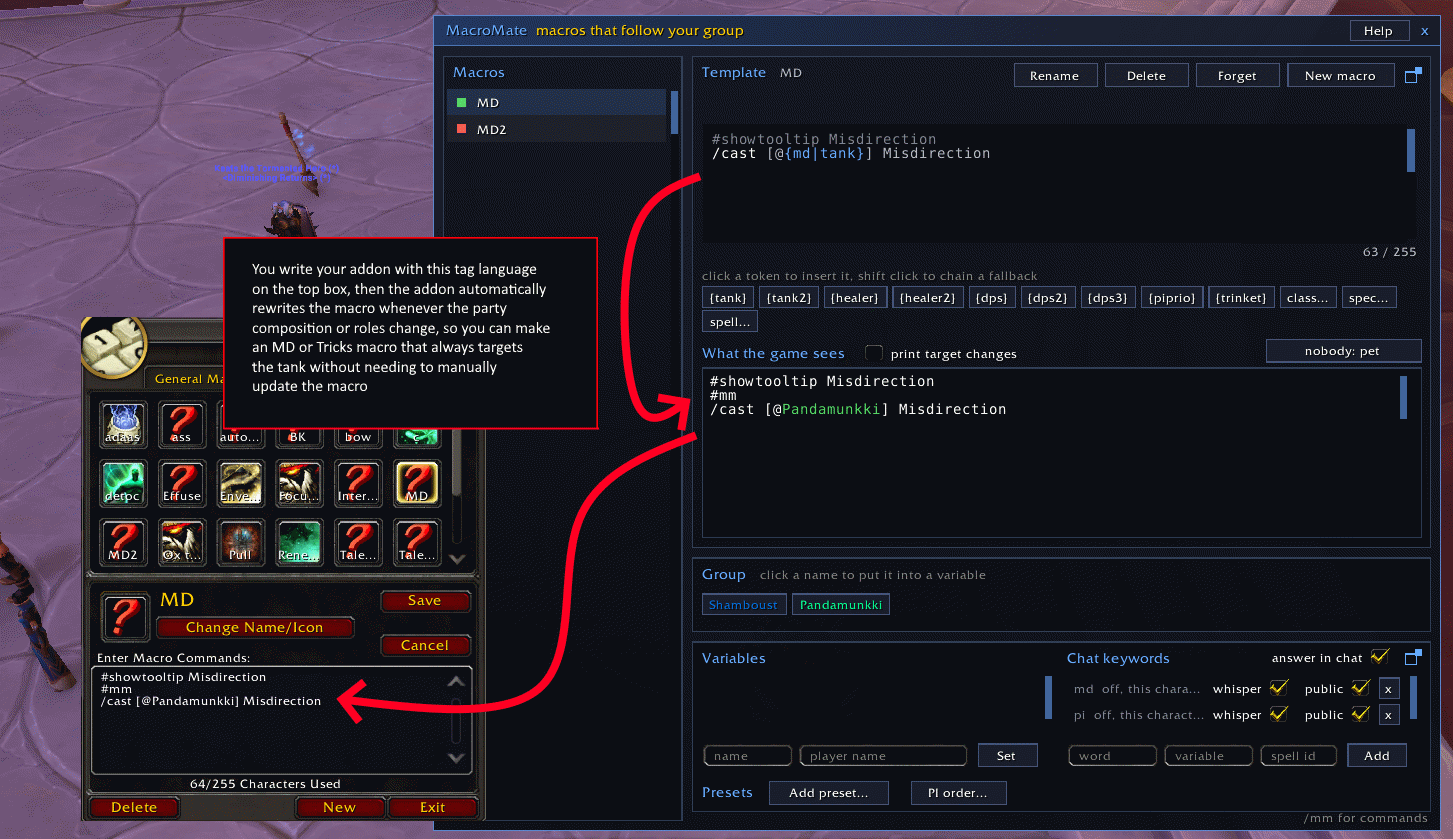
Macros are made and managed in the MacroMate window, opened with /mm. New macro creates one, presets ship ready made ones, and typing an existing macro's name takes that macro over with its text as the template. The window shows what each token turned into, with a live preview and a character counter, and holds your variables, keywords and presets.
Take Power Infusion. Without addons the macro says /cast [@Felboust] Power
Infusion and breaks the moment Felboust leaves the raid. With MacroMate it
says /cast [@{pi|piprio}] Power Infusion instead. Whoever asked for PI in
chat gets it, otherwise the spec that gains most from it, and when the fire
mage hops out mid raid night the macro follows along without you opening an
editor. The same idea covers an evoker's Prescience, a hunter's Misdirection,
a warrior's Intervene and any macro of your own.
Tokens
{tank}, {healer} and {dps} find the first group member with that role, and a number picks the next ones, {dps3} for the third dps. Class words like {priest} or {dk} and spec words like {enh} or {holypriest} work the same way. Roles come from the group's assigned roles, specs from inspecting each member as they come in range, so right after forming a group some fill in as people gather. {player} is plain player, handy as a last fallback.
Put a pipe between alternatives and the first one that finds someone wins. {pi|healer2|priest|player} means whoever asked for PI, else the second healer, else the first priest, else you.
A variable is a name you invent that points at one person, for the cases no role describes. Set {boost} from the window or by clicking a name in the group strip. It only counts while that person is in your group, so a chain moves on when they leave.
{trinket} on a line of its own turns into /use 13 and /use 14 for whichever of your equipped trinkets have an on-use effect, and drops away while neither does. Error speech is muted around the lines, so pressing the macro with the trinket on cooldown stays quiet, and if you keep error speech off anyway the macro never flips it back on.
Chat keywords
A keyword ties a word in group chat to a variable. Bind pi to {pi} and anyone typing "pi", "pi me" or "pi Bob" in party, raid, instance chat or a whisper puts themselves (or Bob) into {pi} and gets an answer in the same channel. The message has to be exactly that, the word alone or the word and one name, so normal sentences never trigger it. "pi off" clears it again. Untick public on a keyword and only your own messages move it, handy in pugs. Give the keyword a spell id and the person also gets a whisper when you cast that spell on them, and a whisper box on the keyword row turns just that off.
Power Infusion
{piprio} resolves to the group member Power Infusion helps most, walking bloodmallet's dps ranking or your own order from the PI order window. The Power Infusion preset sets the whole thing up in one click, a PI macro with {pi|piprio} plus the pi keyword, so whoever asked gets it and otherwise the best spec you have along. Misdirection, Tricks of the Trade, Prescience and Intervene presets are there too, plus a trinket macro skeleton where you only fill in the spell, all behind one Add preset menu with your own class listed first. Each asks what to call the macro before creating it.
The window
/mm opens the editor. Pick a macro on the left, edit its template with tokens highlighted, and the preview shows exactly what the game gets, with a counter against the 255 character limit. Chips insert tokens at the cursor, a click inside a token swaps just that word and shift click chains a fallback onto it. The word under the cursor turns yellow so you can see what a click will swap. The spell chip lists your spellbook and drops the picked spell's name at the cursor, so a basic cast macro is New macro plus two clicks. Ctrl+Z and Ctrl+Y undo and redo, chip clicks included.
Editing in the Blizzard macro window works too. Keep a token in the text and the new version becomes the template. Take the tokens out and MacroMate lets go of the macro and says so.
The editor and the variables panel each have a little squares button that pops them into their own bigger window, with more room for long lists and previews. It is the same panel moved over, so nothing needs syncing, and closing the popout slots it back into the main window.
Good to know
Every macro MacroMate writes carries a #mm comment line so you can tell a managed macro apart in the Blizzard editor. The game ignores it, it costs four characters and it goes away when you forget the macro.
Macros cannot be edited in combat, so a change that lands mid fight is applied the moment combat ends. During boss encounters and M+ the server restricts chat for addons, MacroMate stays quiet there instead of erroring.
Account wide macros share their template and settings across all your characters, manage one anywhere and every character renders it with its own group. Per character macros stay with their character.
A token that finds nobody renders as player and the macro turns red in the list so you can see it. The nobody button in the editor picks a different stand in per macro, your pet for a solo Misdirection, or your mouseover and then your target so you can still aim the cast by hand. If the rendered macro would not fit the 255 limit it is left untouched until it fits.
Features
- Role, class and spec tokens that always point at the right group member.
- Fallback chains with pipes, {pi|healer2|player}.
- Variables you name yourself, set from the window, chat or your target.
- Chat keywords, a teammate saying "pi" in party chat points your PI macro at them.
- {piprio} picks the best Power Infusion target, in bloodmallet's order or yours.
- {trinket} writes the use lines for your on-use trinkets, quietly.
- One click presets for Power Infusion, Misdirection, Tricks, Prescience and Intervene.
- A template editor with syntax highlighting, live preview and chips.
- An optional chat line per macro telling you when its target changes, and from whom.
- Works with the Blizzard macro editor instead of fighting it.
- A minimap button and an options page, with /mm to open the window.
Macromate - Smart macros Team
Owner