Macro Manager Forever
- By
Create, edit, explain, and organize WoW: Forever macros with 27,000+ searchable icons and a built-in command/template finder.
Description
Macro Manager Forever
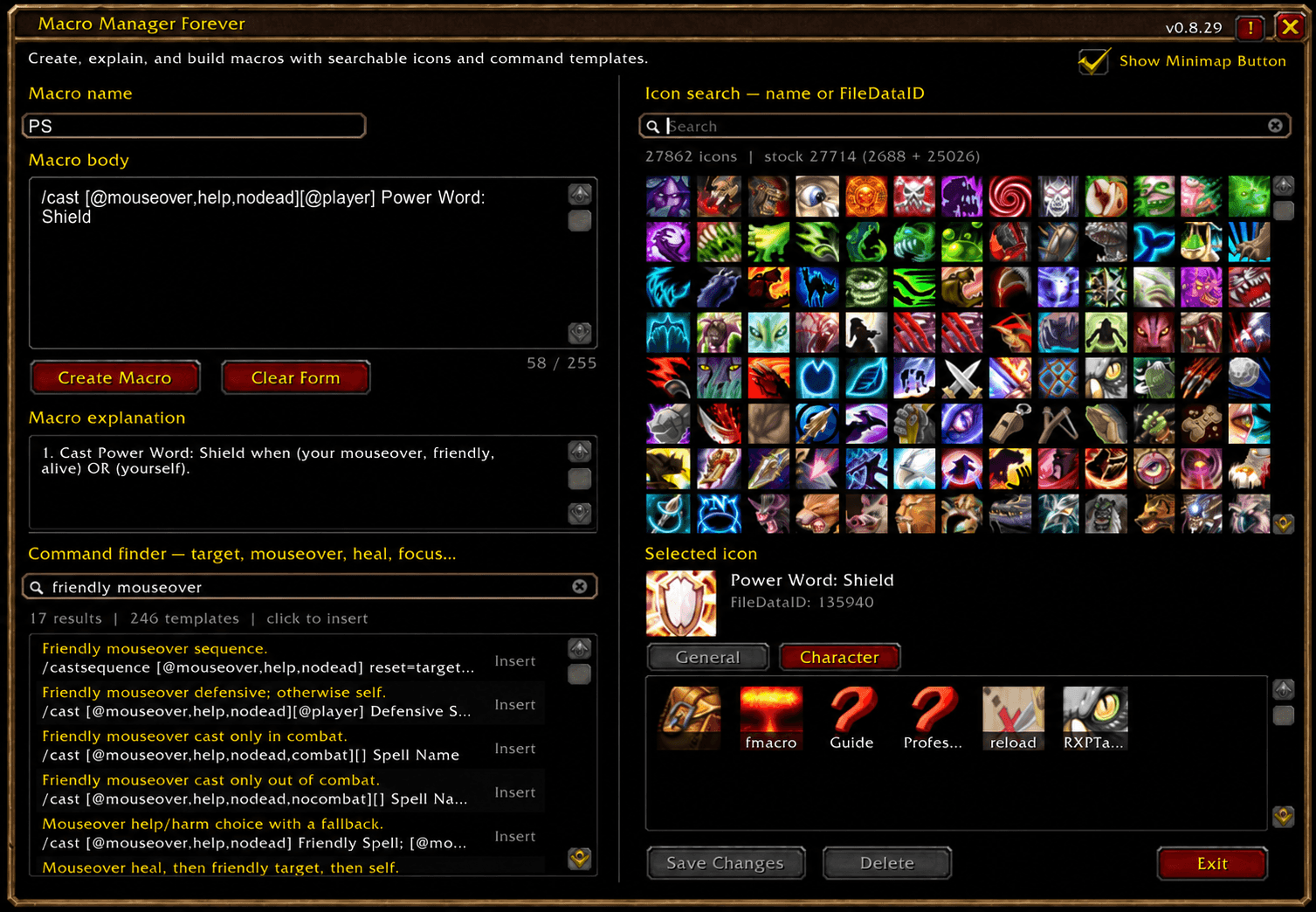
Macro Manager Forever is a complete macro creation, editing, discovery, and reference tool built specifically for World of Warcraft: Forever.
It combines macro management, a massive searchable icon browser, automatic macro explanations, and a searchable library of ready-to-use macro commands and templates in one Blizzard-style window.
Instead of remembering every conditional, slash command, targeting modifier, or icon FileDataID, you can build and manage your macros from one interface.
Features
- Create both General and Character macros.
- Edit or delete existing macros directly from the addon.
- Drag saved macros directly onto your action bars.
- Built-in macro body editor with the normal WoW 255-character limit.
- Automatic Macro Explanation that breaks down supported macro commands and conditionals into readable descriptions.
- Full searchable Blizzard macro-icon catalogue.
- Loads all 27,714 stock macro icons currently exposed by the WoW: Forever client:
- 2,688 general macro icons
- 25,026 item icons
- Supplemental item-icon discovery can find additional valid item textures outside Blizzard's stock macro picker.
- Search icons by name or FileDataID.
- Icon search can use information from learned spells, inventory/equipment, existing macros, and other resolvable client data.
- Large 13-column virtualized icon browser designed to handle tens of thousands of icons without creating thousands of UI frames.
- Built-in Command Finder containing 246 macro commands and templates.
- Search the Command Finder using normal terms such as
target,mouseover,heal,focus,interrupt,modifier,pet,trinket,party, orraid. - Includes targeting patterns, mouseover macros, focus macros, help/harm conditionals, modifier combinations, cast sequences, item use, trinkets, pet commands, utility commands, healer patterns, DPS helpers, and more.
- Click any Command Finder result to insert it directly into the macro body at your current cursor position.
- Multi-line templates are supported.
- Templates are prevented from being inserted if they would exceed WoW's macro character limit.
- Separate General / Character macro views for easier organization.
- Saved macros are displayed as an icon grid for quick visual identification.
- Blizzard-style scrollbars and window presentation.
- Native draggable minimap button with saved position.
- Optional Show Minimap Button setting.
- Built-in Forever Collection catalogue access.
- Designed specifically around the APIs and restrictions of WoW: Forever.
- No external addon libraries required.
- Icon and command browsers are heavily virtualized to keep memory usage low despite the large catalogues.
Command Finder
The Command Finder is designed for players who know what they want a macro to do but may not remember the exact WoW macro syntax.
For example, searching:
friendly mouseover
can return templates such as:
/cast [@mouseover,help,nodead][@player] Spell Name
Searching:
interrupt focus
can surface focus-targeting interrupt patterns.
Searching:
modifier
can surface Shift, Ctrl, and Alt conditional examples.
You can click a result to insert it directly into your macro and then replace the placeholder spell, item, or unit name.
Macro Explanation
As you write or paste a macro, Macro Manager Forever attempts to explain the supported commands and conditionals in plain language.
This makes it useful both as a macro editor and as a learning/reference tool when experimenting with unfamiliar macro syntax.
Icon Browser
Macro Manager Forever uses Blizzard's own macro-icon lists as its primary source.
On the current WoW: Forever client, that means 27,714 unique stock icons are available before supplemental icon discovery is considered.
You can search using an icon name when known, or enter a FileDataID directly.
The browser is virtualized, so only the icons currently needed by the interface are represented by active UI buttons instead of creating tens of thousands of frames.
Macro Management
Existing macros can be loaded directly into the editor.
From there you can change the name, icon, or macro body and save the changes.
Macros can also be dragged directly from Macro Manager Forever onto your action bars.
The active General or Character tab determines where newly created macros are stored.
Minimap Button
The minimap button provides quick access to Macro Manager Forever.
Left-click: Open or close Macro Manager Forever.
Drag: Reposition the button around the minimap.
The minimap button can also be disabled from the main window.
Slash Command
/mmf
Opens or closes Macro Manager Forever.
Performance
The icon catalogue is intentionally designed around virtualization and compact icon data.
Macro Manager Forever does not create one UI button for every icon or every Command Finder entry. Only a small reusable set of visible controls is kept active.
This allows the addon to provide a very large searchable catalogue while remaining lightweight during normal use.
Compatibility
Built specifically for:
World of Warcraft: Forever
Interface: 16001
Macro Manager Forever is designed around the Forever client's APIs and may not behave correctly on unrelated Retail or Classic branches.
Notes
WoW's normal macro restrictions still apply.
Macros cannot exceed the game's character limit, and protected macro operations may be unavailable during combat.
The Macro Manager Forever Team