M+ SoloQ
- By
M+ SoloQ helps form Mythic+ groups by checking your gear and selecting solo applicants based on rating, role balance, and unique specs. Adjust the minimum rating and invite eligible players with a click through Group Finder.
2.png
3.png
4.png
Description
M+ SoloQ
M+ SoloQ helps you build a Mythic+ group from solo applicants through Blizzard's Group Finder. It selects eligible players using a minimum rating, balanced roles, and unique specializations, so you can spend less time reviewing the applicant list.
How it works
The SoloQ panel covers the applicant list and presents the next eligible player with their Invite button. Each invitation requires your click. Applicants can join through normal Group Finder and do not need the addon.
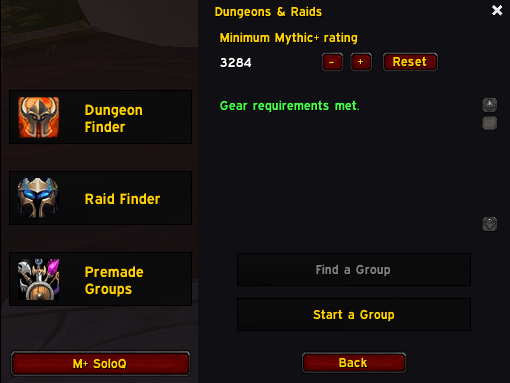
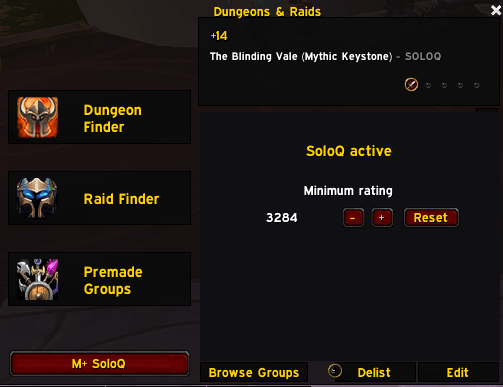
- Adjustable minimum rating: Starts at 99% of your current-season Mythic+ rating. Use -, +, and Reset in either SoloQ panel to adjust the percentage or restore the default. Your choice is saved per character, and the panel displays the calculated minimum score.
- Balanced composition: Accounts for your role and pending invitations toward a group of one tank, one healer, and three damage dealers.
- Unique specializations: Skips applicants whose specialization is already represented in the group or reserved by a pending invitation.
- Solo applications: Considers players applying individually.
- Host gear checks: Checks your equipped gear for required enchants and empty sockets before you can start or publish a SoloQ listing. Missing requirements appear in the panel with the affected slots.
- Party gear warnings: Inspects every joined party member in turn, including later arrivals, and reports missing enchants and gems in party chat and the applicant panel. Includes tanks and avoids repeating unchanged counts. Players are never removed automatically.
- Short invitation delay: Waits at least one second after a confirmed invitation before selecting the next applicant. Periodic checks can extend the wait slightly.
- Focused messages: Only confirmed joined-player gear warnings are sent to party chat. Other status updates stay in the interface.
Getting started
- Open Dungeons & Raids and click M+ SoloQ in the sidebar.
- Meet the gear requirements and choose your minimum rating.
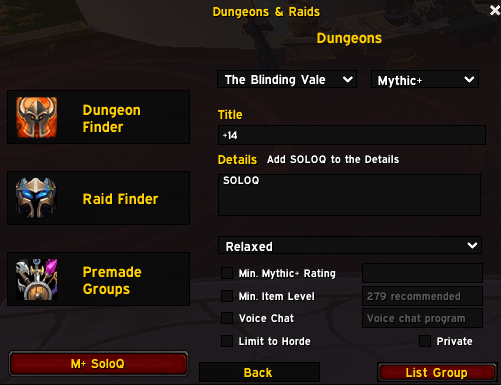
- Click Start a Group, select your keystone, and enter your listing details. SoloQ presets the Relaxed playstyle.
- Click SoloQ's List Group button. Applicant selection starts after Blizzard confirms your listing.
- Click Invite for each eligible applicant presented by SoloQ.
Use /soloq ui to open the panel, /soloq to publish or activate your current key's listing, and /soloq stop to stop applicant selection. Use /soloq check to recheck the current party's enchants and gems.
Current test version
M+ SoloQ currently focuses on hosting your own key. Its Find a Group action is disabled while the community grows; normal dungeon browsing remains available through Group Finder. Joined-player gear warnings wait for inspection data and follow WoW's native inspection availability check.
Invitations use Blizzard's controls and require manual clicks. Reloading stops the active session; use /soloq to resume your listing while solo. Cross-realm and cross-faction invitation behavior still needs in-game verification.
For more information or to report an issue, visit the GitHub project.
M+ SoloQ Team


Owner