Lucid Vials
- By
Turns your player, target and target-of-target frames into bronze glass vials with liquid health that sloshes as you move.

01-lebensfluessigkeit.gif

02-debuffs.gif

03-ziel-zier.gif

04-mana.gif

05-xp-roehre.gif
Description
Lucid Vials turns your player, target and target-of-target frames into bronze glass vials. Health and resource are liquid inside them. When you run, turn or jump, the liquid sloshes, and it settles again when you stand still. The experience bar becomes a liquid tube as well.

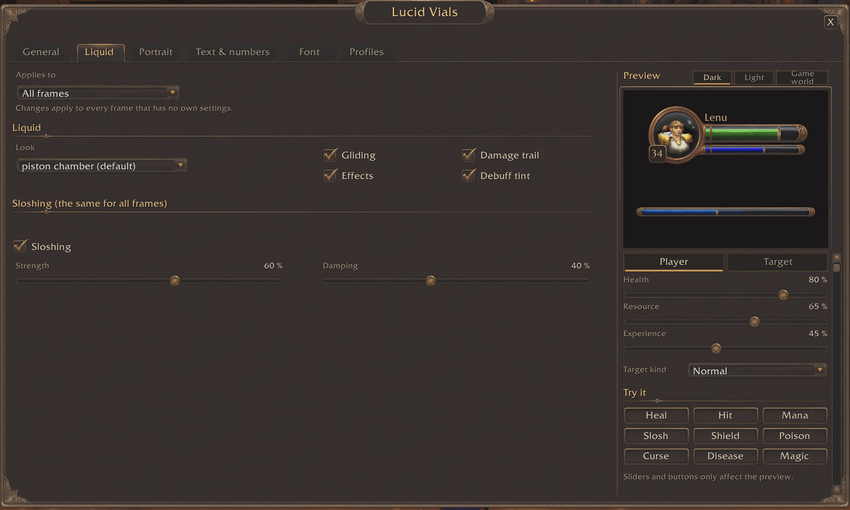
When your health changes, the liquid glides to the new level instead of jumping there. Lost health leaves a short glowing trail. Hits, heals, shields and mana regeneration show up as small effects inside the glass. You can choose between two looks: the piston chamber shown here (the default) or a plain liquid edge.
Debuffs tint the liquid: dark green and murky for poison, violet for curse, yellow for disease, blue for magic. This works in combat too.

Mana bubbles while it regenerates.

The target portrait gets an ornament that depends on the target: horns and a skull for bosses, a gold dragon for elites, a silver dragon for rares. It also shows the raid marker, the quest symbol and the level. You can resize the aura icons on the target frame.

The experience tube has a rested section and a small effect when you level up.

Make it yours
Since 1.1.0 the settings window has six tabs, and next to each one sits a live preview of the frames. Sliders for health, power and experience, a target type picker and test buttons show every change right away, on a dark, light or game-world background. Every slider marks its default; right-click it to go back.
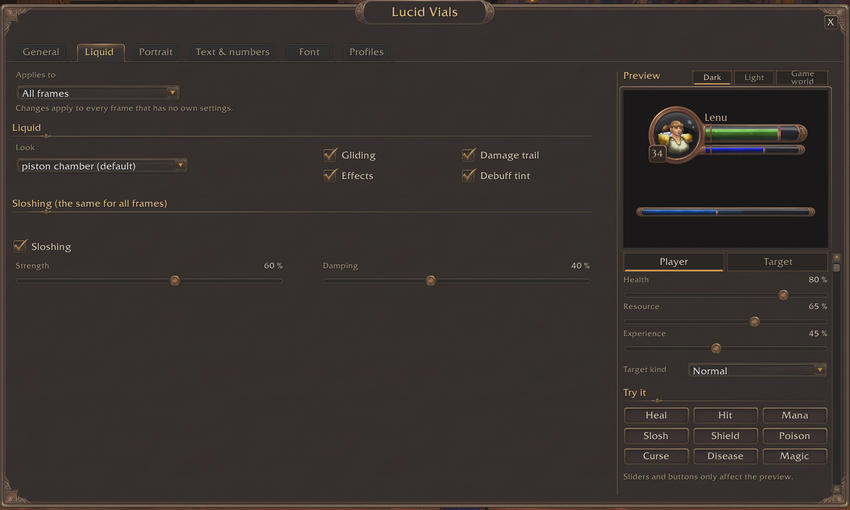
- Per frame or for all: liquid, portrait, text and font can be set once for all frames or separately for player, target and target of target.
- Portraits: keep the classic static portrait or pick an animated style for player and target: a living painting that breathes and cracks like glass at low health, a portrait submerged in the vial, a 3D model that reacts to hits and heals, or a plain animated model.
- Numbers: show health, power and experience permanently in Blizzard's formats or your own short forms. The number can sit where Blizzard puts it, centred in the tube, float on the liquid level or look etched into the glass.
- Fonts: choose a font, size, outline and shadow for each text. Four fonts come with the addon, the Blizzard fonts are there, and fonts from other addons via LibSharedMedia show up too.
- Profiles: each character can use its own profile.
Out of the box everything looks the same as before.
How it works
Lucid Vials reskins Blizzard's own frames and does not replace them. Clicks, the right-click menu, focus and Edit Mode stay Blizzard's. Because nothing is secure-templated, it also works in combat.
It is made for WoW Forever (Interface 16001) and runs on Retail (Interface 120105) from the same download. I play Forever, so Retail gets less testing; reports from Retail players help a lot. In Forever the frames show the full name with surname.
Lucid Vials is by the author of Lucid. It is a separate addon and works with or without Lucid.
Getting started
The frames are on right after installing. Type /vials for the list of commands, or /vials config for the settings window (also under Options > AddOns > Lucid Vials). Changes apply immediately, no reload needed.
Commands
/vialslists all commands,/vials configopens the settings window/vials on|offturns the frames on or off,/vials style piston|edgepicks the look/vials slosh on|off|<0-100>sets how strongly the liquid sloshes,/vials slosh damping <0-100>how quickly it calms down/vials fx on|offturns the liquid effects on or off,/vials debuffs on|offthe debuff tints/vials xp on|offturns the experience tube on or off/vials auren 14-36sets the aura icon size on the target frame/vials testruns a preview with changing values./vials test heal|hit|mana|poison|curse|disease|magic|weak|shield|slosh|xp|xprest|levelup|all|offplays single effects without a real fight/vials test target elite|rare|rareelite|boss|normal|offpreviews the portrait ornaments/vials versionshows the version
Compatibility
If another addon replaces the unit frames (ElvUI unit frames, Shadowed Unit Frames, PitBull, XPerl and similar), Lucid Vials stays off, and the settings window tells you which addon is the reason.
With Questie loaded, the quest symbol on the target portrait comes from Questie's own data. Lucid Vials only reads it and fades Questie's own icon on the target frame.
While you are in a vehicle, the player frame stays Blizzard's.
The addon uses no libraries and no network access. Settings are saved in LucidVialsDB. It is available in English and German.
Known problems
In combat WoW Forever hides the debuff type from addons, so the liquid takes the colour of the game's own debuff border instead. Debuffs without a dispel type tint red, like their border. Extras such as poison bubbles only show outside combat.
If a frame looks wrong, please report it with a screenshot.
AI notice
I built Lucid Vials with a lot of help from Claude Code. Most of the graphics (frames, portrait ornaments, liquid and effect sprites, the icon) were made with Google Gemini and edited by me. The GIFs are real in-game recordings; for a clean look, the frames were enlarged and shown on a plain background.
Licenses
Code: MIT License, (c) 2026 EveN. Graphics and media: all rights reserved. The font Marcellus is used unchanged under the SIL Open Font License 1.1.
Bugs and ideas
Comments here or an issue on GitHub both work. For an error, please include the message (/console scriptErrors 1 shows Lua errors), your Lucid Vials version (/vials version) and whether you play Forever or Retail.
Source code and issues: https://github.com/even512/LucidVials
If you like the addon and want to support it, you can do so on Ko-fi: https://ko-fi.com/even512
Lucid Vials Team