


Ink & Embers: An Adventurer's Journal
- By
Beta. This is the first public version. Expect rough edges, and please report anything that looks wrong.
Every character has a story, and most of it gets lost along the way: the first wolf that got you, the quest that took the whole evening, the strangers you shared a campfire with. Ink & Embers is your own adventurer's journal for WoW Forever and Retail. You carry it from level 1, it writes itself while you play, and it collects what you come across on your journey: zones and routes, fights and deaths, quests, finds, the people you meet. Open it whenever you like and leaf back through your adventure.
Available in English and German. The add-on was originally written in German and is fully available in both languages. It follows your game language automatically, or you can switch with /chronik language auto|de|en (takes effect after /reload).
Your journey, recorded
The add-on records your route while you play: every zone you enter, flights and hearthstones, kilometers on foot, level-ups, deaths and fights. The Journey page turns this into a book. Each zone becomes a chapter with its level and date range, a short line of narration and a small table (playtime, levels, kills, deaths, quests, moments). Next to it is a zoomable zone or continent map with your path, markers for level-ups, deaths, flights, notes and to-dos, and optionally your fights.
Press play and your route draws itself again at slow, medium or fast speed; idle time is skipped and you can scrub along the time line. The "Whole Journey" tab shows all continents with milestones such as level 10, 20, 30, your first instance or your favorite zone; a click on a milestone jumps the playback there. The route can also be shown on the game's world map.
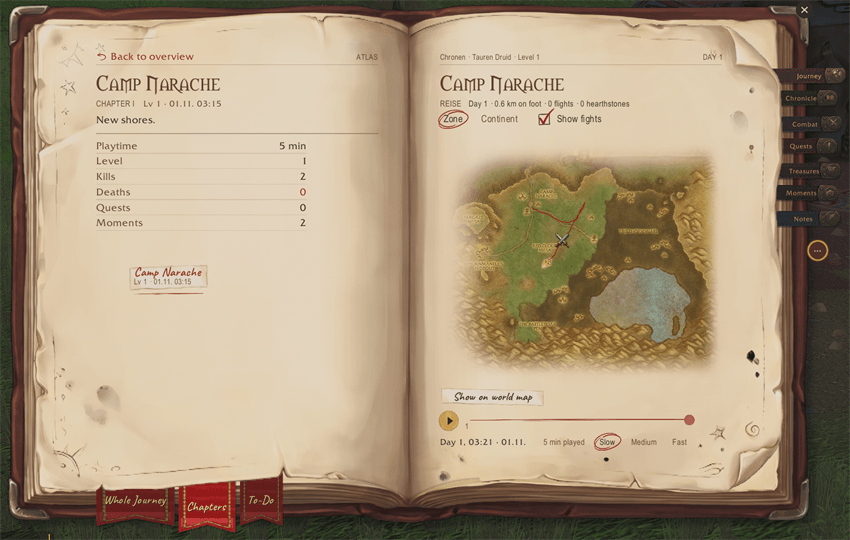
Journey: one chapter per zone, your route on the map
Open quests
(Currently available only in WoW Forever)
The "Open" tab on the Quests page lists the quests you can still pick up in a zone, with level and quest giver, and shows the givers as "!" pins on the map. List and map are linked. Filters show or hide locked quests (with the reason), group, repeatable, class and profession quests. One click adds a quest giver to your to-do list as a place goal. The quest data comes from QuestieDB (Classic data; above level 30 it is marked as not yet confirmed for Forever, and this will be updated as Forever data comes in).
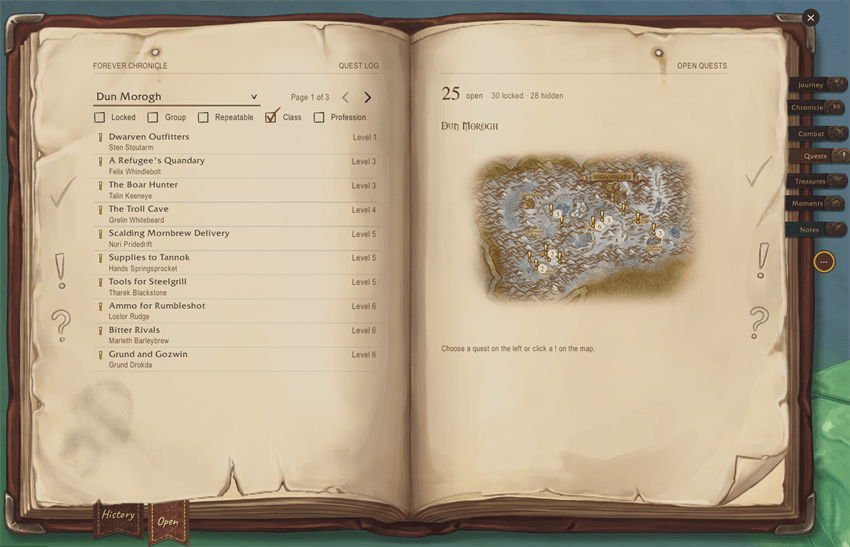
Open quests and their quest givers on the map
To-do list
Write down what you want to do next, as a free note or as a goal that ticks itself off:
- a place, picked on a small map, done when you get there,
- enemies to slay with a count, picked from a list or from your current target,
- items to find with a count (shift-click an item to insert it).
Enemies you still need show "To-Do: 3/10" in their tooltip and a small book icon on their nameplate. A mini note at the screen edge shows your open goals with progress or distance. The journal page shows the next open goal near you and recently completed ones; finished goals move to an archive where you can restore or delete them.
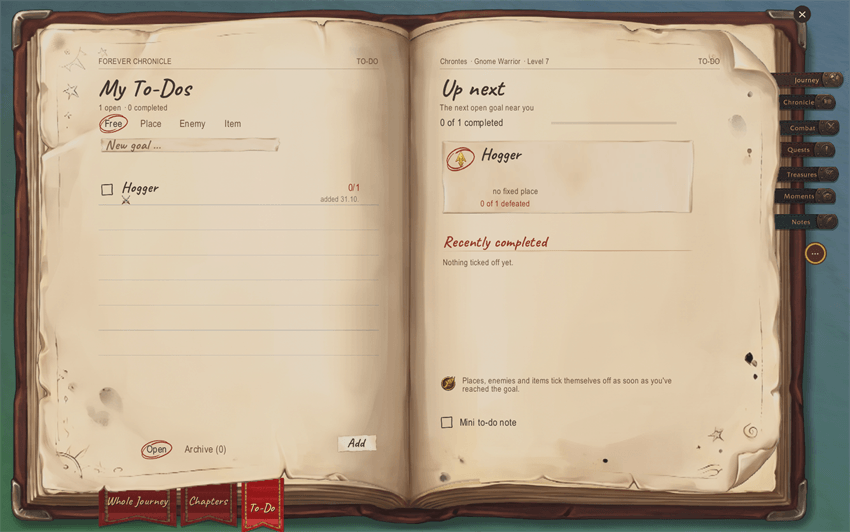
To-do list: goals that tick themselves off
Campfire conversation starters
Camping is one of the big new mechanics in WoW Forever, and campfires are where players meet. But sitting next to strangers, it is not always easy to know what to say or how to start a conversation. This feature helps get the conversation rolling.
When you sit down at a campfire, up to three notes float above the fire, each with a conversation starter drawn from your own journal and from the people sitting with you: a recent death or rare kill, a quest you just finished, a new zone or level, or a question about another player's class or race. Left-click says the line in /say, right-click discards it. After the first line a small spark offers one or two follow-up questions, and if the fire stays quiet for a while a new note appears. The journal remembers who sat with you ("By the Fire" on the Chronicle page). To tell who is there, the add-on can turn on friendly nameplates while you sit and restores your setting when you stand up.
When you rest at a campfire or an inn (in Forever and Retail), a card sums up the stretch since your last rest: time on the road, kilometers, kills, quests, levels and the best find.
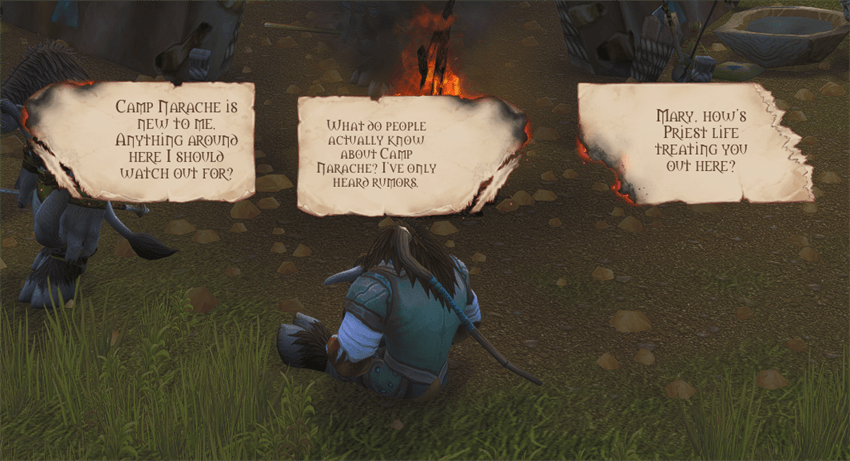
Campfire: conversation starters from your own journey
The other pages
- Chronicle: a profile of your character with a level ring, time played and sessions, experience by source, how long each level took, and 35 medals with bronze, silver and gold tiers. A diary in first person with one entry per play day. Companions you grouped with, with shared time, quests and kills.
- Combat: kills per zone with tally marks, the enemies you hunted most (with 3D model), hunting grounds as hotspots or exact points on a map, graves where you died with a death report, and close calls.
- Quests: the history of every quest with quest text, objectives, turn-in text, timeline and reward, sortable and filterable.
- Treasures: your purse and a ledger of income and expenses by source, gold over your levels, gear changes over time, and a table of all gear finds from uncommon up with where they came from.
- Moments: a polaroid album of milestones (levels, fights, finds, places), play time by hour of day, books and letters you read, and curiosities such as how often you waved or danced.
- Notes: notes with headings, lists, checkboxes, ink colors, symbols and item, quest or spell links. Notes can be pinned to the map where you wrote them. A quick note field at the screen edge creates a note with one line.
Also included
- A welcome card when you log in (last place, open quests, rested experience, a to-do nearby), told by a narrator of your race.
- Toasts for new medal tiers and new zones, with optional sound.
- Automatic screenshots for level-ups, rare, elite and boss kills, close calls, new zones and deaths, saved to the game's normal Screenshots folder.
- A short introduction book (
/chronik tutorial), settings under Options > AddOns > Ink & Embers, sounds per event (also from LibSharedMedia), and HUD elements that can be moved in the game's Edit Mode.
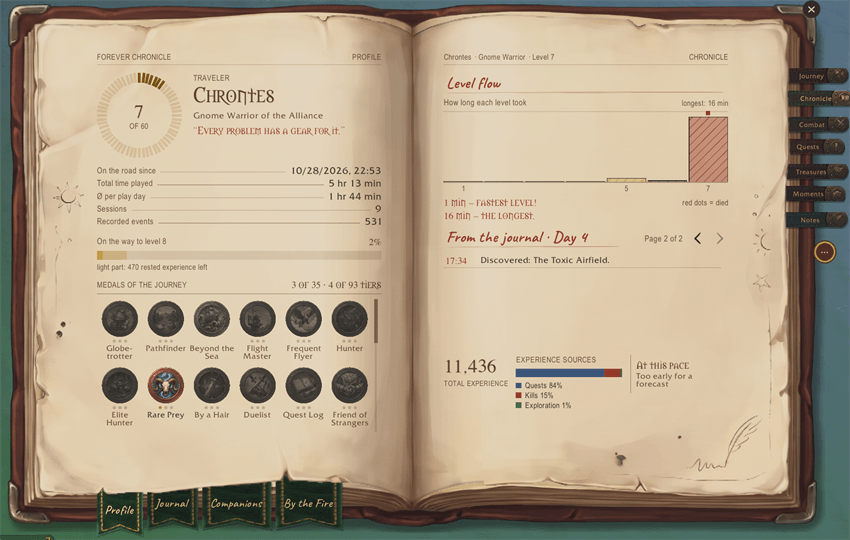
Chronicle: profile, level flow and medals
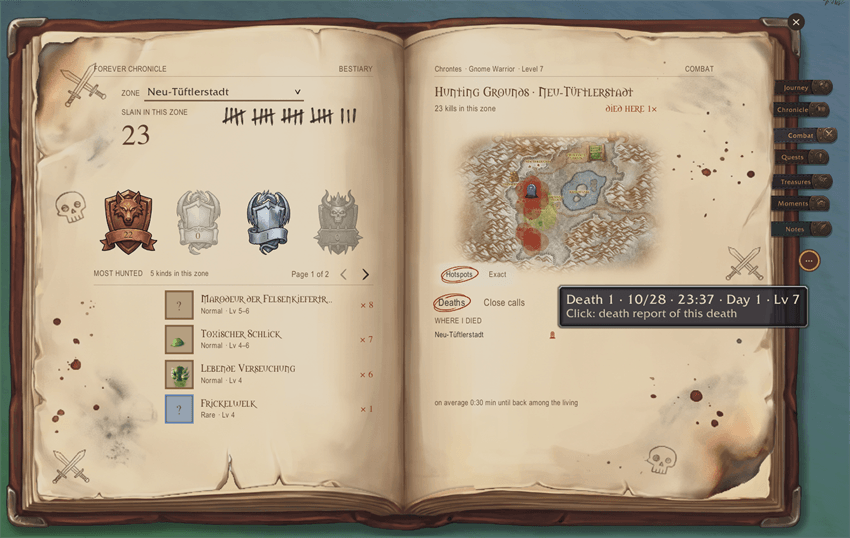
Combat: bestiary and hunting grounds
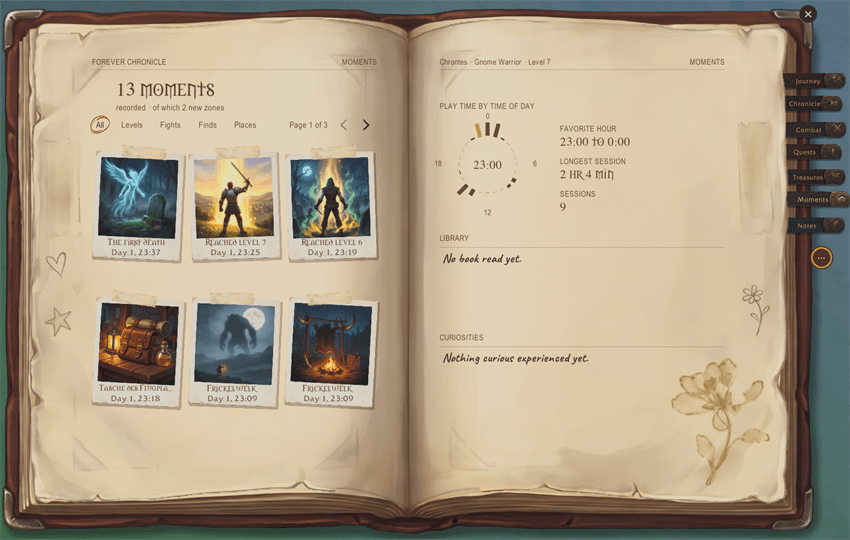
Moments: polaroids of your journey
Game versions
One download for WoW Forever (Interface 16001) and Retail (Interface 120105). Some features depend on the client.
Commands
/chronikopens or closes the journal./chronik helplists all commands./chronik optionsopens the settings./chronik minimapshows or hides the minimap button./chronik notequick note field,/chronik todoto-do list,/chronik openopen quests./chronik toastand/chronik soundswitch pop-ups and their sound./chronik welcomeshows the welcome card./chronik language auto|de|en,/chronik tutorial,/chronik reset(window size and position),/chronik save(backup window).- German command names also work (
/chronik hilfe,/chronik optionen,/chronik notiz,/chronik spracheand so on). /chronik diagruns a self-test of all game interfaces the add-on uses; useful for bug reports.
Privacy
Everything stays on your computer. The add-on has no network access (WoW add-ons cannot make web requests) and sends nothing to anyone. Data is stored per character in the account-wide saved variable EveNChronicleDB (file InkAndEmbers.lua in WTF\Account<name>\SavedVariables). Delete that file to delete all data. Automatic moment screenshots go to the game's normal Screenshots folder. The only thing that can reach other players is a campfire conversation note that you click yourself: it says one line in /say.
The add-on may switch on the game's built-in damage meter for the combat page (/chronik meter off or the settings turn this off).
Included folders
InkAndEmbers: the main add-on.InkAndEmbers_QuestDataandInkAndEmbers_Data: lists for open quests, quest givers, enemies and items. They load only when needed and can be deleted if you do not want those features.
AI Notice
I've been a passionate World of Warcraft player since day one. I have an IT background with some basic coding skills. Claude Code helped a lot in building this add-on and made it possible for me to bring my ideas to life.
Even though I used AI, many hours and days went into this project: planning, tinkering with new features and testing.
I wanted to build the add-on I wish I had for the WoW Forever launch.
Most pictures of the journal (pages, polaroids, seals, narrator portraits, icons) were created with AI tools (Google Gemini) and edited by me. The screenshots on this page are real in-game screenshots.
Licenses
- Code: MIT License, (c) 2026 EveN.
- Graphics and media: all rights reserved, to the extent that protection exists.
InkAndEmbers_QuestDataandInkAndEmbers_Data: GNU GPL v3. The data is derived from QuestieDB (Questie team and contributors, https://github.com/Questie/QuestieDB). German names and zone assignments come from the Forever database (data.morthen.net).- Credits for embedded parts, each under its own license: LibStub (public domain), CallbackHandler-1.0 (Ace3, BSD style), LibSharedMedia-3.0 (LGPL-2.1), LibEditMode by p3lim (embedded unmodified with permission), fonts Spectral and Caveat (SIL OFL 1.1), book and writing sounds (CC0, Kenney, StarNinjas, Kawgrim, NachtmahrTV and others). Details are in
THIRD-PARTY.mdin the add-on folder. - World of Warcraft and related content are (c) Blizzard Entertainment. This add-on is not affiliated with or endorsed by Blizzard Entertainment.
Feedback
I'd love to hear from you! Whether it's a new idea, a wish for the next version or a bug you ran into, I'm always open to it. Feel free to leave a comment here or open an issue on GitHub.
For bug reports, please include the exact error message (/console scriptErrors 1 shows Lua errors) and your game version: https://github.com/even512/InkAndEmbers/issues
Source code: https://github.com/even512/InkAndEmbers
Support
If you enjoy the add-on and want to support it: https://ko-fi.com/even512
Ink & Embers: An Adventurer's Journal Team
