LowerMyKeystone
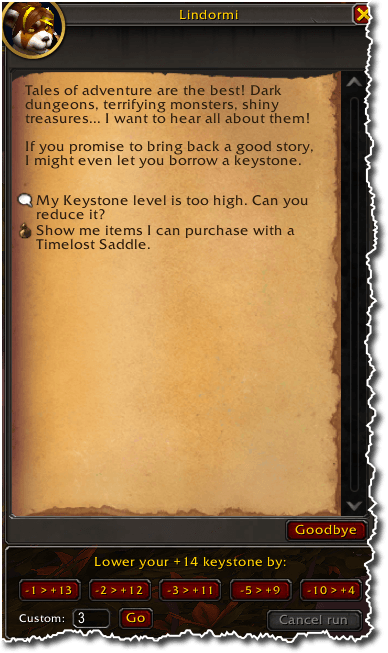
Lowers your Mythic+ keystone by a chosen number of levels when you talk to Lindormi.
DialogWindow.png

2026-11-01_08-29-52.png
Description
LowerMyKeystone
Lower your Mythic+ keystone by as many levels as you choose, straight from Lindormi's dialogue.
Lindormi will reduce your key one level at a time, and each level means a new conversation. LowerMyKeystone does the repetitive part for you: pick an amount once and it takes every step.
Features
- Panel on Lindormi's dialogue. Preset buttons (-1, -2, -3, -5, -10), each showing the level you will end at, plus a box for any amount you like. Buttons that would take you below +2 are greyed out.
- Slash command.
/lowerkey 3lowers your key by three levels. - Follows your real keystone. It works toward a target level and checks the key you actually hold, so it stops at the right level. If a request is ignored it retries a few times, then stops and tells you why.
- Cancel any time. Use the Cancel run button,
/lowerkey stop, or right-click the continue button. - Combat friendly. If you get pulled into combat between levels, the run carries on once combat ends.
How to use it
- Talk to Lindormi.
- Click a preset button, or type an amount and press Go. (Or type
/lowerkey 3.) - After each level, a Target Lindormi button appears. Left-click it, then right-click Lindormi to open her dialogue again. The addon continues on its own and stops at your target level.
Game addons cannot open an NPC conversation themselves, so reopening Lindormi's dialogue between levels is a step you do. To use a key for it instead of right-clicking, run /lowerkey key F (any key). While a run is waiting, that key is bound to "Interact with Target". /lowerkey key none clears it.
Commands
| Command | What it does |
|---|---|
/lowerkey <levels> |
Lower your keystone by that many levels, for example /lowerkey 3 |
/lowerkey stop |
Cancel a run in progress |
/lowerkey key <KEY> |
Bind a key to "Interact with Target" while a run waits. none clears it |
Good to know
- The addon never goes below +2.
- Only the English (enUS) option text is matched the first time. After that, Lindormi's option is remembered.
- You need a keystone to use it.
Bugs and suggestions
Report problems and ideas on the public issue tracker: https://github.com/wkerstiens/LowerMyKeystone-Issues/issues
Please include your addon version, your key level before and after, and any Lua error text.
LowerMyKeystone Team