LFG Filters Enhanced - Forever
- By
LFG Filters for WoW Forever, sort and filter groups and players
Description
EnhancedLFG – LFG Filters for WoW Forever
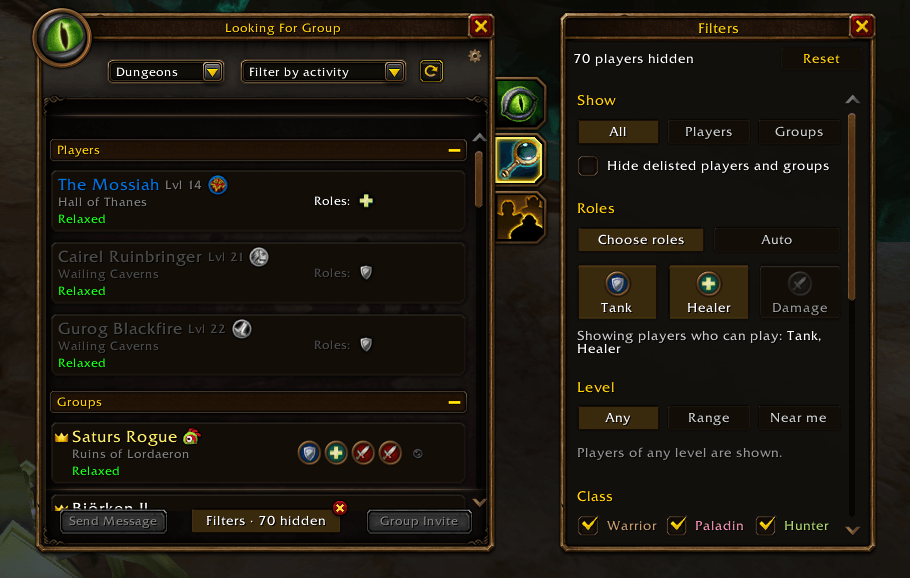
Filters for the World of Warcraft: Forever Looking For Group window. Find a tank or healer fast, match your level, and hide the clutter.
Features
- Roles: show only Tanks, Healers or Damage. Auto shows only players who fill your group's missing role.
- Level: set a range, or show only players near your level.
- Class: pick which classes to show.
- Groups: show only groups with a spot for your role.
- Show: players only, groups only, or both.
- Hide delisted greyed-out rows.
- Playstyle, new-player friendly and Discord filters.
- Hide players: hover a row and click ✕. Unhide anytime.
The filter panel sits next to the LFG window. With all filters off, the list is exactly Blizzard's.
How to use
Open Looking For Group → Browse and set your filters in the panel on the right. The Filters button at the bottom shows or hides the panel.
Not needed but:
/elfgshows or hides the panel./elfg resetturns all filters off./elfg unhideallclears hidden players.
Notes
- For WoW Forever (interface 16001).
- Can't search group comments; the game doesn't allow it.
- Filtering pauses during boss fights (chat lockdown).
LFG Filters Enhanced - Forever Team