Level Up Info (LevelUpInfo)
- By
See what you gained and which class skills you can now train, with prices, every time you level up.

Level Up Info
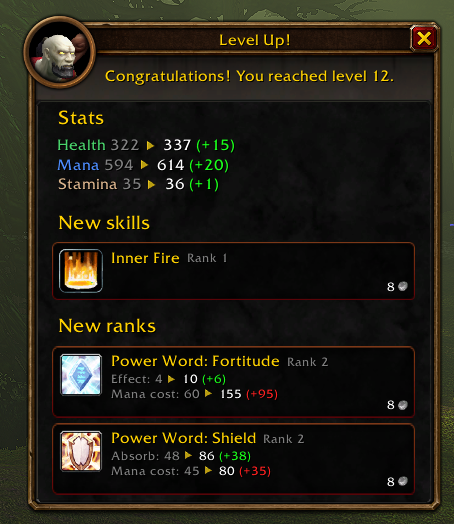
Ding! Now what? Level Up Info answers that the moment you level up. A small window in Blizzard's own trainer style shows what you just gained and which class skills you can now buy, with their price. No more running to the trainer to find out there was nothing new.
Why install it
- See your gains at a glance. Health, mana, talent points and stats from the new level.
- Know what to train. New class skills for your level, with icon, rank and price.
- Know what a new rank does. Each new rank lists what changed, like patch notes:
Healing: 47-58 → 76-91,Mana cost: 30 → 45. - Looks like it belongs. Blizzard's trainer style, no extra libraries.
- Light as a feather. Does nothing while you play. It wakes up only when you level up or open a class trainer.
What you see
- Gains. One line per stat that went up, old value, green arrow, new value:
Stamina 25 ▲ 26. Talent points show as▲ +1 Talent points. - New skills and New ranks for your level, each with icon, name, rank and price. The price turns red when you can't afford it. Hover a row for the spell tooltip.
- Not yet learned. Ranks you skipped at earlier levels, so nothing slips through.
- Weapon skills. Which weapons you can learn, with the weapon master and city.
- Long lists stay small. Long sections show 5 rows; click
+N moreto scroll the rest right in the window.
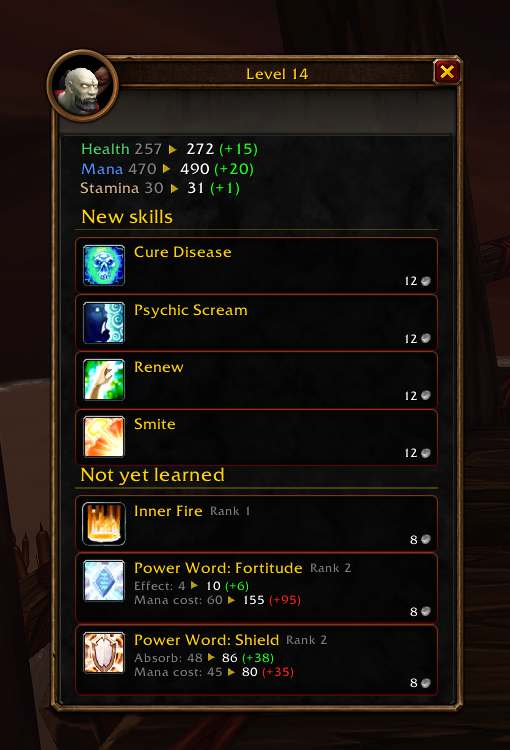
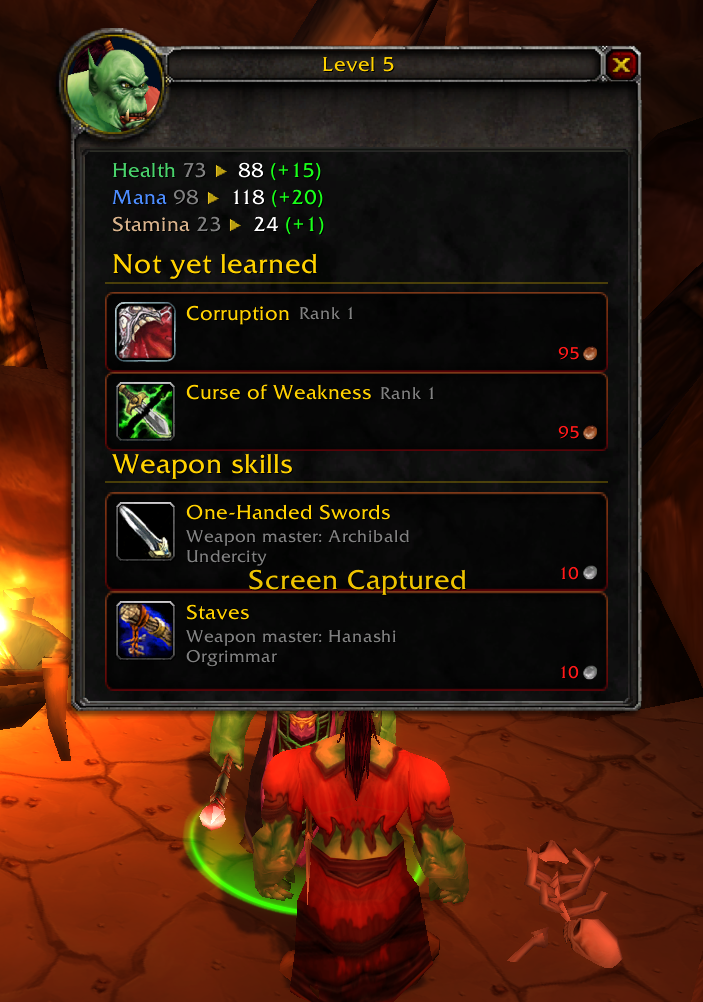
The window closes by itself after a few seconds. Hover it to keep it open, drag it to move it, or press X to close it. Level up in combat? It waits until combat ends.
How it learns skills and prices
Visit your class trainer once and Level Up Info remembers what they teach and for how much. Until your race's trainer has been visited for the new level, the window adds a short line telling you to visit your class trainer.
Settings
Type /lui or open Options → AddOns → Level Up Info.
- Enabled – show the window on level-up
- Duration – seconds before it closes (3 to 30)
- Wait for combat to end – hold the window until you leave combat
- Scale – window size (0.5 to 1.5)
- Reduced motion – close at once instead of fading
- Show minimap button – left-click: preview, right-click: options, drag to move it
- Reset position, Clear skill data, Test (shows a preview right now)
Commands
/lui– open the settings/lui test– preview the window
Game versions
One download works in Classic Era, WoW: Forever and TBC Anniversary.
Feedback
Found a bug or missing skill? Open an issue on GitHub or leave a comment here.
Level Up Info (LevelUpInfo) Team