Legacy Swap
- By
Save, share and switch Legacy System point loadouts in WoW Forever: /ls one-click switching, trainer-reset queue and share strings.
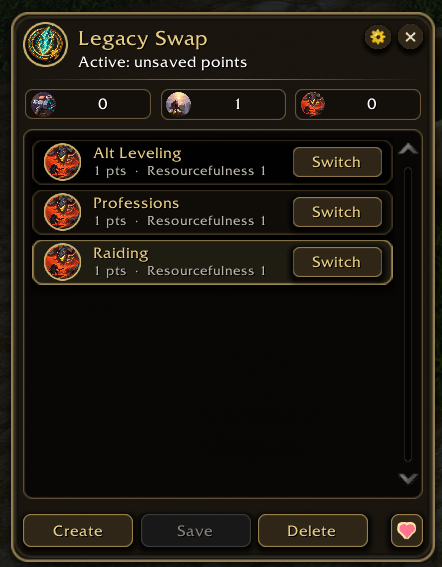
Screenshot 2026-11-06 231548.png

Screenshot 2026-11-07 001355.png
Description
Legacy Swap
Save your Legacy System points as named loadouts and switch between them in a click, in World of Warcraft: Forever.
Leveling an alt one evening, gathering the next, raiding on Thursday? Legacy Swap keeps a set of Legacy Tree points for each, shows which one is active, and gets you from one to the next with as little clicking as the game allows.
Features
- Your own sets, starting with a clean list. Click Create to name a new set from your current Legacy points (including a planned preview). Click Save to update the selected set with applied points after confirmation, or save a new named set if nothing is selected. Keep sets for one character or share them across your account. Delete removes the selected saved set after confirmation.
- Switch from wherever you are:
- the manager window (
/ls, also/legacyswap) - the round minimap button
- a Swap button inside Blizzard's Legacy panel
- an optional floating quick switcher
- the addon compartment
- key bindings
- slash commands such as
/ls load Raidand/ls next
- the manager window (
- Honest switching. If the new loadout only adds points, it is applied straight away. If it would take points out, which the game only allows through a paid reset at your class trainer, the addon queues it, reminds you at the trainer, and applies it as soon as your points are free. It never spends gold for you.
- Every perk at a glance. Hover a loadout to see each perk and rank. Ones you already have show in green.
- Share strings. Share with
/ls export <name>and/ls import: strings start with!LS1!, and older!LL1!strings still work. Import and Export buttons are no longer in the manager. - Clean start. No bundled starter sets. Your existing saved sets and settings are preserved when updating.
- Polished, rounded UI. A dark panel with gold edges that matches the Legacy panel. Round icons, rounded buttons and clear hover and pressed states.
Getting started
- Type
/ls, or click the minimap button. - Choose points in the Legacy panel (Y), then click Create and enter a name. Create can include a preview you have not applied yet.
- To update a selected set from the points actually applied now, click Save and confirm. Apply or Undo any preview first; Save is disabled while staging, during a switch, or when there are no applied points.
- Switch with Switch, by double-clicking a row, or from the minimap menu. Select a row and click Delete to remove its saved set after confirmation.
| Command | What it does |
|---|---|
/ls |
Open or close the manager |
/ls create <name> |
Create a new set, including any staged preview |
/ls save <name> / /ls saveacc <name> |
Save applied points as a new set for this character / the whole account |
/ls load <name> (or just /ls <name>) |
Switch to a loadout. Partial names work |
/ls next / /ls prev |
Cycle through your loadouts |
/ls list |
List your loadouts |
/ls rename Old > New / /ls delete <name> |
Rename or delete a loadout |
/ls export <name> / /ls import |
Share strings |
/ls cancel |
Drop a queued switch |
/ls minimap / /ls button / /ls panel |
Toggle the minimap button or the floating switcher, or open the Legacy panel |
/ls donate |
Show the support links |
Notes
- Built for the WoW Forever client (1.60.1, Interface 16001).
- Switching is blocked in combat and is applied when combat ends.
- Save never uses a queued target or an unapplied preview. This client has no verified separate applied snapshot during staging, so Apply or Undo the preview first; Save never silently commits or rolls it back.
- Deleting a loadout never changes the points you have spent.
- Updating from Legacy Loadouts: remove the old
LegacyLoadoutsfolder fromInterface/AddOnsafter you install. Saved settings do not copy over automatically, because the game stores them per folder.
Support
Legacy Swap is free. If it saves you a few clicks every week and you'd like to say thanks, a coffee is always appreciated ♥
- Ko-fi: ko-fi.com/eliteplayerbars
- PayPal: paypal.me/eliteplayerbars
In game, click the heart button in the manager's footer or type /ls donate to get the links to copy.
Found a bug or have an idea? Leave a comment on this page.
Legacy Swap Team