Elite Cast Bar
- By
Move, resize and restyle the player, target and focus cast bars in WoW Forever. Blizzard look by default. /ecb
Description
Elite Cast Bar
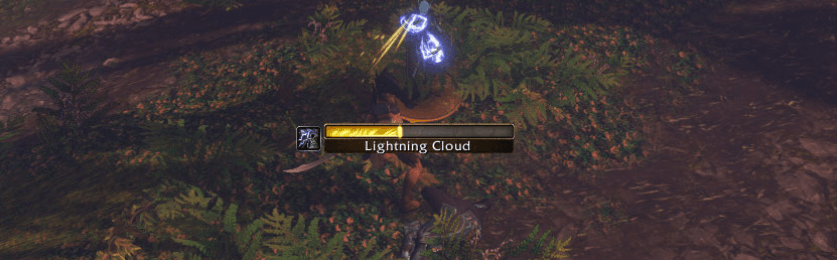
Move, resize and restyle your player, target and focus cast bars in World of Warcraft: Forever. Each bar has its own settings, with Blizzard's original look used by default.
Type /ecb to open the options.
Features
- Position and size. Unlock the bars to drag them, resize them from the corner of their gold boxes, or enter position and size values in the options. Adjust scale and reset a bar's position when needed.
- Blizzard look or custom styling. Keep Blizzard's cast-bar artwork, or use the optional Clean look preset with blue casts, green channels, a thin border and a timer. Returning to Blizzard look resets styling without changing position, size, scale or Hide bar.
- Textures and colors. Choose built-in bar textures, borders, background opacity and colors for casts, channels, uninterruptible casts and interrupted casts. Additional status-bar textures appear when a SharedMedia addon supplies them.
- Text and icons. Adjust the spell name, alignment, font size and outline; show or hide the cast timer, spell icon and spark. Choose the icon's side and timer format.
- Visibility per bar. Hide or show each bar independently, including Blizzard's bar. Target and focus bars also have a Hide for friendly units option.
- Preview while styling. Options are grouped into Layout, Style & colors, and Text & icon. The preview offers Cast, Channel, Uninterruptible and Interrupted samples, even when the real bar is hidden or disabled. Test mode also shows looping sample casts on the bars so you can position them without a target.
Getting started
- Type
/ecband choose Player, Target or Focus. - Outside combat, click Unlock bars to move or resize them. Use Test mode if you need sample casts.
- Adjust the selected bar's layout and style, then lock the bars again. Right-clicking a gold box also locks them.
Commands
| Command | What it does |
|---|---|
/ecb |
Open or close the options; /elitecastbar works too |
/ecb player, /ecb target, /ecb focus |
Open options for that bar |
/ecb unlock, /ecb lock, /ecb toggle |
Unlock, lock or toggle bar positioning |
/ecb test |
Toggle sample casts |
/ecb reset player, /ecb reset target, /ecb reset focus |
Reset that bar to defaults |
/ecb reset all |
Reset all addon settings |
/ecb status |
Show diagnostics |
/ecb version |
Show the installed version |
Compatibility and combat
- Built for WoW Forever 1.60.1 (Interface 16001).
- Restyles Blizzard's own player, target and focus cast bars rather than replacing their cast tracking.
- Bars automatically lock and test mode turns off when combat starts. Unlocking and test mode remain unavailable until combat ends.
- SharedMedia is optional; built-in textures are available without it.
Support
Elite Cast Bar is free. If it helps your game, you can support development:
- Ko-fi: ko-fi.com/eliteplayerbars
- PayPal: paypal.me/eliteplayerbars
The Donate button in the options window shows both links ready to copy.
Elite Cast Bar Team