Lazy Disenchanter
- By
Lazy Disenchanter is a simple, standalone mass disenchanting addon for enchanters
lazydis.jpg
lazydis2.jpg
Description
Lazy Disenchanter
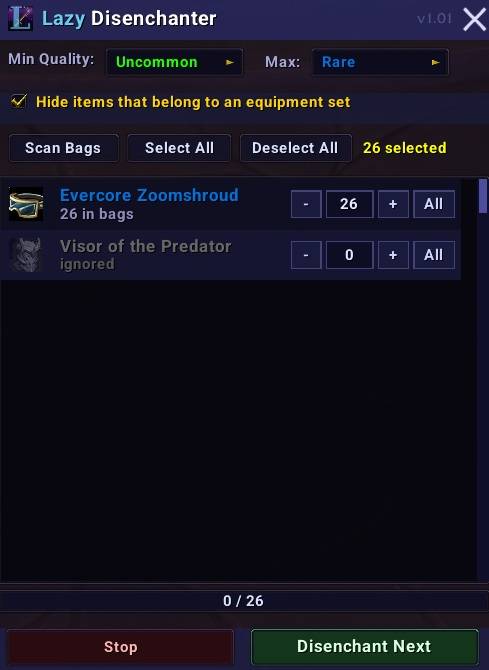
A simple, no-fuss mass disenchanting addon for enchanters. Open your bags, scan for disenchantable items, and work through them one click at a time — no need to manually find and right-click each piece of gear.
Features
- Grouped item list — items are grouped by name and sorted by quality, showing how many of each you have in your bags
- Per-group quantity control — use
+,-, andAllbuttons (or type a number directly) to choose exactly how many of each item to disenchant - Min / Max quality filters — set the quality range to include: Uncommon, Rare, or Epic
- Equipment set protection — optionally hide items that belong to any of your gear manager equipment sets, so you never accidentally disenchant something you're using
- Right-click to ignore — right-click any item in the list to ignore it; the row greys out and is skipped during runs. Right-click again to restore it. Ignored items are remembered across sessions
- Live updates — the list updates as you go, no need to re-scan between items
- Progress bar — tracks how many items have been disenchanted in the current run
- Combat safety — automatically stops if you enter combat
- Minimap button — click to open/close, right-click to start/stop, drag to reposition
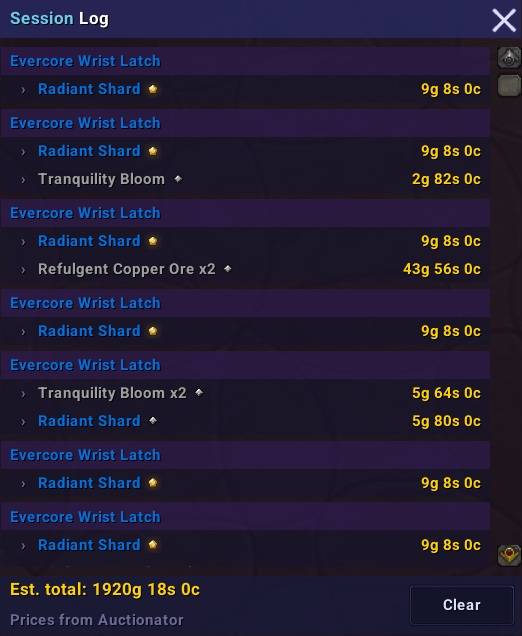
- Session Log — tracks every item disenchanted and the materials received, including crafting quality rank. Shows estimated gold value per material using Auctionator prices if installed, otherwise vendor sell value. The log persists across reloads and relogins — only cleared when you hit the Clear button
Usage
Open the window with /ld or by clicking the minimap button. Hit Scan Bags to find disenchantable items, adjust quantities if needed, then click Start and press Disenchant Next for each item. Materials are looted automatically — no need to interact with the loot window.
Session Log
The Session Log opens automatically when you disenchant your first item, or manually via the Session Log button. It shows each disenchanted item alongside the materials received, their crafting quality rank, and an estimated gold value. If you have Auctionator installed the prices come from your last AH scan — otherwise it falls back to vendor sell value. The log carries over between play sessions and is only wiped when you press Clear.
Auctionator
Auctionator is not required but is recommended for accurate pricing in the session log. Without it, prices shown are vendor sell values only.
Slash Commands
| Command | Description |
|---|---|
/ld |
Open the window |
/ld start |
Begin a disenchanting run |
/ld stop |
Cancel the current run |
/ld log |
Toggle the session log |
/ld quality <2-4> |
Set minimum quality (2=Uncommon, 3=Rare, 4=Epic) |
/ld sets |
Toggle equipment set protection |
/ld minimap |
Toggle the minimap button |
/ld help |
Show all commands |
Requirements
Requires the Enchanting profession. The Enchanting tradeskill window does not need to be open.
Lazy Disenchanter Team