Laggy Addon Detector
- By
Finds the addon behind lag and stutter: live CPU per addon, slow frames logged with the culprit, memory growth, and optional on-screen stats.
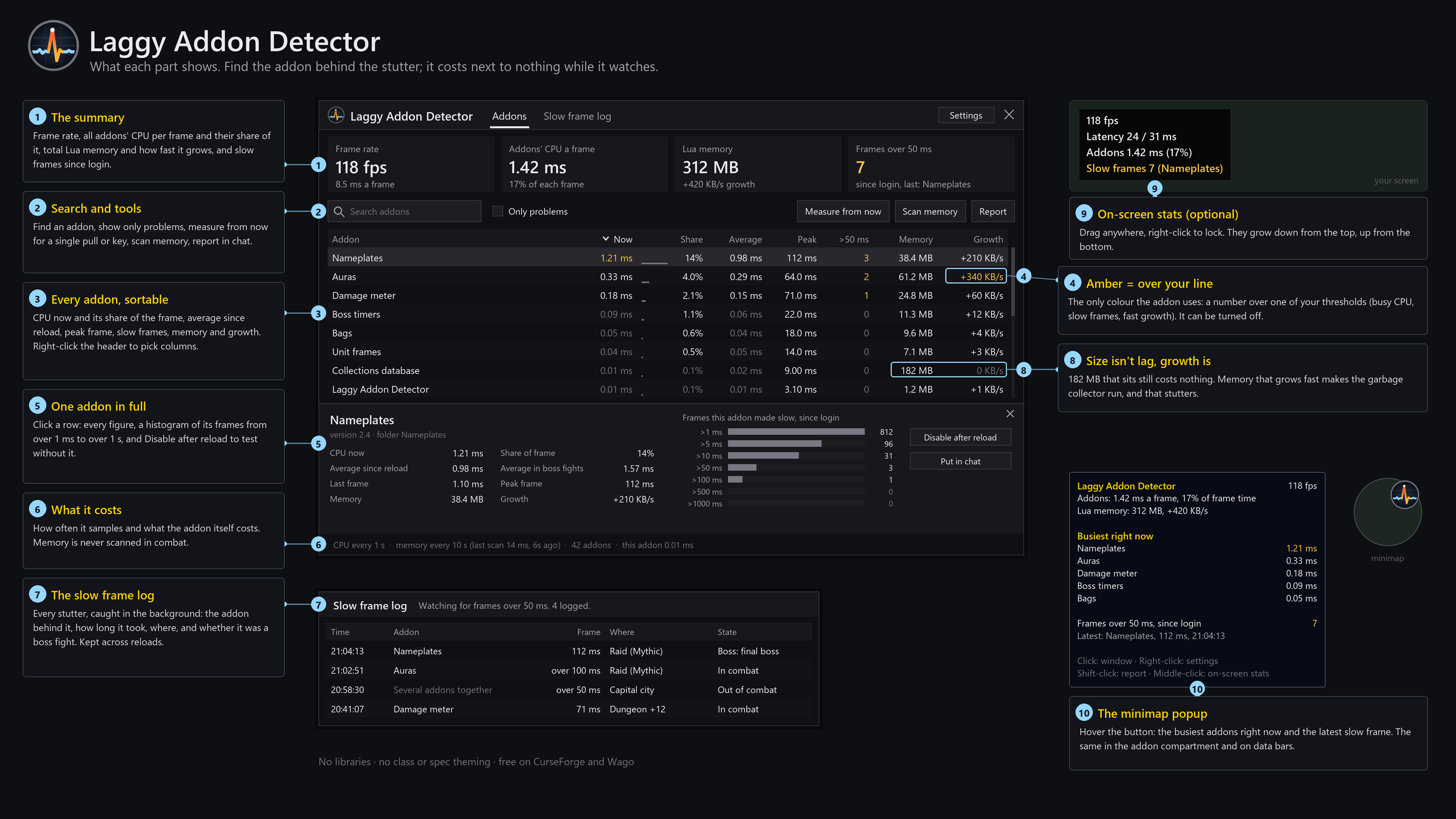
**Find the addon behind the stutter.**
Something updated and now the game hitches? Instead of disabling addons one by one, Laggy Addon
Detector watches every addon live with the game's own addon profiler. It tells you which addon
made each slow frame, and when and where it happened.
## Highlights
- **Slow frames, with the culprit.** Logged in the background: the addon behind each one, how long
the frame took, the zone or key level, the boss, and whether you were in combat. Kept across
reloads, so a hitch in a boss fight can be looked up after the fight.
- **Live CPU per addon:** right now, since reload, in boss fights and at its peak, plus each
addon's share of the frame.
- **Memory growth, not just size.** A big addon that sits still costs nothing; memory that grows
fast makes the garbage collector run, and that's what stutters.
- **Measure from now** for a single pull or key.
- **On-screen stats (optional):** frame rate, latency, addons' CPU and slow frames, anywhere on
screen.
- **Quiet and light.** Nothing in chat at login unless something is wrong. With nothing open it
reads one number every two seconds.
## How to use
- `/lad`, or click the minimap button: the window. Click an addon for its full breakdown.
- Hover the minimap button: the busiest addons right now and the latest slow frame.
- `/lad stats`: on-screen stats. `/lad help`: every command.
- Settings: Options → AddOns → Laggy Addon Detector.
Retail 12.1 (Midnight). No other addons needed.
Issues and ideas: [github.com/powercover/LaggyAddonDetector/issues](https://github.com/powercover/LaggyAddonDetector/issues)
Laggy Addon Detector Team