Better Great Vault
- By
Exact item levels and loot previews on every Great Vault slot, a loot table and season loot database, and an opening animation for every specialization.
compare.png
openings.png
reveal.png
loot-table.png
database.png
Description
See exactly what your Great Vault can give before you choose.
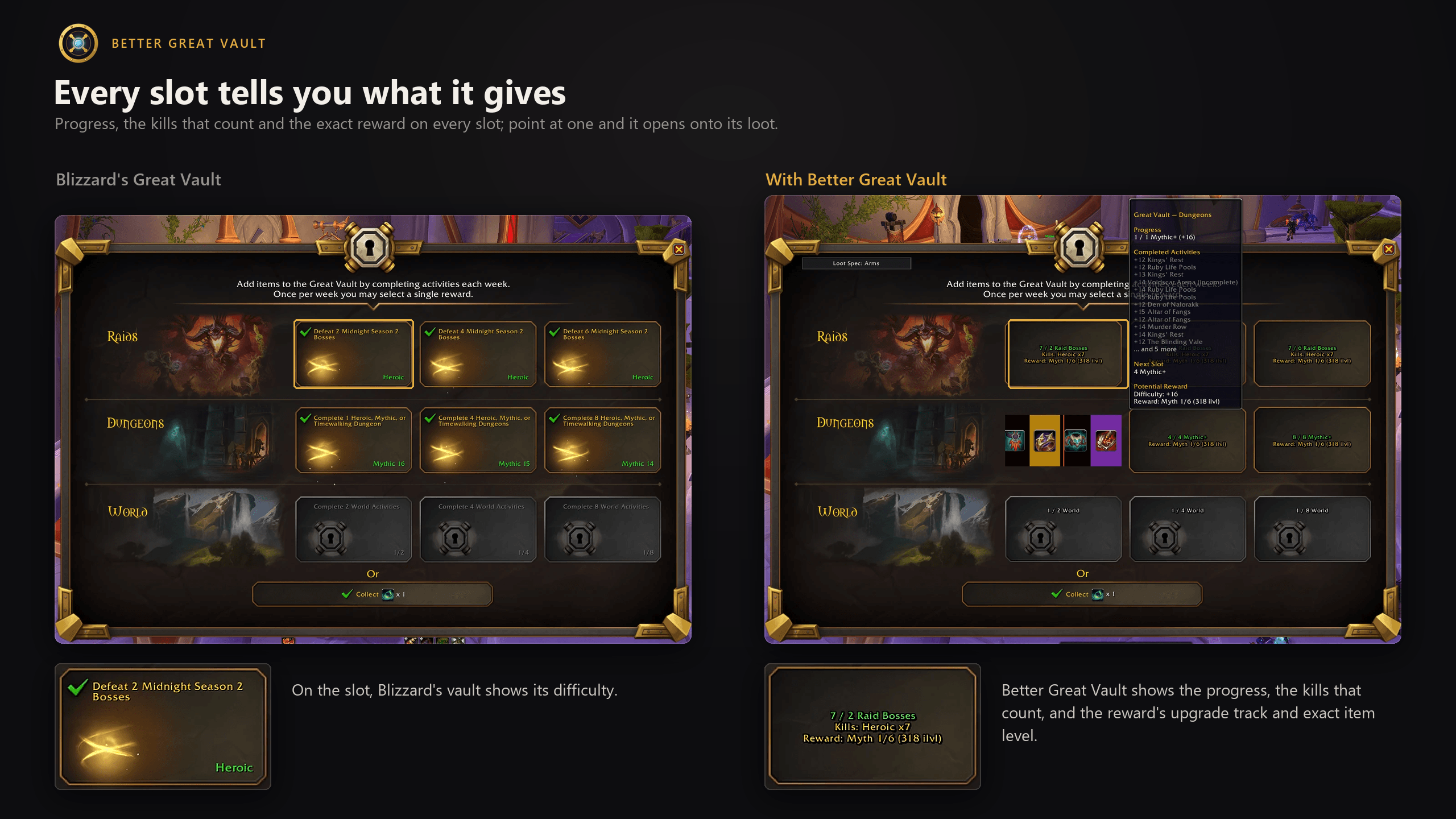
Better Great Vault turns the Great Vault into a planning tool. Every slot shows how far along it is and the exact item level it awards, and opens onto a reel of everything it can drop. A searchable loot table and a season-wide loot database list every reward for any class and specialization, so you know what to run next.
Highlights
- Exact item levels, never guesses. Taken from the game's own reward data, including the vault's rule for a raid's last two bosses. When the game can't confirm a level, the addon says so.
- Loot reels. Point at an unlocked slot and it opens onto a reel of the loot it can award, colored by Best-in-Slot tier.
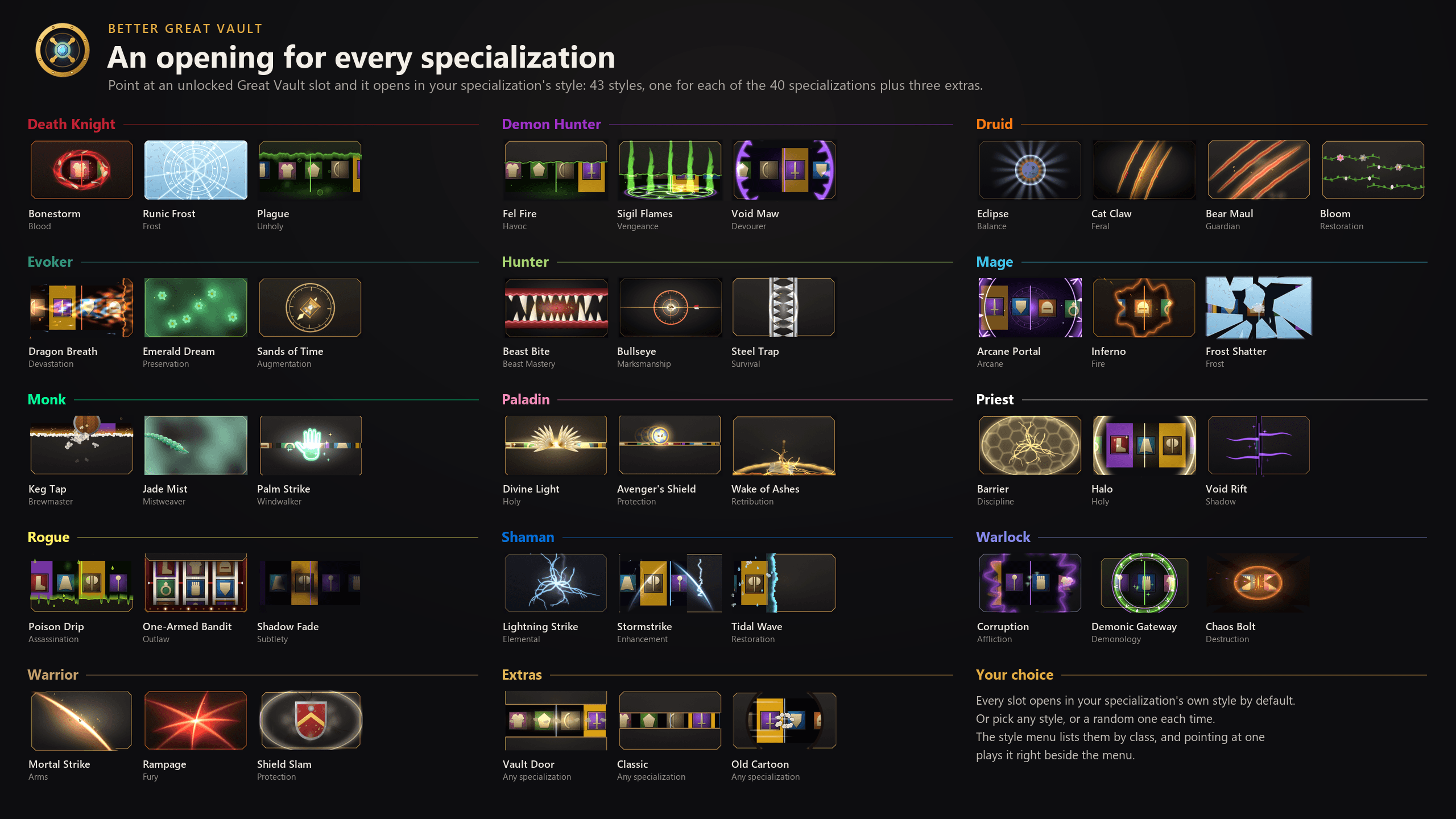
- An opening for every specialization. 40 animations, one for each specialization, plus three extras.
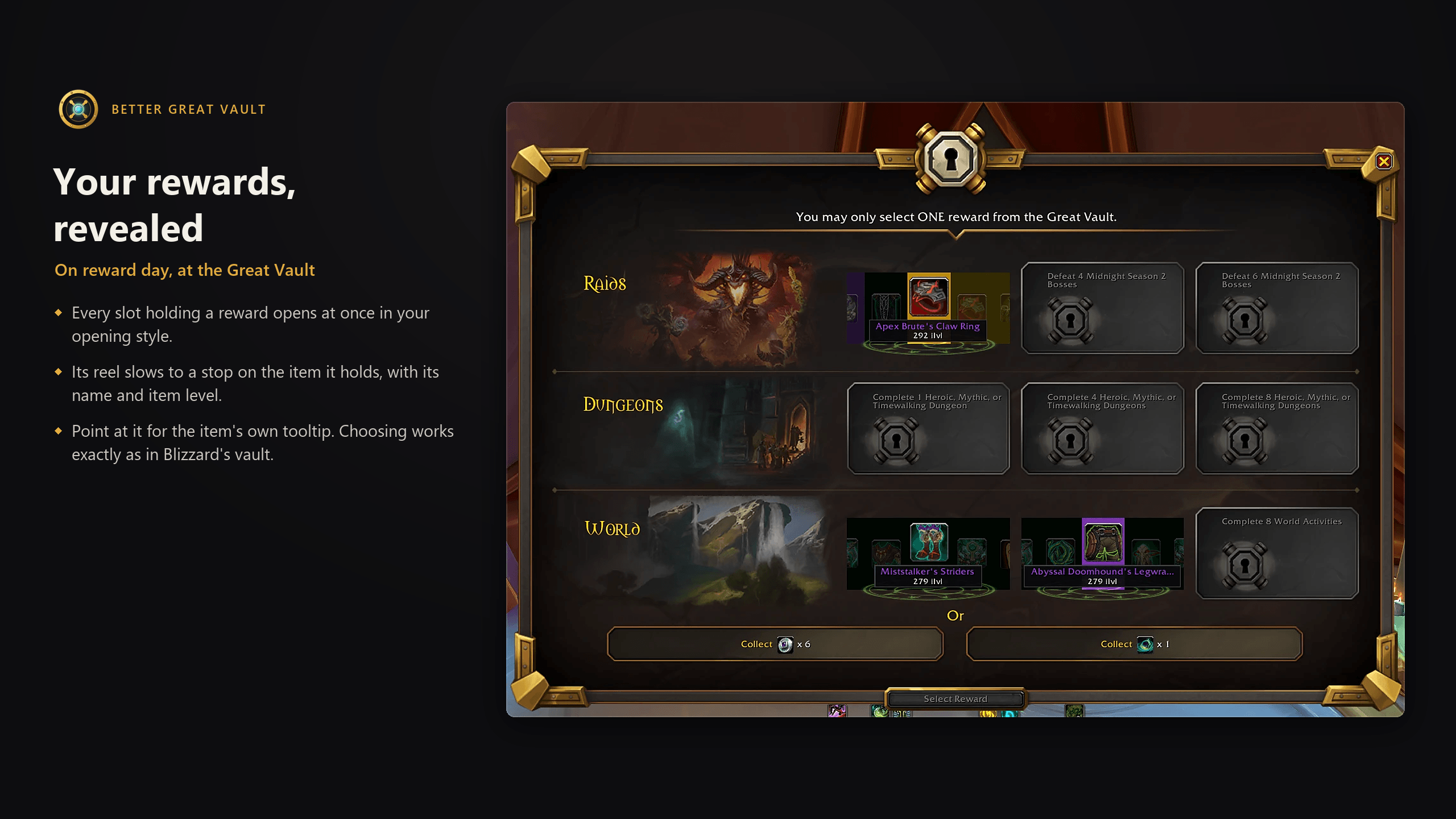
- Your rewards, revealed. At the vault, every slot holding a reward opens and lands on it, with its name and item level. Choosing works exactly as in Blizzard's vault.
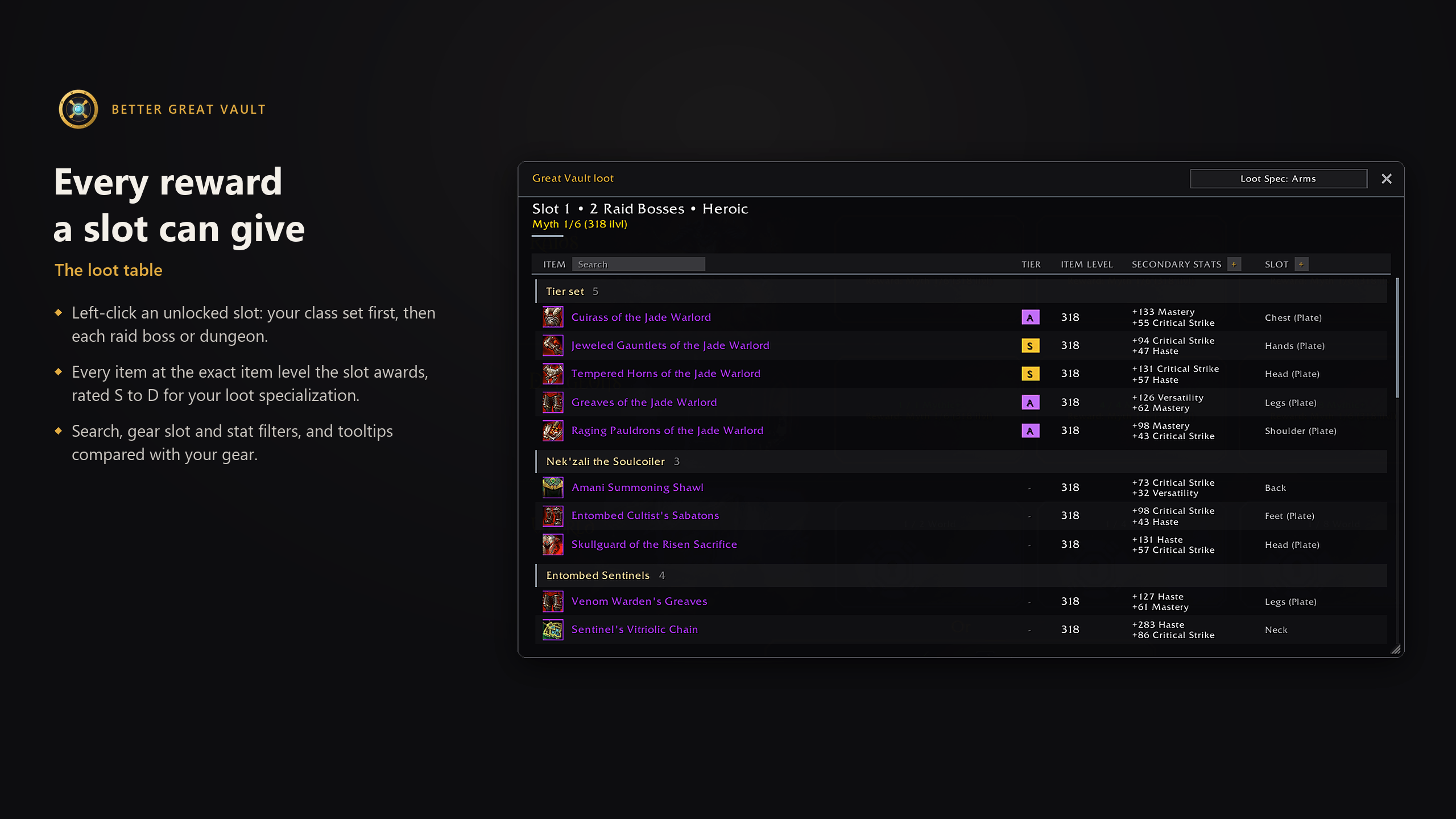
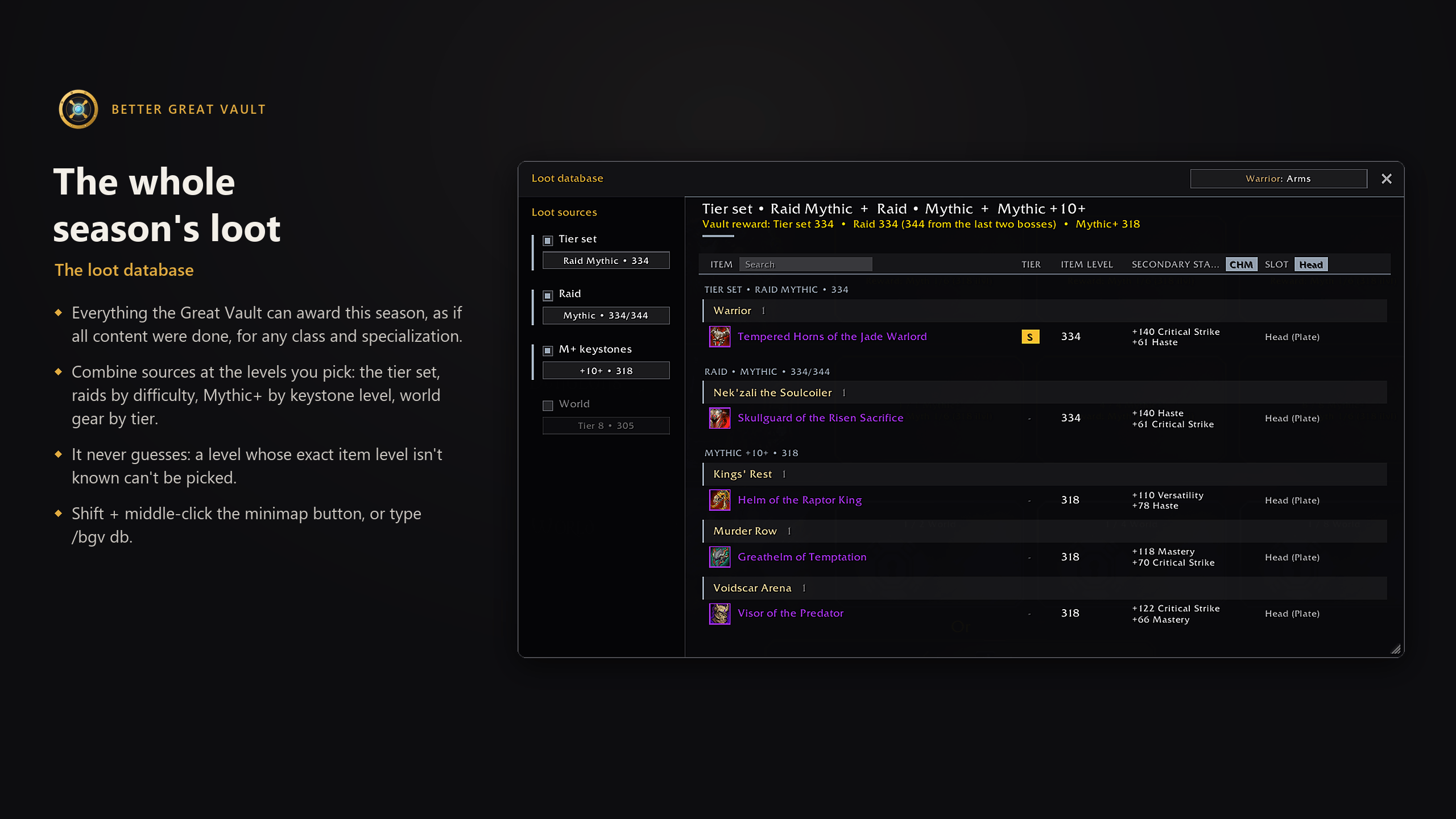
- Loot table and loot database. Every reward at its exact item level, with search, slot and stat filters, set bonuses and item comparison.
- Light by design. Nothing runs every frame unless something on screen is moving. No other addons needed.
- 11 languages, including Ukrainian.
On the Great Vault
- Progress and reward on every slot:
3 / 4 Raid Bosses, then the reward's upgrade track and exact item level once it unlocks. - Detailed slot tooltips: what counts toward the slot (bosses killed, Mythic+ runs, world activity tiers), what the next slot needs, and the next step up in reward.
- Best-in-Slot tiers: items rated S, A, B, C or D for your loot specialization, from Wowhead's class guides.
- Loot spec button: see and change the specialization your vault loot is filtered by, right on the vault.
- Sad gates: point at Collect and your completed slots look disappointed. The slot holding your best reward takes it hardest. You can turn this off.
Opening styles
Every slot opens in your specialization's own style. You can also pick any style, or a random one each time; pointing at a style in the menu plays it right beside the menu.
- Death Knight: Bonestorm (Blood), Runic Frost (Frost), Plague (Unholy)
- Demon Hunter: Fel Fire (Havoc), Sigil Flames (Vengeance), Void Maw (Devourer)
- Druid: Eclipse (Balance), Cat Claw (Feral), Bear Maul (Guardian), Bloom (Restoration)
- Evoker: Dragon Breath (Devastation), Emerald Dream (Preservation), Sands of Time (Augmentation)
- Hunter: Beast Bite (Beast Mastery), Bullseye (Marksmanship), Steel Trap (Survival)
- Mage: Arcane Portal (Arcane), Inferno (Fire), Frost Shatter (Frost)
- Monk: Keg Tap (Brewmaster), Jade Mist (Mistweaver), Palm Strike (Windwalker)
- Paladin: Divine Light (Holy), Avenger's Shield (Protection), Wake of Ashes (Retribution)
- Priest: Barrier (Discipline), Halo (Holy), Void Rift (Shadow)
- Rogue: Poison Drip (Assassination), One-Armed Bandit (Outlaw), Shadow Fade (Subtlety)
- Shaman: Lightning Strike (Elemental), Stormstrike (Enhancement), Tidal Wave (Restoration)
- Warlock: Corruption (Affliction), Demonic Gateway (Demonology), Chaos Bolt (Destruction)
- Warrior: Mortal Strike (Arms), Rampage (Fury), Shield Slam (Protection)
- Extras: Vault Door, Classic, Old Cartoon
Loot table and loot database
Left-click an unlocked slot, or middle-click the minimap button, to list every reward it can give: your class set first, then each raid boss or dungeon, every item at the exact item level the slot awards. Columns for Best-in-Slot tier, item level, secondary stats, and slot with armor type; a search box, a gear slot filter and a stat filter; tooltips compared with your gear; Shift-click to link an item in chat at that item level whenever the game can build that link.
The loot database lists everything the Great Vault can award this season, as if all content were done, for any class and specialization: your class set, every raid boss by difficulty, every Mythic+ dungeon by keystone level, and world gear (delves, prey and world bosses) by tier.
Minimap button and more
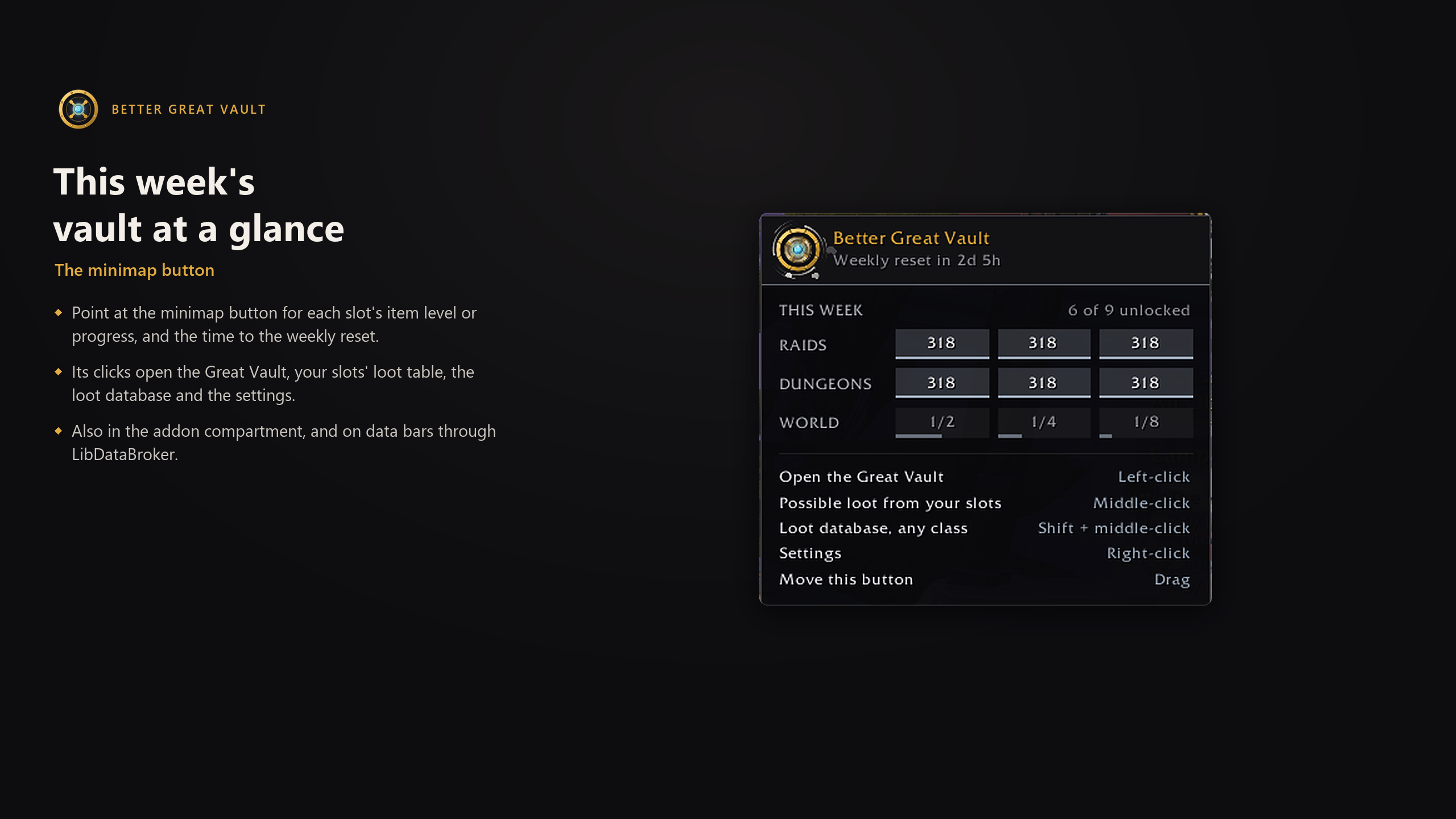
- An animated vault door on the minimap. Hover it for this week's vault at a glance: each slot's item level or progress and the time to the weekly reset. Also in the addon compartment.
- A data bar feed for ElvUI, Titan Panel, ChocolateBar and other data bars, when another addon has loaded LibDataBroker.
- A reminder in chat when rewards are waiting, and
/bgv statusfor this week's vault in chat. - Your look: text size from -5 to +5, an accent color (your specialization's or one you pick), key bindings, and settings saved per character.
Commands
/bgv: the version and the list of commands/bgv status: this week's Great Vault in chat/bgv db: open or close the loot database/bgv perf: what the addon costs (CPU, memory, load time)
Everything else is in Options → AddOns → Better Great Vault, or right-click the minimap button.
Languages
English, Deutsch, Español (Spain and Latin America), Français, Italiano, Português, Русский, Українська, 한국어, 简体中文 and 繁體中文. The addon speaks the game's language; Ukrainian, which the game doesn't have, is picked in the settings.
Compatibility
Retail World of Warcraft 12.1 (Midnight). Works with addons that gather minimap buttons into a bar or menu, such as EllesmereUI.
Found a bug or have an idea? Open an issue and include the output of /bgv debug.
Better Great Vault Team