Kudos
- By
Logs every instance and raid you join. Remembers who you played with, gives them kudos, and keeps your favourite companions one click away.
Captura de pantalla 2026-11-03 175730.png
Captura de pantalla 2026-11-03 175800.png
Captura de pantalla 2026-11-03 175824.png
Captura de pantalla 2026-11-03 175848.png
Captura de pantalla 2026-11-03 175909.png

Description
Kudos
Your group, remembered. Every instance and raid you run, Kudos writes down who you stood there with — class, role, and how the run went. Give kudos to the players who carried you, keep the ones you want to team up with again one click away, and open any past run to see exactly who was beside you. When the queue drops you with a familiar name, you will know before the first pull.
✨ Why players love it
- No more guessing — the tank who vanished last Tuesday? The healer who carried the whole wing? Kudos remembers every name, with your own verdict attached.
- Your favourites stay close — mark the players you enjoy playing with and Kudos keeps them highlighted everywhere: in the roster, in the run history, and on the popup that greets you when you enter an instance.
- Useful, never noisy — Kudos is quiet while you play. It speaks up once, when it has something worth saying: who you played with before, and what you thought of them.
- Runs entirely on your machine — no account, no upload, no telemetry. Your notes, your ratings and your history never leave your computer.
- One build, every client — Retail (Midnight 12.1) today. Other clients are on the way.
- Featherweight — no third-party UI libraries, no combat-log parsing, no background polling. It reads the group you are already in and writes it down.
🎯 How it works
| Step | What happens |
|---|---|
| 🧭 You enter an instance | Kudos notes the instance, the difficulty and everyone in your group. |
| 📖 You play | Kudos tracks who was there, who left early, and which bosses you beat. Nothing is shown, nothing is sent. |
| 🗂️ The run is over | The run is filed under the instance, with the players who shared it with you. |
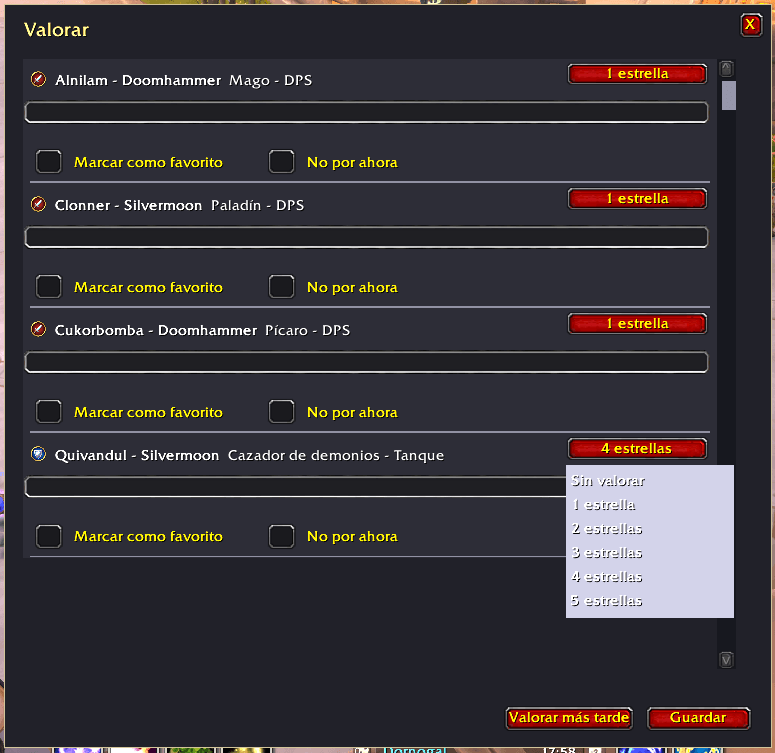
| ⭐ You rate | Open the panel and leave a star rating and a note on anyone you want to remember — good or bad, it is your call. |
| 👋 Next time | Entering an instance you have already done, Kudos shows you who you played with last time and what you thought of them. |
📋 What it does
| Feature | Details |
|---|---|
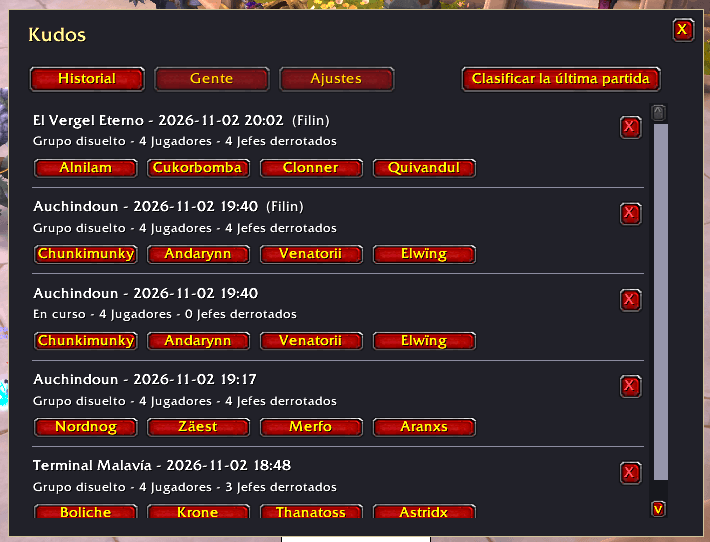
| 📜 Run history | Every instance and raid you enter is filed with its date, difficulty, bosses beaten and the full roster. Browse it by date, and delete the runs you would rather forget. |
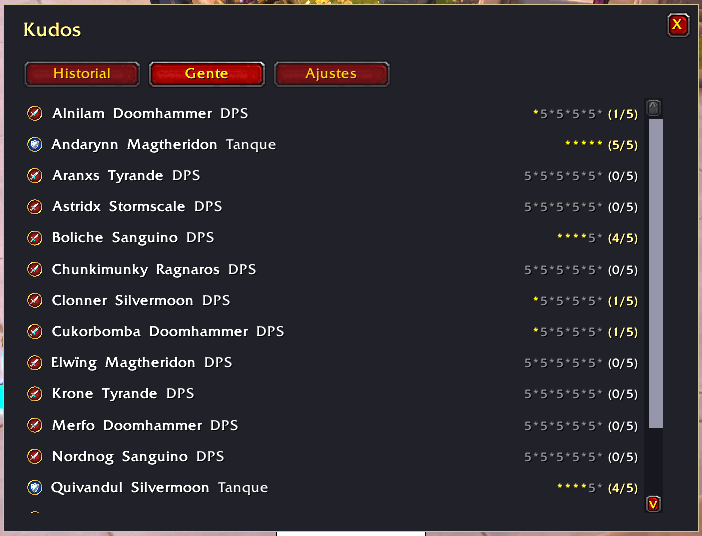
| 🧑🤝🧑 Who was there | Name, class and role for everyone who shared the instance with you — including the ones who left halfway through. |
| ⭐ Ratings | One to five stars per player, plus a free-text note. Keep it for the people you want to team up with again, and for the ones you would rather meet in another group. |
| 🗣️ Your notes | A sentence about the player who saved your skin, or the one who never stopped moving. Notes are yours and stay on your machine. |
| 🧭 The greeting popup | Enter an instance you already know and Kudos tells you, before the first pull, who you played with last time and how you rated them. |
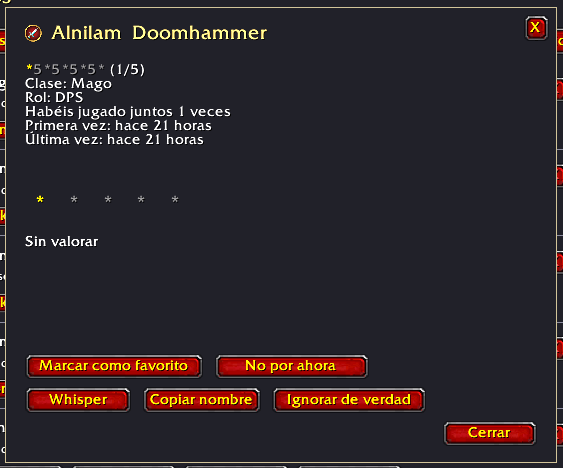
| 🧑💻 Player file | One card per player: class, role, how many times you have met, when you first and last ran together, your rating and your note. |
| 🚪 Your queue, your rules | Kudos can point out the players you have marked as not for now, so you always know who is in the group before you commit to it. |
| 💬 Say hello again | One click to whisper a player from your history — handy when a good group deserves a second run. |
| 📊 Simple stats | How many times you ran each instance, how many bosses you beat, and how many times you met each player. |
| 🗂️ Your data, yours | Everything lives in your own game folder. Nothing is uploaded anywhere, ever. |
⌨️ Commands
| Command | What it does |
|---|---|
/kudos |
Opens the panel: your history, your players and your settings. |
/kudos last |
The last run you finished, with its roster and your ratings. |
/kudos who <name> |
Everything Kudos knows about one player. |
/kudos mark <name> |
Marks a player as play again (or clears the mark). |
/kudos note <name> |
Opens the note editor for a player. |
/kudos version |
The version of Kudos you are running. |
🙋 Your people
The heart of Kudos is the people you meet. Every player you group with gets a card: their class, their role, how many times you have run together, and your verdict.
- Give kudos — five stars and a line about a great run. Your favourite healers, tanks and damage dealers stay easy to find.
- Keep a note — a sentence is enough. "Never stopped moving.", "Saved the whole pull.", "Great with the adds."
- Mark for later — one flag for the players you would happily queue with again, so you can find them and invite them.
- Mark for now — one flag for the players you would rather meet somewhere else. Kudos points them out when they show up in your group, and nothing more happens unless you want it to.
🛡️ Your queue, your rules
Random groups are the whole point of Kudos — and the whole reason it exists. Two small, optional touches:
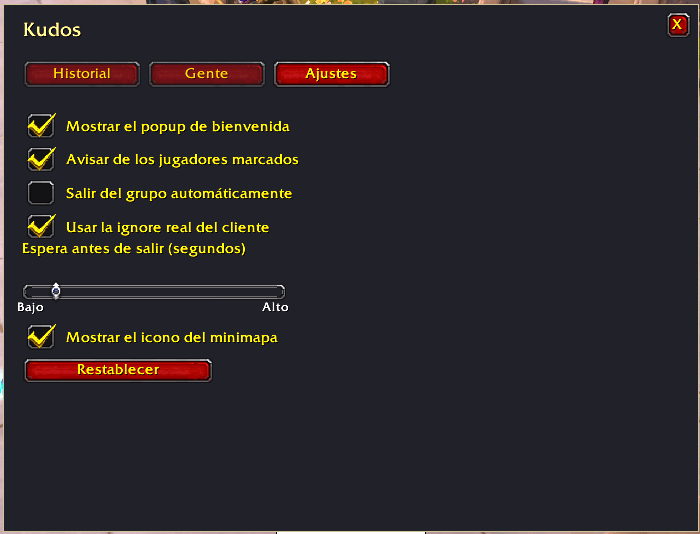
- A gentle heads-up — when you enter an instance and someone in your group is on your not for now list, Kudos tells you. You decide what to do.
- Step aside — if you prefer, Kudos can leave the group for you when that happens. It is off by default, it waits a few seconds before acting, and it always tells you first.
Kudos never blocks anybody, never reports anybody and never touches your queue on its own. The client decides who you play with; Kudos just makes sure you know who is standing next to you.
🔒 Private by design
- Everything stays local. Your history, your ratings and your notes are written to your own game folder. Kudos has no account, no server and no analytics of any kind.
- No combat-log parsing. Kudos does not read your combat log, so it cannot slow your game down and it never touches data it does not need.
- You can wipe it whenever you like. Delete the addon folder and your notes go with it. Nothing is kept anywhere else.
📦 Installation
- CurseForge — search for Kudos and click Install.
- Manually — drop the
Kudosfolder intoWorld of Warcraft\_retail_\Interface\AddOns\.
Requires WoW Retail 12.1 (Midnight). Other clients are on the way.
🌐 Languages
English and Español at launch, with more to follow. The addon respects your client language automatically.
❓ Frequently asked questions
Does it work in random groups? That is exactly what it is for. Kudos records the group you are in, whatever it came from.
Will it slow my game down? No. Kudos listens to a handful of events and writes them down. There is no polling and no combat-log parsing.
Can other players see my notes? No. Your notes are stored locally and are never sent anywhere.
Can I really avoid someone? Not by magic — the matchmaking is decided by the game, not by any addon. What Kudos can do is tell you the moment they show up in your group, so you always have the choice.
What happens if I rename a character? The name is the key. Renamed characters appear as a new entry, and the old one stays as a record of the past.
🙏 Credits
Kudos is part of a small family of addons for World of Warcraft.
Made with care by Philippe Mingo.
Kudos Team