KP_TPlate
- By
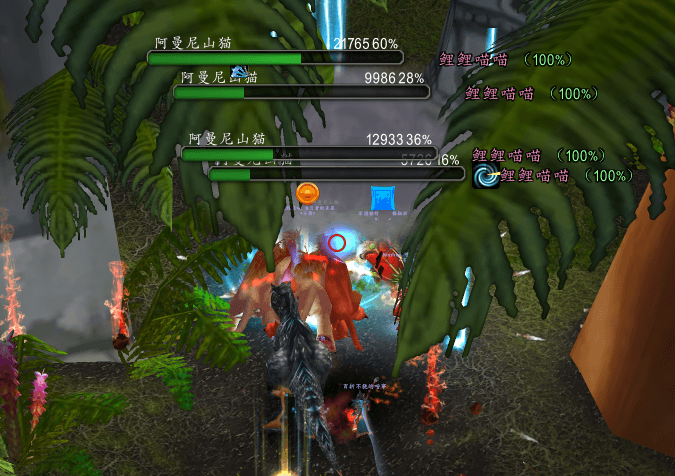
This is a threat alert addon based on the native World of Warcraft nameplates, allowing you to instantly see who in a mob group is targeting you who is targeting your teammates.
微信å¾ç_20260924185749_66107_520.png
Description
KP_TPlate Hate Nameplate User Manual
One-sentence introduction
This is a threat alert plugin based on the native World of Warcraft nameplates, allowing you to see at a glance who in the mob pack is targeting you and who is looking at teammates.
Compatible with: Retail, Classic, Mists of Pandaria, Cataclysm, Titan Reborn, Infinite servers
What is this
This plugin does replace or rebuild the nameplates, but directly colors and adds markers to the game's built-in native nameplates.
The style, position, and toggle of the native health bars remain unchanged; the health bar you see is still the game's original health bar, just with an added set of clear threat colors eye-catching alerts. Because it uses native nameplates, it has good compatibility, is lightweight, and is unlikely to break entirely after client updates.
Tanks,, and DPS share the same set of colors and settings, so there is no need to switch character configurations; it works immediately for both alts and mains.
Highlights
1. If a mob is staring at you, the color immediately gives you the highest warning
When soloing mobs or when the threat API is not working, as long as the current target of the mob is you, its health bar will directly display at the highest danger level, rather than stupidly staying green.
. Four levels of threat colors, scan the entire battlefield at a glance
Safe is green, rising threat is yellow, about to lose control is orange, and already control is red.
When there are many mobs, a quick glance at the color distribution tells you who to hit and who to save.
3. The mobs target is written directly next to the health bar
When a mob is looking at you, the large red text "You" lights up on the right side of the bar, which is the most direct warning on the entire screen.
When a mob is looking at a teammate, it displays the teammate's name, with names colored by class, followed by their current health percentage. It is immediately clear whether the mob has a target and who it is attacking.
4. The current target exclusive markers
The mob you have selected will have a marker on both the left and right sides of its health bar, allowing you to immediately notice if you misclick lose your target in a melee.
Choose from seven styles: triangle arrow, angle bracket, square bracket, diamond, circle, vertical bar, and blue arrow., distance from the health bar, and color are all adjustable. The default is the angle bracket style with a size of 20.
You can also a downward arrow above the nameplate, with the height of the arrow freely adjustable, allowing you to lock onto the current target at a glance even above a mob pack The two types of markers are independent; you can enable only one or both at the same time.
5. Color changes are smooth transitions
When the threat level, the color uses a gradient transition instead of a hard jump, making it visually unobtrusive; however, the moment it actually crosses a threat level, it still changes immediately, ensuring no delay in the warning.
6. Totems and summons can be muted
Use NPC IDs to set an ignore list; mobs on the will always display the safe color, will not turn red, and will not pop up the "You" text, keeping the screen clean when fighting mobs with summons like Sham and Warlocks.
7. Automatic cleanup in main cities
Entering Dalaran or Shattrath automatically hides enemy health bars, which restore to normal upon leaving city. The state (on or off) before entering the city is maintained after leaving.
8. Initial use sets the block casting bar
When the plugin loads the first time, it automatically sets the native nameplate style to a block casting bar. This setting is only applied once; after that, whatever style you change will be fully respected, and the plugin will no longer interfere.
How to open the settings panel
Method 1: Type the slash command /kptp or /kptplate.
Method 2 Click the plugin icon next to the minimap.
The KP_TPlate Team