KP_BisRow
- By
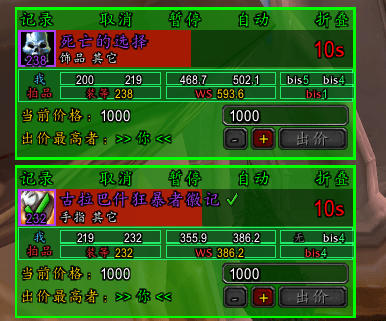
Auction Comparison Mini-addon by TitanBistooltip: When the raid leader auctions gear, an extra "Me/Item" comparison slot automatically below the auction item, allowing you to know at a glance whether you should bid on the gear.
微信å¾ç_20260905143732_45486_1034.png
微信å¾ç_20260904125456_60085_520.png
Description
=======================================
BGLite Pure Version BIS Enhancement Assistant - Plugin Introduction
=======================================One-sentence Introduction】
A small equipment comparison plugin used in conjunction with the BGLite Pure Version auction table: When the raid leader auctions gear, an extra of "Me / Auction Item" comparison boxes automatically appears below the auction entry. A quick glance tells you whether you should bid on the item, so you don' have to alt-tab out of the game to check the BIS list.
------------------------------------------------------------
Features
------------------------------------------------------------
1. Equipment Comparison Row Two rows of small boxes are displayed below each auctioned item:
· "Me": The item level, WS score, and BIS rank of the equipment in same slot you are currently wearing.
· "Auction Item": The item level, WS score, and BIS rank of the auctioned equipment.
For slots where you wear two items (like rings and trinkets), the two pieces of equipment are displayed side-by-side.
2. Upgrade Highlighting (Default Neon Effect) When the auction item is better than the worst item in the same slot you are currently wearing (an upgrade worth swapping to),
the entire comparison block will light with a rainbow neon effect, allowing you to instantly identify the gear you should bid on.
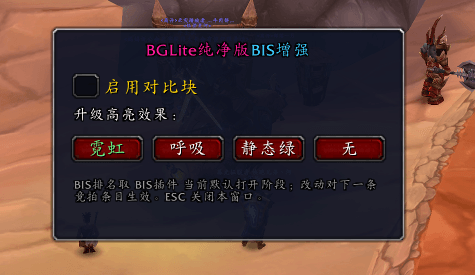
Four display effects can be toggled in the settings: Neon / Breathing Static Green / None.
3. Smart Filtering
If the item is not wearable by your class (e.g., a Priest finding plate armor), the row will automatically
not be displayed, preventing it from misleading you.
4. Hover for Details
Hovering the mouse over the comparison boxes allows you see detailed equipment information and the source of the BIS rank.
------------------------------------------------------------
How to Use
------------------------------------------------------------
· There is a crosshair icon on minimap: Left-click to open the settings panel, right-click to quickly toggle on/off.
· The icon can be dragged along the edge of minimap by holding the left mouse button; its position is automatically remembered.
· Typing /bisrow in chat can also toggle the plugin on/off and effects.
------------------------------------------------------------
Notes
------------------------------------------------------------
1. You need to install both plugins simultaneously to use it:
· BGL Pure Version (the main auction table)
· TitanBistooltip (the BIS plugin, providing item level/WS score/BIS rank data)
If either missing, the comparison row will not be displayed.
2. The BIS rank follows the currently default-opened phase in the BIS plugin. Check the phase in the
plugin first before checking the rank, otherwise the rank might not match.
3. The WS score is completely consistent with what is displayed in the BIS plugin' mouseover tooltip; the two will not conflict.
4. Choose between this plugin and the comparison feature of "PaiPai - BG Auction Enhanced Version": both are enabled, this plugin will automatically yield, so it won't draw two duplicate comparison rows.
5. If the auction item's rank displays "None means this piece of equipment is not in the current class/spec's BIS list.
6. When equipment has not been cached by the game (rare), the hover might take about half a second
to load the data, but it will be normal the second time.
7. Settings are saved in the plugin's archive, and the selection of switches and effects will be maintained after re-logging.
8. plugin does not register any auction events, nor does it send or receive auction messages; it is purely for "viewing and speaking," and will not interfere with the normal auction process.
The KP_BisRow Team