KP_ApiDumper
- By
This plugin scans all the native interfaces actually provided by your current client and provides a browsing window in-game. When writing plugins, checking interfaces, studying the UI framework, you can search and copy directly in-game.
ScreenShot_2026-09-12_121519_880.png
ScreenShot_2026-09-12_121500_429.png
ScreenShot_2026-09-12_122432_631.png
ScreenShot_2026-09-12_090925_263.png
Description
============================================================
KP_API Browser Plugin Introduction
============================================================
Author: KuaiPaoNO1
Compatible with: All versions of World of Warcraft client (live servers, various classic servers, time-travel servers, etc.)
I. What does the plugin do
------------------------------------------------------------
This plugin scans all native interfaces actually provided by your current client and provides an in-game browsing window. When writing plugins, checking APIs, or studying interface frameworks, you no longer need to leave the game to browse web pages—simply search and copy directly within the game.
The scanned content is divided into three categories:
1. Global Native Functions
For example, UnitHealth, GetSpellInfo, SendChatMessage, etc. These are automatically filtered to exclude functions written by other plugins, retaining only the client engine's original interfaces.
2. C_ Namespace Interfaces
Modern-style interface tables such as C_Timer, C_Map, C_CVar, etc.
3. Control Methods
All methods available for over twenty types of UI controls, including Frame, Button, EditBox, Texture, FontString, and more.
Since the scanning is performed directly on the running client, the results perfectly match your specific client environment—including private interfaces from custom servers or special clients. You won't encounter cases where online references exist but aren't present in your client.
II. Main Features
------------------------------------------------------------
1. Auto Scan
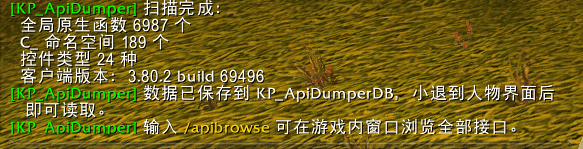
Upon entering the game, an automatic scan is performed and the results are saved in the plugin's save file, available throughout the current session without requiring a restart. After switching clients or updating the client, you can manually rescan to refresh the list.
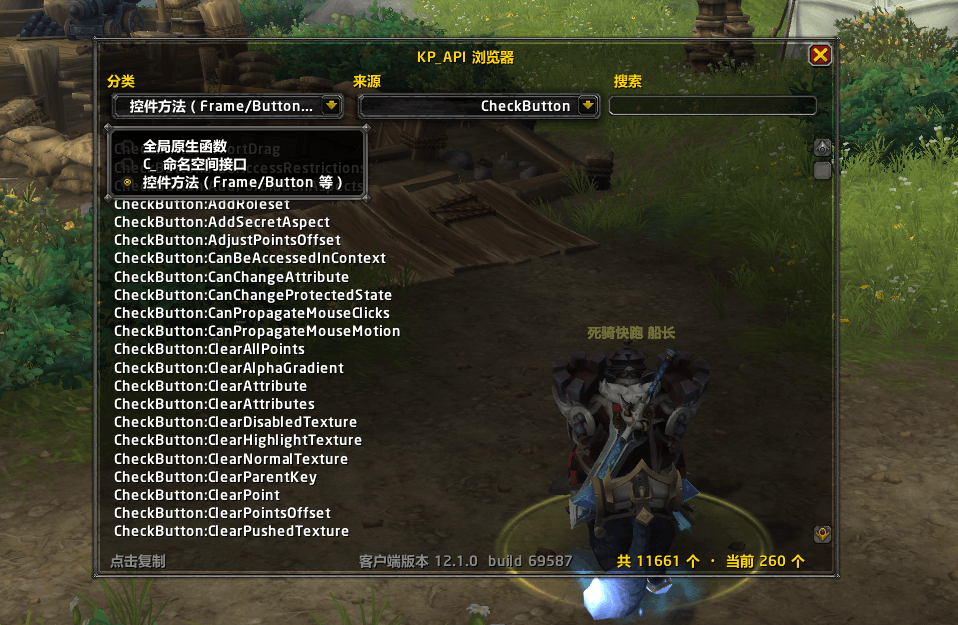
2. In-Game Browser Window
Open with the slash command /KPAPI. The window includes:
- Categories: Switch between global functions, C_ namespace, and control methods
- Source: Select a specific namespace or control type
- Search: Instantly filter by keyword (case-insensitive)
- List: Virtual scrolling ensures smooth performance regardless of interface count
- Copy: Click any interface name to pop up a copy box for direct copying
3. Bottom Information Bar
Displays client version and build number (automatically detected and updated when switching clients).
Shows total interface count and current filtered result count.
Includes a prompt indicating how to copy via click.
4. Mouse Hover Frame Info
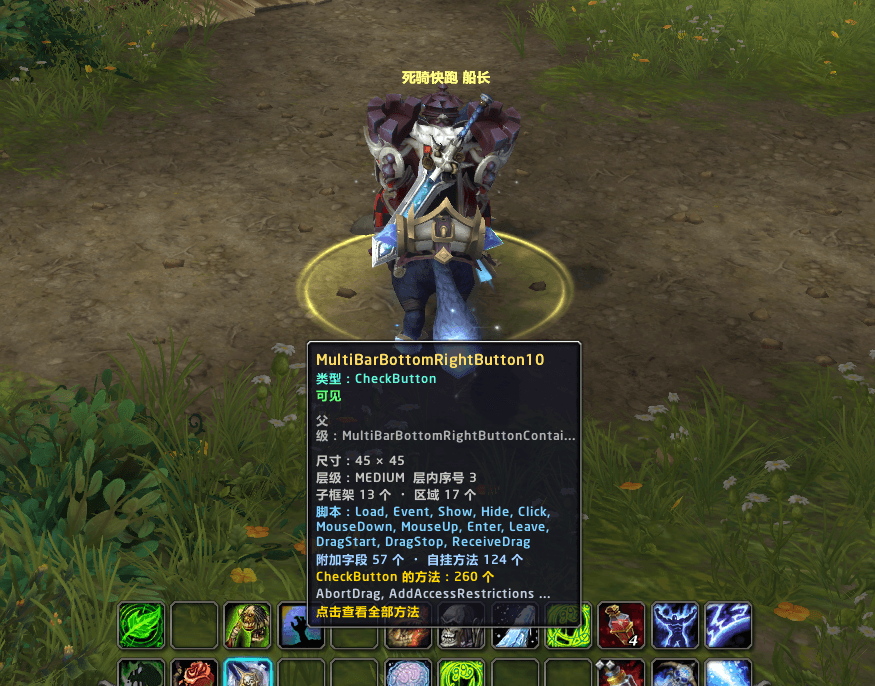
Enable in settings. When hovering over any frame in-game, the following information appears:
- Frame name (anonymous frames are specially marked)
- Control type
- Visibility status (visible, hidden by parent, hidden, mouse disabled)
- Size and scale
- Layer level and index within layer
- Number of child frames and regions
- Mounted scripts (e.g., Click, Event, Update, Enter)
- Texture path (when hovering over textures)
- Text content and font size (when hovering over text)
- Number of available methods for this type and partial method previews
- When hovering over interactive WeakAuras frames, displays aura name
Clicking the tooltip opens your browser directly to the complete method list for that type. The tooltip automatically chooses the best screen edge to avoid blocking the hovered icon or native system tooltips.
5. Integrated into Game Settings
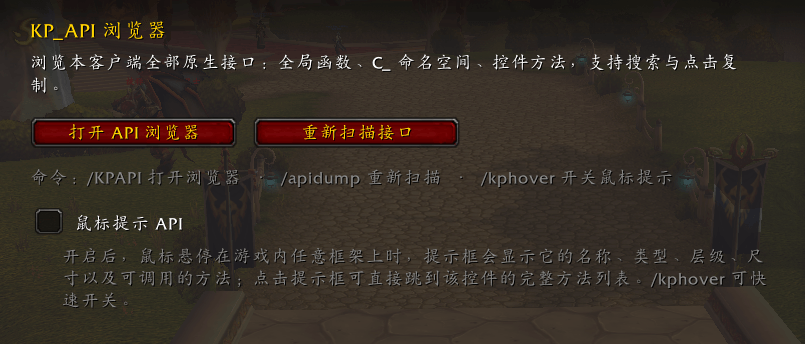
Press ESC to open options; locate KP_API Browser in the plugin list. From here, you can open the browser window, rescan interfaces, or toggle mouse hover tips. Checkbox states always match actual functionality.
6. Multi-Language Support
Interface language automatically matches the client: Simplified Chinese and Traditional Chinese display in Chinese; other languages use English. Interface names themselves are code identifiers and remain untranslated.
7. Multi-Version Compatibility
Includes multiple descriptor files that automatically adapt to various clients including Live, Pandaren, Cataclysm, Wrath of the Lich King, Classic, Burning Crusade, and Timeless Isle (treated as part of the Wrath version). The UI code handles runtime differences between old and new configuration systems and tooltip templates.
8. Scan Results Can Be Used to Assist AI Plugin Development
The scan provides a complete, accurate list of all interfaces actually present in your client. Feeding this data to AI (such as conversational coding assistants) allows it to generate plugin code strictly based on your client’s API—avoiding functions that don’t exist or have different parameters. This is especially useful for heavily modified clients or Timeless Isle servers where official documentation doesn't align.
Usage Steps:
Step 1: Log out to the character selection screen or fully exit the game to allow scan results to be written to the save file.
Step 2: Open the folder WTF\Account\Your_Account\SavedVariables\ in your game directory
KP_ApiDumperDB.lua
Step 3: Send the contents of this file to AI, specifying that it is the complete native API list for this client, and instruct AI to write or modify plugins based on it.
The file also includes the client's version number and build number, allowing AI to verify the source of each interface. For routine temporary lookups, there's no need to exit—simply search and copy directly within the in-game window.
III. List of Slash Commands
------------------------------------------------------------
/KPAPI Open the API browser window
/apidump Rescan all interfaces immediately
/kphover Toggle mouse hover frame hints
Slash commands are case-insensitive.
IV. Usage Tips
------------------------------------------------------------
1. For the first installation, completely exit the game and then log back in to allow the plugin to load.
2. After entering the game, wait a few seconds for the scan to complete before using it.
3. To check an API interface at any time, type /KPAPI and search by keyword.
4. When researching what a specific UI button or frame is or what methods it has,
type /kphover to enable hover tooltips, then hover over the element with your mouse to view details.
5. After a major client update, simply click "Rescan Interfaces" in the settings panel.
V. Data Storage
------------------------------------------------------------
Scan results and feature toggles are saved in the plugin archive of the character account:
KP_ApiDumperDB Scanned interface data
KP_ApiDumperCfg Feature toggle settings
When the mouse tooltip feature is disabled, the plugin performs no continuous monitoring and incurs no additional performance overhead.
Scan results are written to KP_ApiDumperDB.lua upon minor logouts or game exits. This file can be directly sent to AI to enable it to develop plugins based on the actual interface of this client. For specific instructions, refer to section 8 in part two above.
============================================================
The KP_ApiDumper Team