ezde.webp
Description
Koda-EZDE
Easy disenchanting, one click at a time.
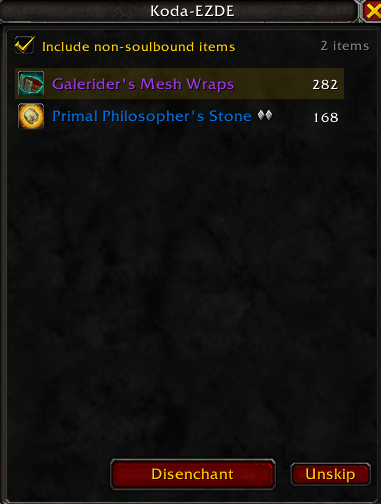
Koda-EZDE gives you a simple, clean window that lists everything in your bags you can disenchant. Hit the Disenchant button and it breaks down the top item, removes it from the list, and is ready for the next one. No dragging items around, no hunting through bags.
Features
- Auto-populated list – shows your soulbound, disenchantable weapons and armor (Uncommon, Rare and Epic). Item level doesn't matter.
- Include non-soulbound items – one checkbox adds BoE and tradeable gear to the list. Your choice is saved.
- One-button disenchanting – the next item up is highlighted; click Disenchant, and the list moves on automatically.
- Skip items – right-click any item to leave it out for the session. Click Unskip to bring them back.
- Gear set protection – items saved in your equipment sets are never listed.
- Hover tooltips – see the full item tooltip before you commit.
- Movable window that remembers its position, and closes with Escape.
Usage
Type /kde, /ezde or /disenchant to open or close the window.
Notes
- Requires the Enchanting profession.
- Blizzard requires a click for every cast, so each disenchant is one click. Nothing is ever disenchanted automatically.
- The Disenchant button can't update during combat.
Part of the Koda addon collection.
Koda EZDE Team