


2.png
1.png
Description
Koda MogRun Vendor
Running old raids for transmog fills your bags with gear you don't need. Koda MogRun Vendor sells that old gear automatically when you open a vendor, and keeps gear from recent expansions so you can still disenchant it for better gold.
How it works
When you talk to any vendor, the addon checks your bags and sells weapons and armor that pass all of these checks:
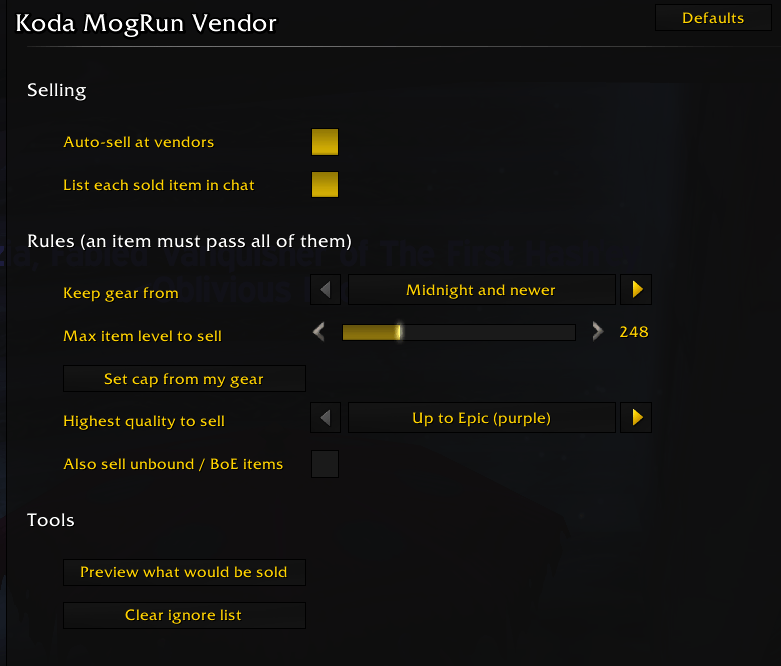
- From an older expansion. You choose which expansions to keep (by default, the current and previous ones). Anything older is sold.
- At or below your item level cap. A safety net that protects current gear that reuses an older item. Set it yourself or click "Set cap from my gear".
- Soulbound. Bind-on-Equip items are kept by default, since they may be worth more on the Auction House.
- At or below your chosen quality. Uncommon, Rare or Epic.
What it never sells
- Gear from the expansions you choose to keep
- Items saved in an equipment set
- Cosmetic items
- Legendaries, artifacts and heirlooms
- Items on your ignore list
- Anything with no vendor value
Features
- Options panel — set everything with checkboxes, dropdowns and a slider. Open it with
/kmv, the addon button by the minimap, or Esc → Options → AddOns. - Preview — see exactly what would be sold before turning auto-sell on.
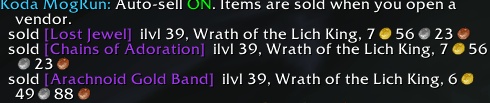
- Sale log — every sold item is listed in chat with its item level and expansion, plus a gold total.
- Ignore list — protect specific items from ever being sold.
- Buyback warning — tells you when a sale is larger than the 12-item buyback limit.
- Off by default — nothing is sold until you turn it on.
Getting started
- Install the addon and log in.
- Type
/kmvto open the options. - Pick which expansions to keep and set your item level cap.
- Open a vendor and click Preview what would be sold.
- If the list looks right, turn on Auto-sell at vendors.
Chat commands
| Command | What it does |
|---|---|
/kmv |
Open the options panel |
/kmv on / /kmv off |
Turn auto-selling on or off |
/kmv preview |
List what would be sold right now |
/kmv status |
Show your current rules |
/kmv ignore [item] |
Never sell this item (shift-click it into chat) |
/kmv unignore [item] |
Remove an item from the ignore list |
Supported versions
- Retail (Midnight)
- WoW Forever — Koda Vendor (Forever)
Tip
The vendor's buyback tab only holds your last 12 sales. Run Preview after changing your settings, before your first big sale.
Koda MogRun Vendor Team
