KelaVendor
- By
KelaVendor — complete WoW Forever merchant UI: KelaJunk, equipment comparison, Personal Atlas, history & full gamepad support | KelaVendor — торговец WoW Forever: KelaJunk, сравнение, Атлас, история и полная поддержка геймпада
Description
🇷🇺 🪙 KelaVendor — полноценный интерфейс торговца для WoW Forever
KelaVendor полностью переосмысливает стандартное окно торговца в World of Warcraft: Forever. Покупка, продажа, выкуп, ремонт, KelaJunk, история операций, сравнение экипировки, личный Атлас и полноценная навигация геймпадом собраны в одном цельном интерфейсе.
Одно окно торговца. Единый стиль. Мышь, клавиатура или геймпад.
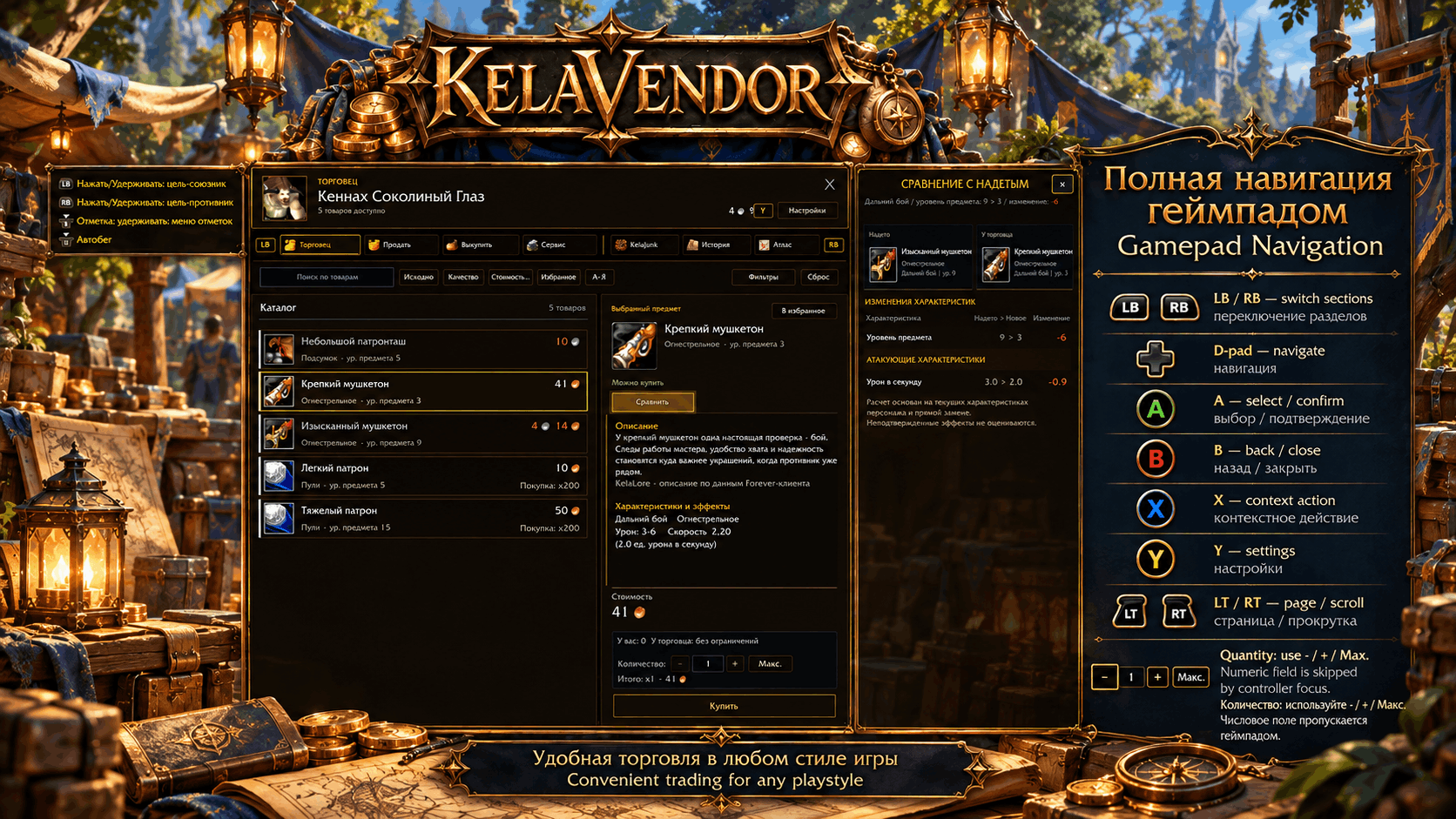
🎮 Полноценное управление геймпадом
Поддержка контроллера здесь не является эмуляцией мыши — для нее сделана отдельная логика навигации.
- LB / RB — переключение основных разделов
- D-pad — навигация по текущему экрану
- A — выбрать / подтвердить
- B — назад / закрыть
- X — контекстное действие там, где оно предусмотрено
- Y — Настройки
- LT / RT — страницы / прокрутка там, где это уместно
- поля количества не перехватывают фокус: доступны − / + / Макс.
- после popup, диалогов и действий фокус возвращается в правильный контекст
- длинные списки, Атлас, История, Сервис и KelaJunk имеют свои продуманные маршруты
KelaVendor рассчитан на то, чтобы торговцем действительно было удобно пользоваться с геймпада, не хватаясь постоянно за мышь.
🛒 Торговец и осознанные покупки
В основном окне собраны:
- поиск, сортировка и фильтры
- понятные цены и доступность товара
- подробная карточка предмета
- избранное
- сравнение с надетой экипировкой
- безопасная логика покупки
📦 Покупка пачками
Если торговец продает патроны или расходники пачками, можно купить сразу несколько торговых стопок.
Пример: товар продается x200 → выбираем 3 стопки → получаем x600.
⚖️ Сравнение экипировки
До покупки можно сравнить товар с тем, что уже надето, и увидеть релевантные изменения характеристик.
💰 Безопасная продажа
Продажа построена вокруг осознанного выбора предметов:
- выбор отдельных строк
- выбор видимых предметов
- итоговая сумма до продажи
- сброс выбора
- фильтры
- подробная карточка выбранного предмета
Массовые действия защищены, а изменение списка не должно неожиданно переносить действие на другой предмет.
↩️ Выкуп
Недавно проданные предметы доступны в отдельном понятном разделе с выбором, ценой и итоговой суммой.
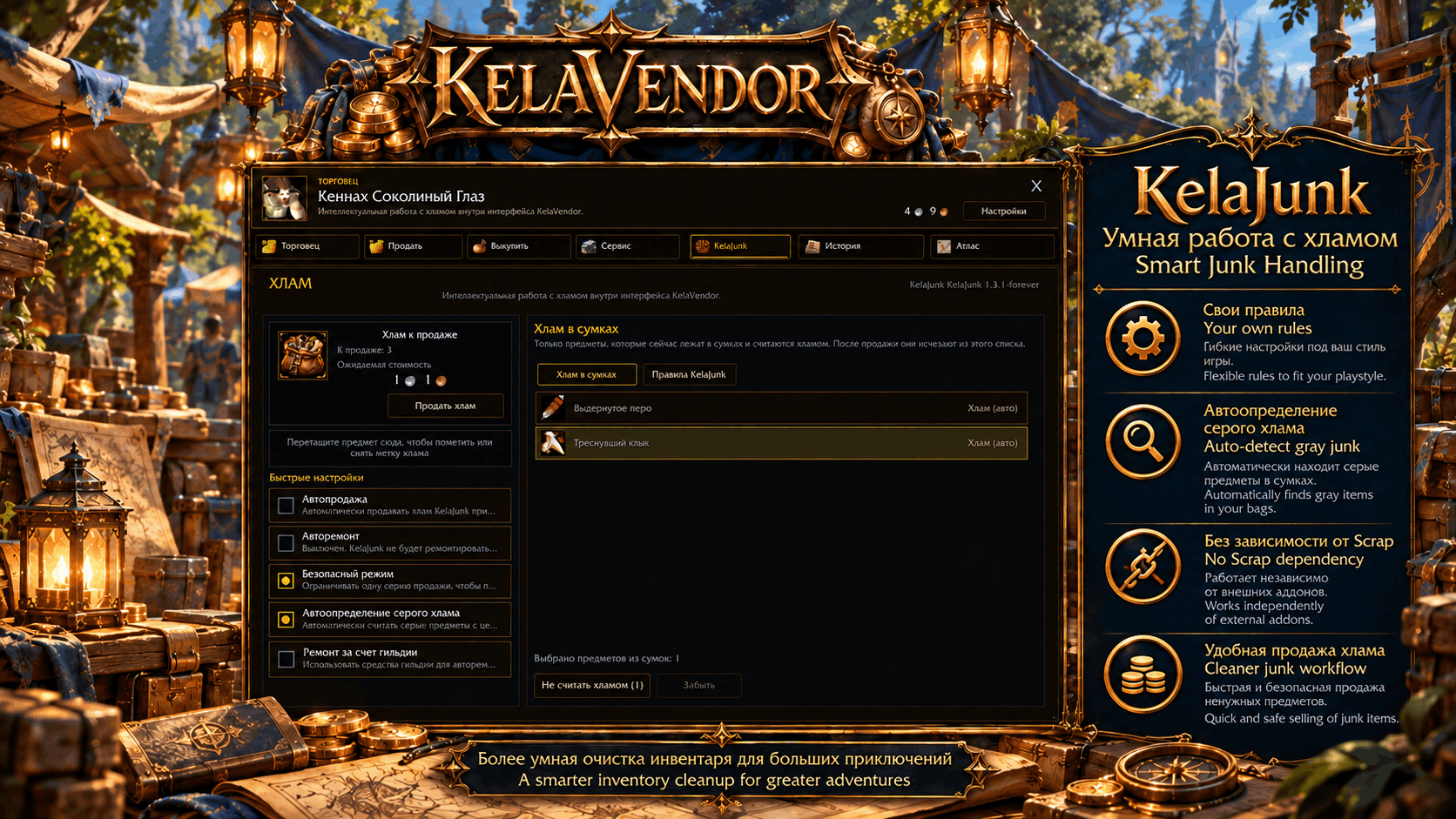
♻️ KelaJunk — встроенная система хлама
В KelaVendor есть собственный KelaJunk — зависимость от Scrap не нужна.
- автоматическое определение серого хлама
- правила Хлам / Не хлам
- безопасный режим продажи
- опциональная автопродажа
- опциональный авторемонт
- управление правилами прямо внутри KelaVendor
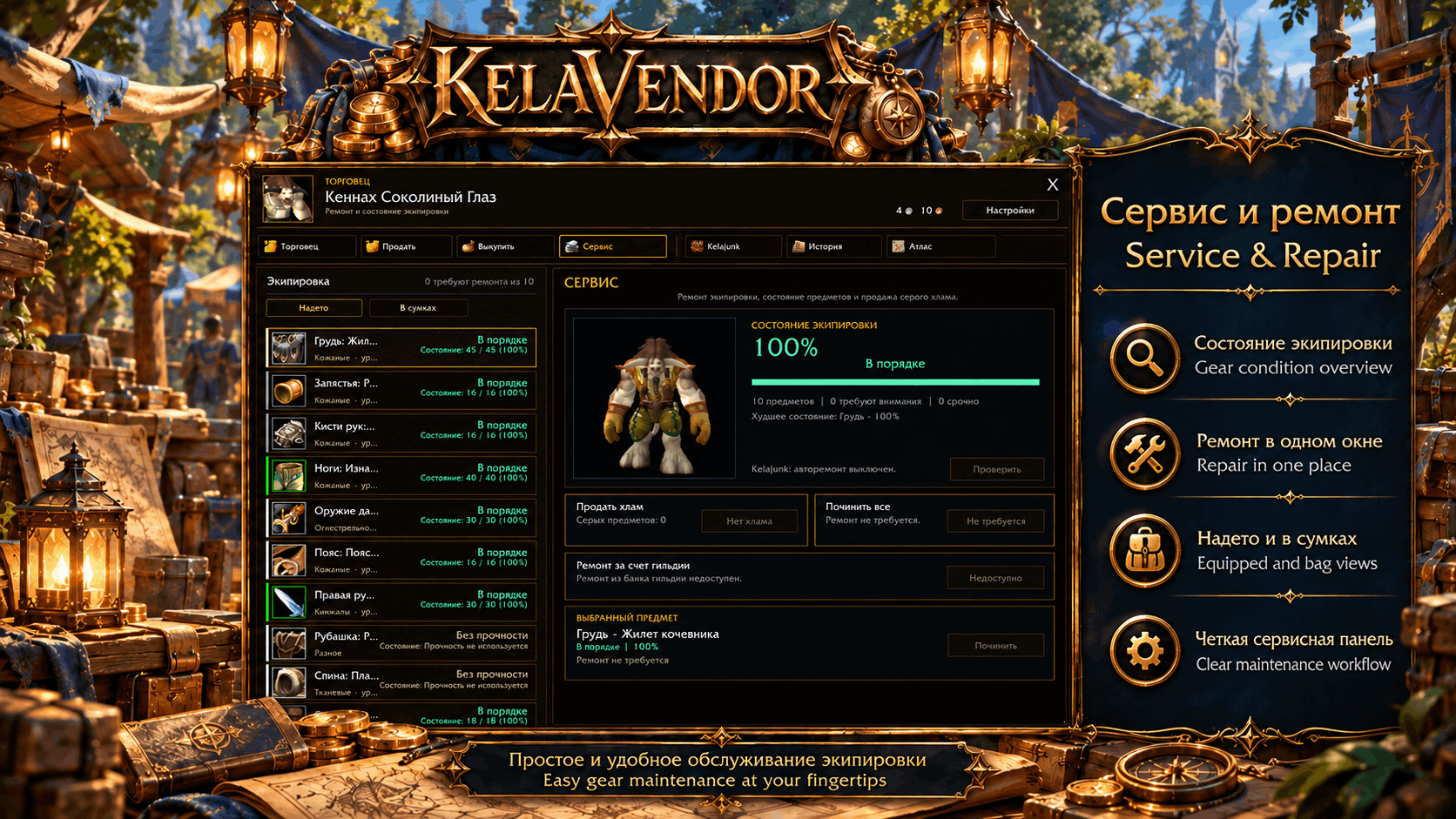
🛠 Сервис и ремонт
В одном экране собраны:
- надетые предметы
- предметы в сумках
- состояние экипировки
- ремонт выбранного предмета
- ремонт всего
- ремонт за счет гильдии, если доступен
- состояние KelaJunk / продажи хлама
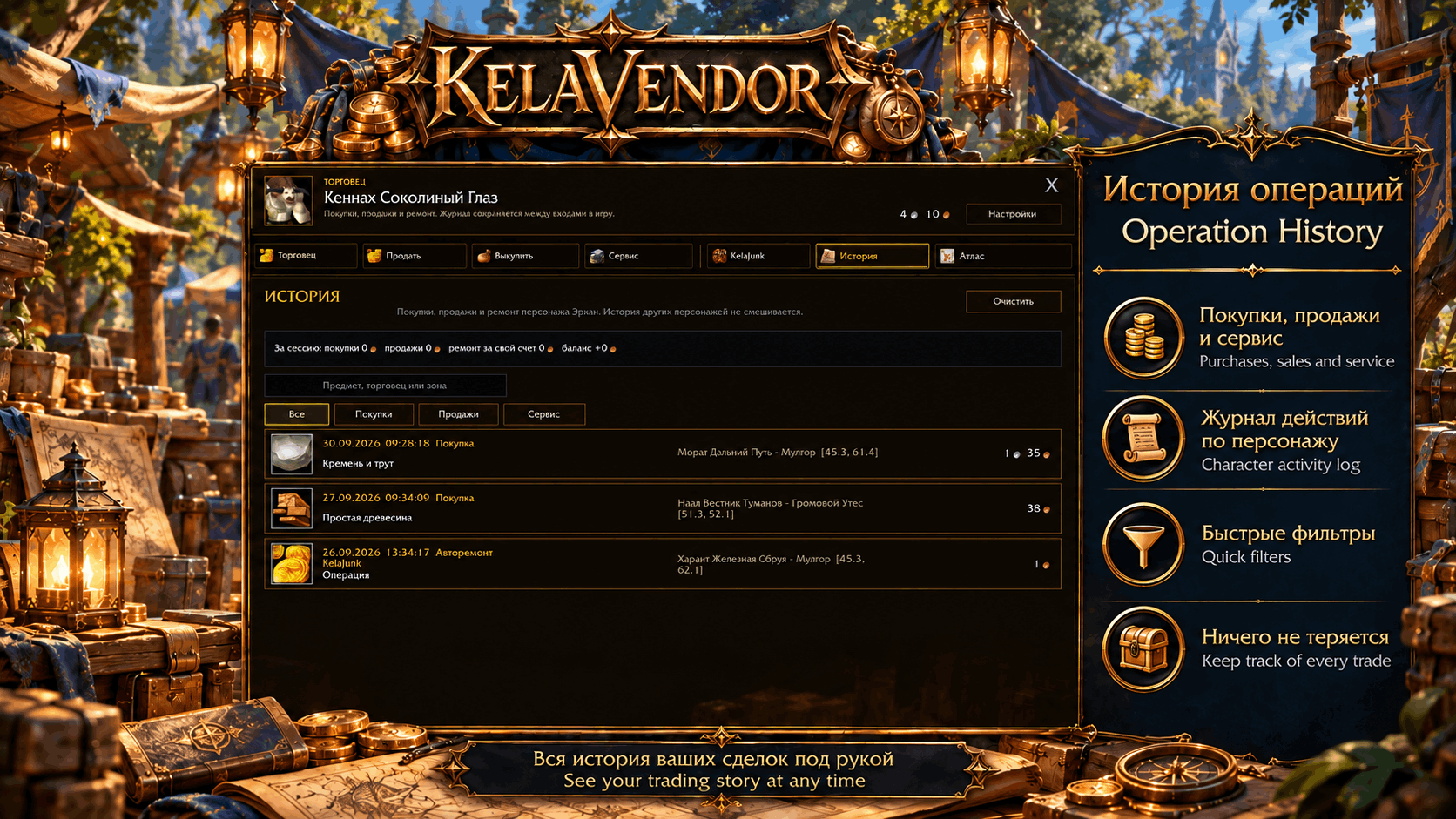
🧾 История операций
Покупки, продажи и сервис сохраняются между входами в игру.
- фильтры по типу операции
- контекст торговца / зоны
- стоимость и предметы
- подтверждение перед очисткой истории
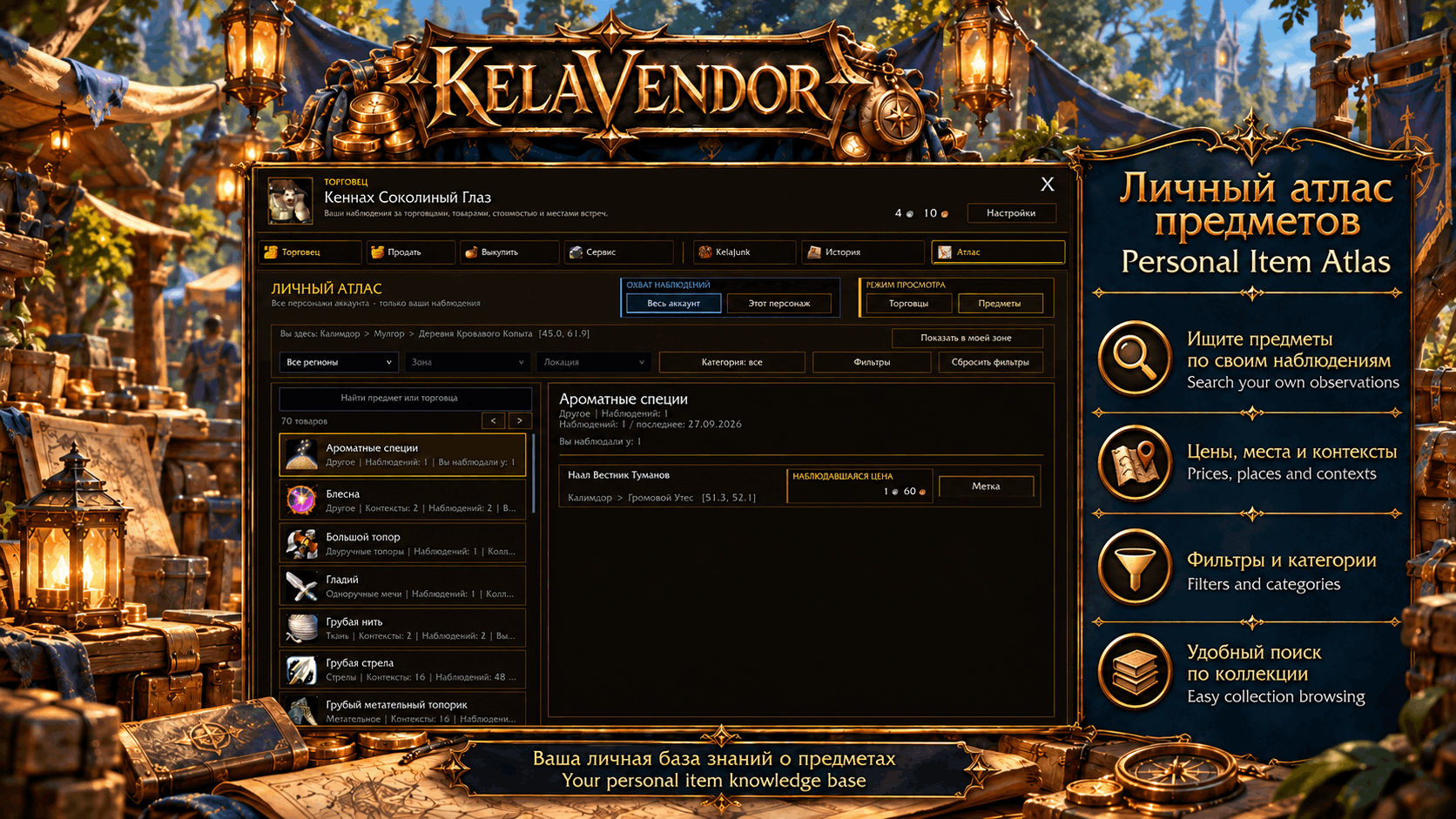
🗺 Личный Атлас
KelaVendor собирает ваши собственные наблюдения за миром.
Атлас торговцев
- запоминает встреченных торговцев
- сохраняет наблюдавшийся ассортимент
- показывает наблюдавшиеся цены
- фильтрует по региону / зоне / локации
- переключается между всем аккаунтом и текущим персонажем
Атлас предметов
- ищет предметы по вашим наблюдениям
- показывает, где и по какой цене предмет встречался
- поддерживает фильтры по местам и категориям
- формирует личную историю открытий
Атлас растет вместе с вашим путешествием по миру.
🛡 Безопасность операций
KelaVendor проверяет важные торговые изменения, сохраняет корректный выбор после обновления списков и старается не допускать ситуации, когда повторное нажатие внезапно действует уже на другой предмет.
🌍 Интерфейс и локализация
- ruRU и enUS
- современный темный/золотой визуальный стиль в духе WoW
- мышь + клавиатура + геймпад
- компактная и информативная компоновка
- разработан специально для WoW Forever
📌 Requirements / Требования
- World of Warcraft: Forever — Interface 16001 / game version 1.60.1
- KelaWorldCore — required dependency / обязательная зависимость
- KelaVendorTrace — optional diagnostics bundled with the download / опциональная диагностика, включена в архив
EN 🪙 KelaVendor — a complete merchant experience for WoW Forever
KelaVendor is a full replacement for the standard merchant workflow in World of Warcraft: Forever. It brings buying, selling, buyback, repair, junk management, transaction history, equipment comparison, a personal merchant/item atlas and full gamepad navigation into one coherent interface.
One merchant window. One visual language. Mouse, keyboard or gamepad.
🎮 Full gamepad navigation
KelaVendor treats controller support as a first-class interface, not as mouse emulation.
- LB / RB — switch main sections
- D-pad — navigate the current section
- A — select / confirm
- B — back / close
- X — contextual action where available
- Y — open Settings
- LT / RT — page / scroll where appropriate
- Quantity fields are controller-safe: use − / + / Max instead of getting trapped in a numeric field
- Focus starts on meaningful content and returns to the correct place after popups, dialogs and actions
- Long lists, Atlas screens, History, Service and KelaJunk all have dedicated controller routes
KelaVendor is designed so you can comfortably use the merchant interface from a controller without constantly reaching for the mouse.
🛒 Merchant & smart purchasing
A clean, readable catalog keeps the important information in one place:
- item search, sorting and filters
- clear prices and item availability
- detailed item cards
- favorites
- equipment comparison without leaving the merchant
- safe purchase flow for special or expensive purchases
📦 Stack purchases
If a merchant sells ammunition or consumables in stacks, KelaVendor lets you buy several vendor stacks in one clear flow.
Example: the merchant sells x200 → choose 3 stacks → buy x600.
⚖️ Equipment comparison
Compare the merchant item with the item you currently wear and immediately see the relevant changes before spending your gold.
💰 Safe selling
Selling is built around deliberate selection instead of accidental clicks.
- select individual items
- select visible items when needed
- see the total before selling
- clear the current selection
- use filters to narrow the list
- inspect the selected item in a dedicated detail panel
Mass actions are protected so the interface stays predictable even when bags or selections change.
↩️ Buyback
Recently sold items get their own clear Buyback section with selection, price and total shown before the action.
♻️ KelaJunk — built in
KelaVendor includes its own junk-management system. No Scrap dependency is required.
- automatic grey-junk detection
- explicit Junk / Not Junk rules
- safe selling mode
- optional auto-sell behavior
- optional auto-repair behavior
- manage rules directly from the KelaVendor interface
KelaJunk is part of the KelaVendor workflow rather than a separate addon bolted onto it.
🛠 Service & repair
The Service screen brings equipment condition and merchant maintenance into one place:
- equipped items
- items in bags
- condition overview
- selected-item repair
- repair all
- guild repair when available
- junk-selling status
🧾 Operation history
KelaVendor keeps a journal of purchases, sales and service operations between sessions.
- filter by operation type
- see the merchant / area context
- review prices and items later
- destructive clearing requires confirmation
🗺 Personal Atlas
KelaVendor builds a personal knowledge base from your own observations instead of pretending you already know every vendor in the world.
Merchant Atlas
- remember merchants you have encountered
- browse their observed stock
- track observed prices
- filter by region / zone / location
- switch between account-wide and current-character observations
Item Atlas
- search items across your collected observations
- see where and for how much an item was observed
- filter by location and category
- browse your own discovery history
The Atlas grows naturally as you play.
🛡 Safer merchant interactions
KelaVendor verifies important merchant mutations and keeps selection/focus consistent after list changes. The goal is simple: reduce the chance of buying, selling or confirming the wrong thing because the UI changed underneath you.
🌍 Localization & interface
- ruRU and enUS
- modern dark/gold WoW-inspired visual language
- mouse + keyboard + gamepad support
- compact information-rich layout
- designed specifically for WoW Forever
The KelaVendor Team