Kedge's New World
- By
New World style loot toasts, skill-up popups, a weapon mastery panel and a fishing tension bar for WoW: Forever
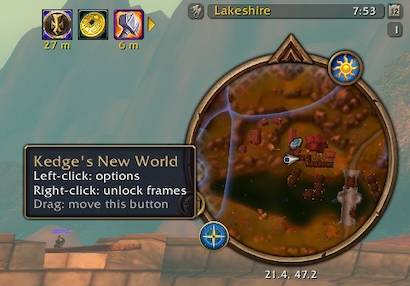
NW-compass.jpg
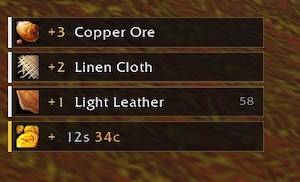
NW-loot-toast.jpg
NW-fishing.jpg
NW-Weapon-Skill.jpg
NW-Skillup-toast.jpg
Description
Kedge's New World
UI pieces for WoW: Forever inspired by the HUD in New World. Four features, each with its own options page and its own on/off switch.
Loot toasts
Items and money you pick up stack on the right of the screen. Each toast shows the item icon, the amount gained in its quality colour, and how many you now have in your bags. Picking up more of the same item adds to the existing toast instead of making a new one.
You can set the lowest item quality to show, how long toasts stay on screen, how many show at once, which way they stack, and their scale. Money toasts can be turned off on their own.
Skill popups
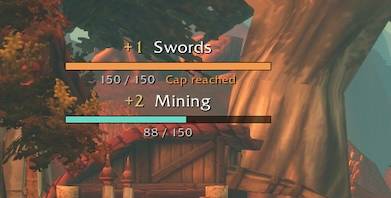
When a profession or weapon skill goes up, a floating "+1 Mining" appears with a bar showing progress toward your current cap. When you reach the cap it tells you, so you know it's time to visit a trainer. Weapon skill popups can be turned off if you only want professions.
Weapon mastery
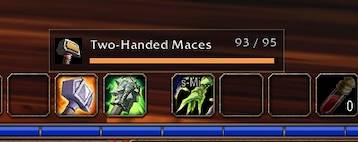
A small panel showing skill level and cap for each weapon you have equipped: main hand, off hand and ranged. The bar is orange while you're still training and gold when you're at the cap, and it flashes when the skill goes up. It switches as soon as you change weapons. Hover a row to see every weapon skill your character has, or tick an option to list them all in the panel.
Fishing
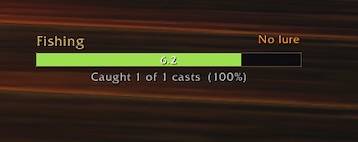
A tension bar counts down your cast from green to red, with a large "Caught!", "Got away" or "Too slow" when the cast ends. It shows whether your pole has a lure and how many casts you've caught this session. The default cast bar is hidden while you fish.
There is an optional audio boost, off by default. When it's on, sound effects go up and music and ambience go down while you fish, so the splash is easy to hear. Your own sound settings come back shortly after you stop, straight away if you enter combat, and at your next login if the game closed mid-session. The volume levels and the restore delay are adjustable.
Setup
- Install and log in.
- Type
/knw testto preview every feature. - Right-click the minimap button, or type
/knw unlock, and drag the blue boxes where you want them. - Lock them again the same way.
All settings are under Options > AddOns > Kedge's New World, or left-click the minimap button. Nothing needs editing in Lua files.
Commands
/knwopens the options/knw unlocktoggles moving frames/knw testpreviews every feature/knw resetputs frames back where they started/knw minimapshows or hides the minimap button/knw skillsprints what the addon reads from your Skills tab, for troubleshooting
Limits
- The game doesn't tell addons when a fish bites. The fishing bar is a timer, not a bite alert. The audio boost is what helps you hear the splash.
- Weapon and profession names are matched in English.
- Catch counts reset when you log out or reload.
Support
If you find Kedge's addons useful, you can buy me a coffee at https://buymeacoffee.com/kedge
Not affiliated with Amazon Games or New World.
Kedge's New World Team