ISNChat
- By
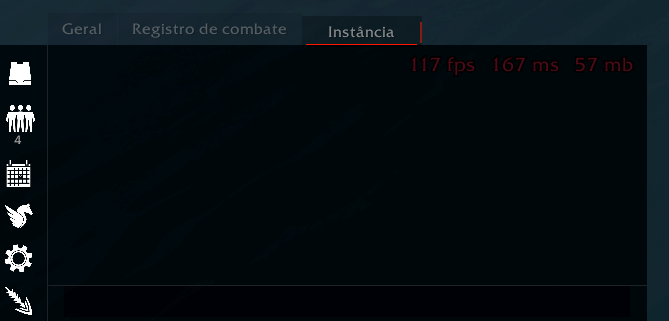
ISNChat is a lightweight dark reskin for the default WoW chat. Clean panel, styled tabs, sidebar shortcuts (copy, friends, mount, calendar), FPS/latency readout, class-colored names, and a multi-tab copy window.
Captura de tela 2026-06-09 035455.png
Captura de tela 2026-06-09 035448.png
Description
# ISNChat
**ISNChat** is a lightweight, taint-safe reskin for World of Warcraft’s default chat frames. It keeps Blizzard’s chat behavior intact while giving you a modern dark panel, quick-access sidebar buttons, optional performance stats, and a practical copy tool — without replacing the entire chat system or requiring a full UI overhaul.
Inspired by clean dark chat designs (including ideas from EllesmereUI-style layouts), ISNChat focuses on polish, readability, and everyday quality-of-life features you actually use while playing.
---
## ✨ Visual redesign
- **Unified dark background** — chat messages and the input box share one seamless panel
- **Restyled tabs** — flat dark tabs with a purple accent underline on the active tab
- **Cleaner layout** — removes default Blizzard chrome (scroll arrows, minimize clutter, old textures)
- **Skinned edit box** — dark input field that matches the rest of the panel
- **Left sidebar** — slim vertical bar with icon shortcuts, always aligned with the chat panel
- **Combat Log fix** — background correctly covers the combat log filter bar (no gap on the left)
The addon is built with **taint safety** in mind: it does not write custom properties onto Blizzard chat frame tables. All per-frame data is stored in a separate side table, reducing conflict risk with other addons and protected actions.
---
## 🧰 Sidebar shortcuts
A vertical icon bar on the left side of the chat gives you one-click access to:
| Icon | Function |
|------|----------|
| **Copy** | Open the chat copy window |
| **Friends** | Open the Friends list (shows online count below the icon) |
| **Calendar** | Toggle the in-game calendar |
| **Mount** | Summon your chosen mount (or a random favorite) |
| **Settings** | Open ISNChat options |
| **Hide / Show** | Collapse or expand the entire chat panel |
Icons grow slightly on hover for clear feedback. Tooltips explain each button.
When the chat is collapsed, only the hide/show toggle remains accessible so you can bring the chat back quickly.
---
## 📋 Copy Chat
Copying chat in WoW is awkward by default. ISNChat adds a dedicated **Copy Chat** window:
- Open it from the **sidebar copy icon** or with **`/isnchat`**
- Choose any **open chat tab** from a dropdown (General, Combat Log, Trade, whisper tabs, etc.)
- The addon **activates the selected tab** before reading, so whispers and temporary tabs copy correctly
- Full history from that tab appears in a scrollable text box
- Select all with one click, then **Ctrl+C** to copy to your clipboard
- Preserves **color codes** where possible in the copied text
- Warns you if some lines could not be copied (e.g. protected content in restricted instances)
**Slash commands:**
- `/isnchat` — open the copy window
- `/isnchat options` (or `/isnchat config`) — open settings
**Note:** Whisper tabs must exist and stay open. If you close a whisper tab, Blizzard clears that history — no addon can recover it.
---
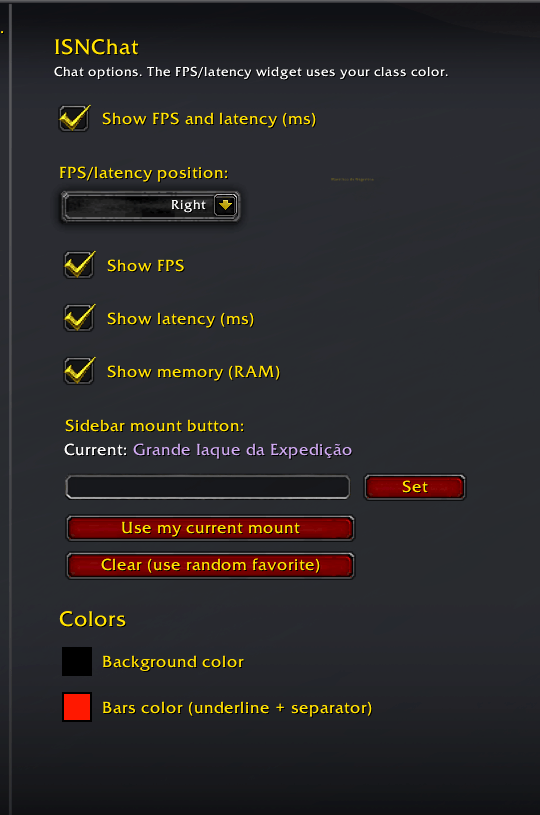
## 📊 FPS / latency / memory widget
Optional readout at the top of the chat panel:
- **FPS** (frames per second)
- **Latency** (ms)
- **Addon memory** (RAM used by addons — optional)
**Customizable in options:**
- Show or hide the entire widget
- Position: **Left**, **Center**, or **Right**
- Toggle each stat individually (FPS, ms, memory)
- Text is colored with **your class color** for a subtle personal touch
The chat message area automatically adjusts padding so lines never overlap the readout.
---
## 🎨 Chat enhancements
- **Class-colored player names** — names in say, yell, guild, party, raid, instance, whisper, and channel chat can be tinted by class (toggle in options)
- **Consistent fonts** — chat uses clean, readable styling aligned with the dark theme
- **No chat fade** — messages stay fully visible (no automatic fading)
- **Subtle resize handle** — still available in the bottom-right corner for resizing the chat frame
---
## 🐎 Mount button
Configure which mount the sidebar mount icon summons:
- Search by mount name and click **Set**
- **Use my current mount** — saves whatever you are riding right now
- **Clear** — fall back to a random favorite mount
- Clicking the button while mounted **dismounts** you
- Respects combat lockdown (shows an error if used in combat)
---
## ⚙️ Settings
Open via the **gear icon** on the sidebar, or **`/isnchat options`**.
Settings are integrated with the modern **WoW Settings** panel (Interface → AddOns → ISNChat).
**Available options:**
- Show/hide FPS and latency widget
- FPS widget position (left / center / right)
- Individual toggles: FPS, latency, memory
- Class-colored names on/off
- Sidebar mount selection
All settings are saved per account in **`ISNChatDB`**.
---
## 🔧 Compatibility & design
- Works with the **default Blizzard chat dock** and standard chat tabs
- Supports **temporary whisper windows** and docked popout tabs
- Does **not** replace chat channels, filters, or macros — it reskins and extends the default system
- Lightweight: single Lua file, minimal overhead
- **Retail** — Interface **120005** (The War Within / Midnight era)
---
## ⚠️ Known limitations
- **Restricted instances** (Mythic+, rated PvP, some raid content): Blizzard may mark chat text as protected/secret; those lines cannot be copied by any addon
- **Closed whisper tabs** lose their history permanently (Blizzard behavior)
- WoW does not allow direct clipboard access — you must **Ctrl+C** from the copy text box
- Tab names like “General” or “Combat Log” follow your **game client language**, not the addon
---
## 📦 Installation
1. Install via CurseForge client or extract to:
`World of Warcraft\_retail_\Interface\AddOns\ISNChat`
2. Enable **ISNChat** on the character select screen
3. `/reload` or log in — the chat reskin applies automatically
---
## 💬 Support & feedback
Found a bug or have a suggestion? Leave a comment on the project page. When reporting issues, include your WoW version, other chat addons in use, and steps to reproduce.
---
ISNChat Team