iLvLSimple
- By
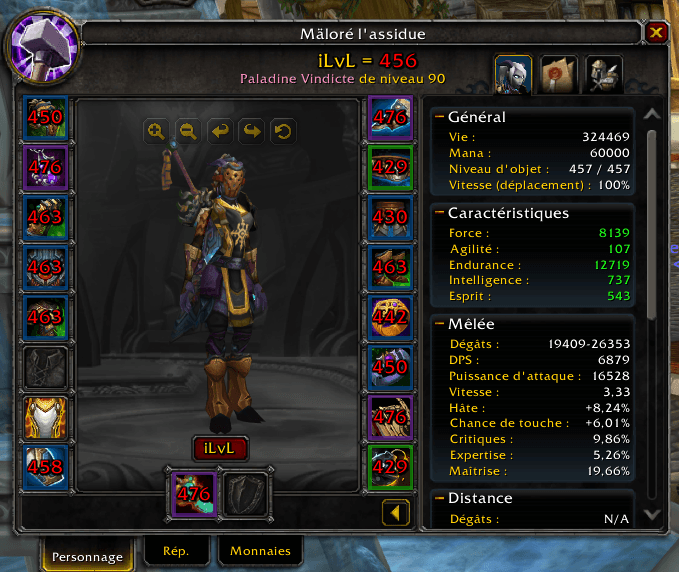
Your iLvL displayed everywhere automatically — character window, bags, tooltips and inspection, no setup needed.
Description
iLvLSimple — Item level everywhere, automatically
Your iLvL, other players', and every piece in your bags — displayed with zero configuration.
What it shows
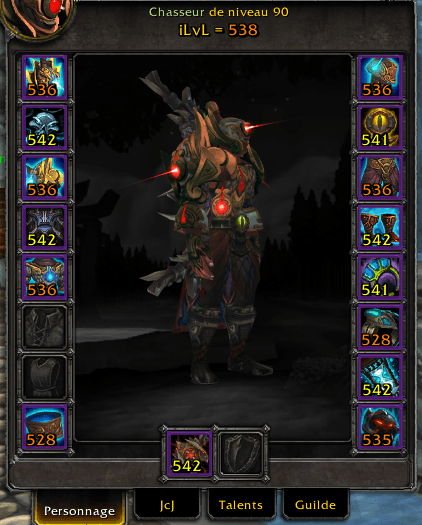
- Character window — your average iLvL above your name, iLvL on each equipment slot, updates automatically on every gear change
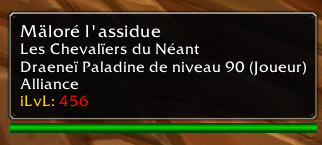
- Other players — iLvL on mouseover, automatic inspection if data isn't available yet, total and per-piece iLvL in the inspection window
- Bags and bank — iLvL on every equipment item, green arrows on pieces that are an upgrade for you, works with Bagnon, BetterBags, Baganator, and all others
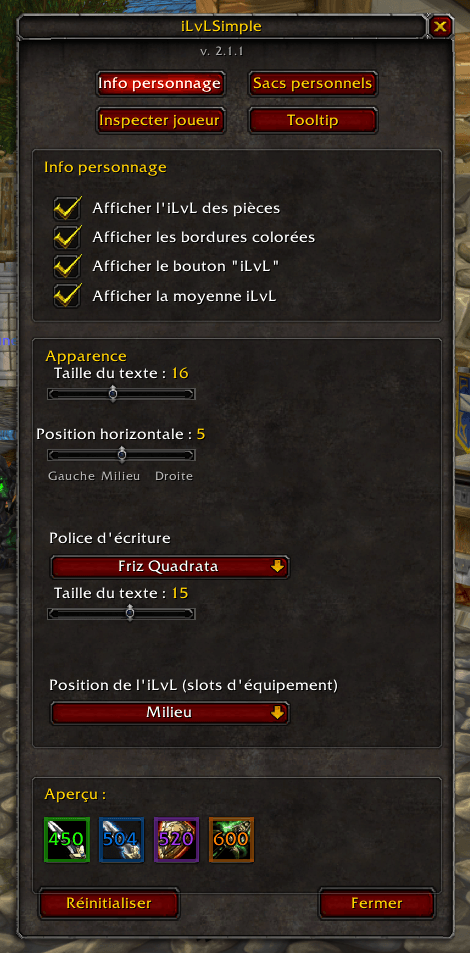
- Colored borders — green (uncommon), blue (rare), purple (epic), orange (legendary) on all items
Color system — Phase 5 (Siege of Orgrimmar)
Colors automatically adapt for instant gear quality reading:
🔴 Red (< 528) · 🟠 Orange (528–540) · 🟡 Yellow (541–550) · 🟢 Green (551–558) · 🔵 Blue (559–567) · 🟣 Purple (568–574)
6/6 upgrades (+24 ilvl) are factored into all calculations.
iLvL sharing
A button in your character window lets you share your iLvL in guild, raid, group, or /s. Right-click for a direct guild share.
Available commands: /ils guild · /ils raid · /ils bg · /ils s
Customization
- Minimap button for quick access to options (hover it to see your current iLvL)
- Font, size, and position adjustable per section
- Toggle colored borders on/off (
/ils border) - One-click reset to defaults
Compatibility
Works on MoP Classic 5.5.4. Interface available in English, French, German, Spanish, and Russian — auto-detected from your game client language.
---
[FR] iLvLSimple — L'item level partout, automatiquement
Votre iLvL, celui des autres joueurs, et celui de chaque pièce dans vos sacs — affiché sans rien configurer.
Ce qu'il affiche
- Fenêtre personnage — votre iLvL moyen au-dessus de votre nom, l'iLvL de chaque slot directement sur les emplacements, mis à jour à chaque changement d'équipement
- Autres joueurs — iLvL au survol de la souris, inspection automatique si les données ne sont pas disponibles, iLvL total et par pièce dans la fenêtre d'inspection
- Sacs et banque — iLvL affiché sur chaque objet d'équipement, flèches vertes sur les pièces qui améliorent votre stuff, fonctionne avec Bagnon, BetterBags, Baganator et tous les autres
- Bordures colorées — vert (peu commun), bleu (rare), violet (épique), orange (légendaire) sur tous les objets
Système de couleurs — Phase 5 (Siège d'Orgrimmar)
Les couleurs s'adaptent automatiquement selon votre iLvL pour une lecture instantanée :
🔴 Rouge (< 528) · 🟠 Orange (528–540) · 🟡 Jaune (541–550) · 🟢 Vert (551–558) · 🔵 Bleu (559–567) · 🟣 Violet (568–574)
Les upgrades 6/6 (+24 ilvl) sont pris en compte dans tous les calculs.
Partage d'iLvL
Un bouton dans la fenêtre personnage permet de partager votre iLvL en guilde, raid, groupe ou en /s. Clic droit pour un partage direct en guilde.
Commandes disponibles : /ils guild · /ils raid · /ils bg · /ils s
Personnalisation
- Bouton minimap pour accéder aux options (survolez-le pour voir votre iLvL actuel)
- Police, taille et position réglables pour chaque section
- Activation/désactivation des bordures colorées (
/ils bordure) - Réinitialisation en un clic
Compatibilité
Fonctionne sur MoP Classic 5.5.4. Interface disponible en français, anglais, allemand, espagnol et russe — détection automatique selon la langue de votre client.
iLvLSimple Team