iChat Pro Max Forever
- By
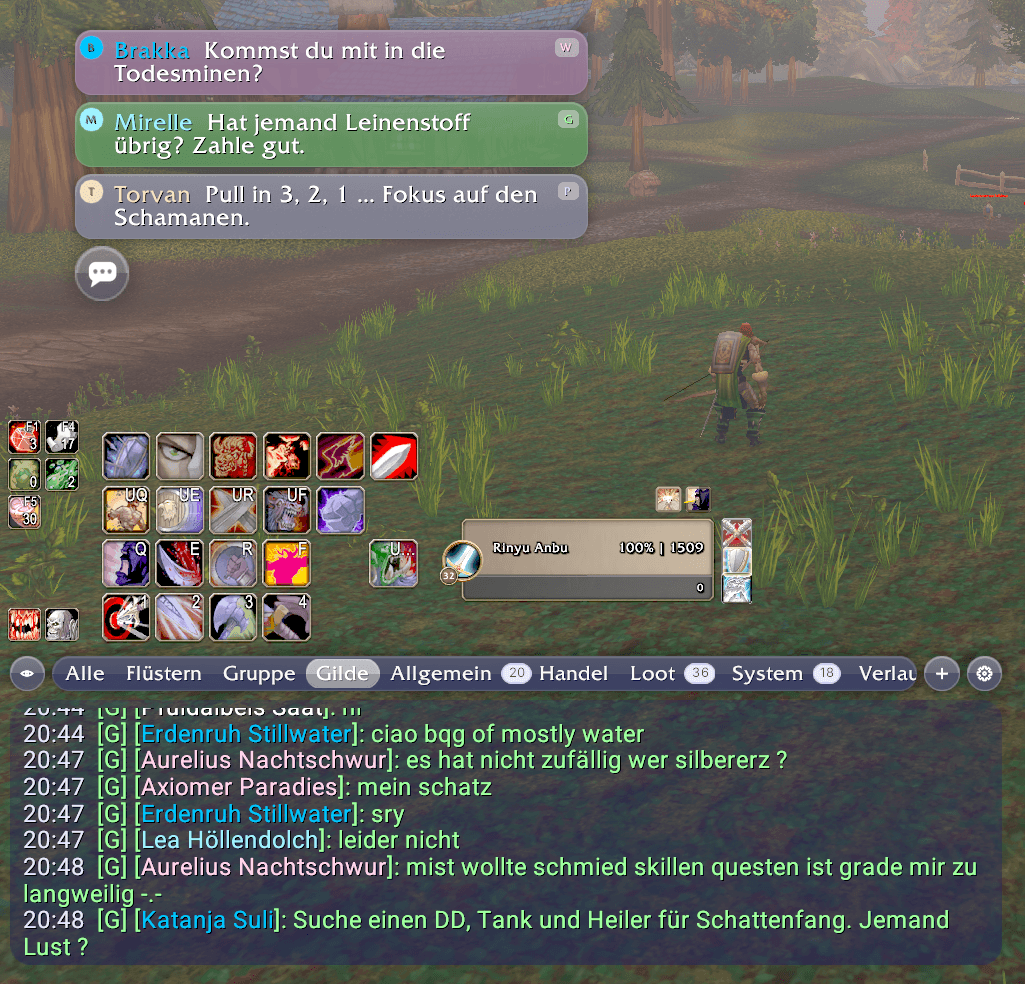
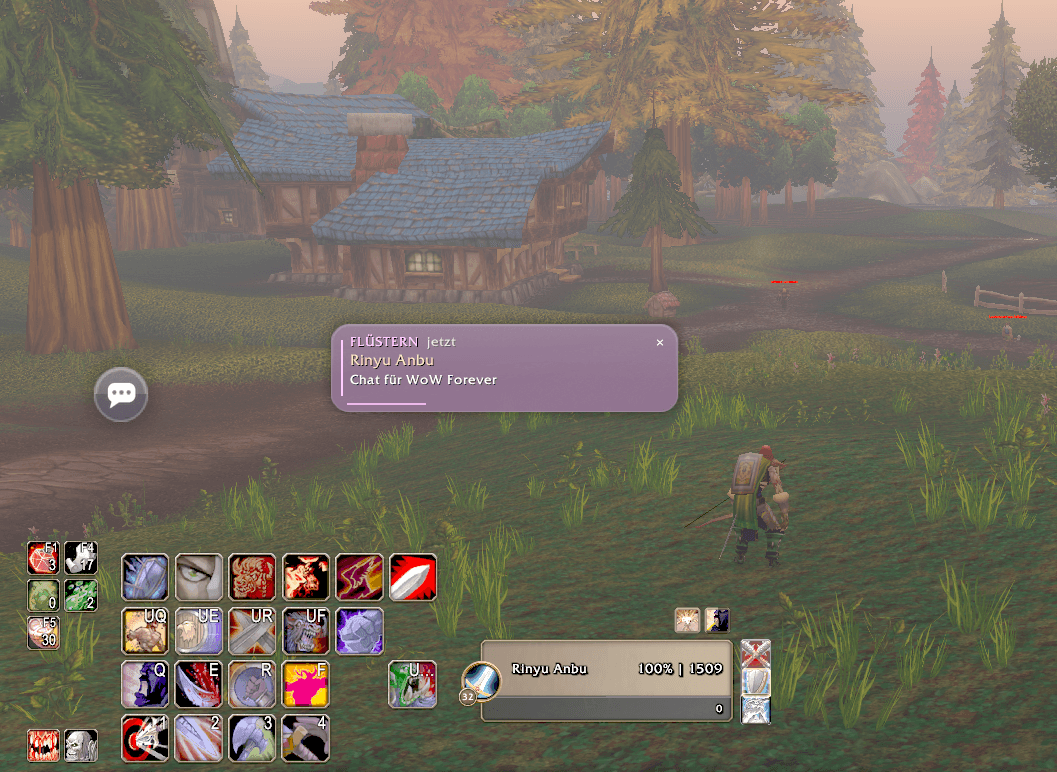
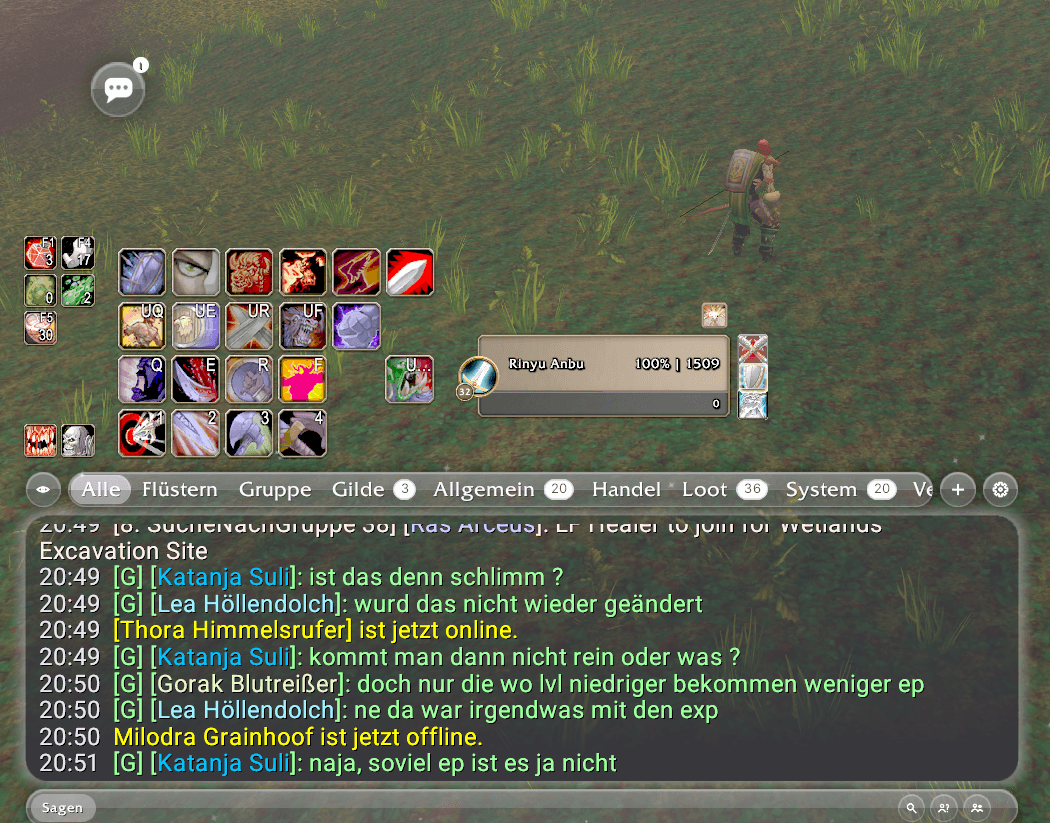
The chat window your WoW Forever deserves: glass look, tabs with unread counters, a hide button with notifications, whisper cards.
Screenshot 2026-11-17 204831.png
Screenshot 2026-11-17 205315.png
Description
The chat window your WoW Forever deserves.
Trade spam, LFG, a guild invite and a whisper you actually wanted — all in one grey box, all in the same font, gone before you read it.
iChat Pro Max is a glass-look chat window for WoW Forever. Tabs that count what you missed, a button that hides the whole chat and still shows you who wrote, and whispers you cannot miss.
Tabs that know what you missed
All, General, Trade, Whisper, Group, Guild, Loot, Etc out of the box — each with a counter for unread lines. Click a tab and your next message goes to that chat.
- Channel tabs: the + on the chat lists the channels you have joined. One click, Trade or LookingForGroup gets its own tab.
- Your own tabs: type a name in the + menu, then tick what it shows - same window as for every other tab.
- Drag tabs to reorder them, rename any tab in the + menu. Right-click a tab to choose what it shows from everything Blizzard's chat settings offer, sorted like Blizzard does (out of the box: what its name says), Shift + right-click removes it.
- Typing
/g,/p,/1or/w Namejumps to the matching tab. A chip in the input shows the chat type in its own colour, so you always see where your message goes.
Hide it — without going blind
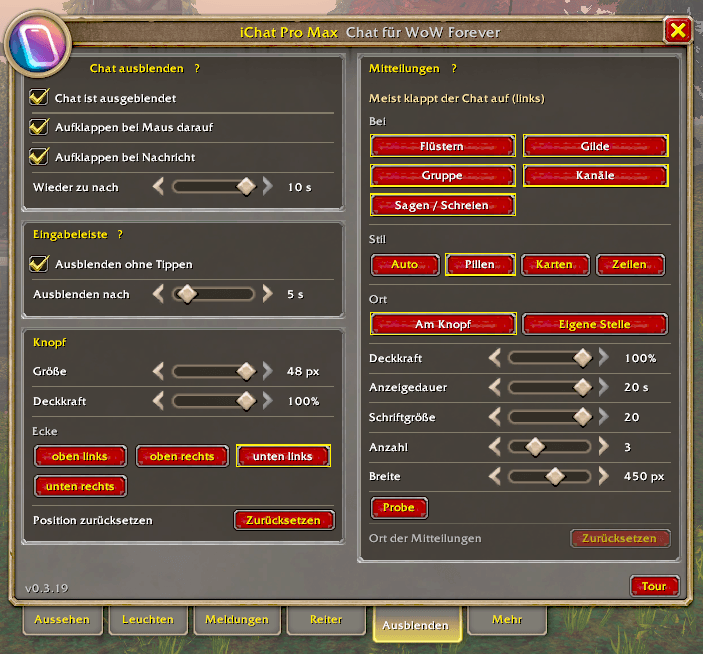
One click hides the chat. A round glass button stays, with a counter.
New messages arrive as notifications next to the button: class colour, name, the whole message. Each one is tinted in the colour of its chat. Click a whisper notification to reply. Choose per chat type what may notify you, how long they stay, how many at once, their size and width — with a Test button to see it before anyone writes. The oldest always fades first. Pick their style — pills, cards or plain chat lines — and put them next to the button or at any spot you drag them to.
Want only the notifications? The layout Notifications only keeps the chat hidden and just shows who wrote; one click on the button brings the chat back.
The hidden chat can also peek: on a new message, or when the mouse rests where it was, it opens for a few seconds and closes again. It stays open while you type or point at it.
The empty input bar fades out after a few seconds when you are not typing, and comes back the moment you press Enter, click a tab or point at the chat.
Whispers you cannot miss
- Whisper cards in your whisper colour at the screen edge, click to reply. Drag the corner to make them bigger — the text grows with them. Choose the side they slide in from.
- Search the chat. The magnifier next to the input field shows only the matching lines, in all tabs. Untick "Matches only" to see the whole chat again with every match highlighted in yellow. Friends list and who buttons sit right next to it.
- Recently whispered list on the Whisper tab.
- Edge glow, flash, sparks and a sound when something arrives — per category, or off.
Survives a /reload
Whispers, group and guild chat of the last 2 hours come back after /reload and after logging in again — slightly dimmed, with their real time. Stored per character, at most 300 lines per kind. Battle.net whispers are not stored.
Make it yours
- Two layouts (plus Notifications only), switched live: Capsules (tabs on top, input below, text on a soft veil) or Dock (free text, everything in one bar at the bottom).
- Fourteen colour schemes that tint the glass, and an opacity slider that goes from airy glass to almost solid dark. A separate chat background slider sets just the backdrop behind the text, per layout.
- Seven clean fonts shipped with the addon — Inter, Roboto, Open Sans, Noto Sans, Nunito, Atkinson Hyperlegible, Fira Sans — plus the game fonts. Chat font size up to 32.
- Channel names long
[2. Trade - City], short[2. Trade]or just[2];[Guild]becomes[G]. Still clickable. - Timestamps in three formats, window size 60–150 %, lock, collapse.
Under the glass
- It mirrors Blizzard's main chat — links, channels and chat filters keep working. Blizzard's own chat window stays hidden.
- A guided tour walks you through the window the first time you log in —
/icpm tourreplays it any time. - Settings in one window in the game's own look (like my other addons): Look, Alerts, Glow, Tabs, Hide. Minimap button and entry in the AddOn compartment.
- Full English and German localisation.
- Needs the Rinyufx Hub — CurseForge installs it alongside. The hub holds the update notes and the minimap buttons of all my Forever addons in one place.
- Nothing phoned home. Saved locally only: your settings, the 2-hour history above, and a short technical log (last 80 entries: chat type, channel, whisper target, no message text) that helps me fix bugs.
Slash commands
/icpm or /ichat — settings
/icpm hide — hide / show the chat
/icpm lock · /icpm unlock — hold the window in place
/icpm reset — position and size back to default
/icpm clear — clear the current tab
/icpm tour — guided tour of the window
/icpm news — update notes in the Rinyufx Hub
/icpm help — everything else
Fonts: SIL Open Font License 1.1, license files included in media/fonts.
iChat Pro Max Forever Team