YEMS Forever - Your Easy Macro Sequencer
- By
One key, a whole rotation. Drag abilities into a row and every press casts the next step. Weapon swaps, Shift/Ctrl/Alt macros, profiles. Sequences, Variables but the easy way.
Screenshot 2026-11-17 205903.png
Screenshot 2026-11-17 205829.png
Description
YEMS Forever — Your Easy Macro Sequencer
One key, a whole rotation. Drag your abilities into a row, give the macro a key, and every press casts the next step. Built for WoW Forever, works in combat, no macro syntax to learn.
How It Works
- Create a macro — give it a name, then press the key that should run it.
- Drag abilities into the order — from the list in the window, your spellbook, your action bars or your bags.
- Press the key — each press runs the next step. At the end it starts over.
That's it. A guided tour walks you through the window the first time you open it.
Building a Sequence
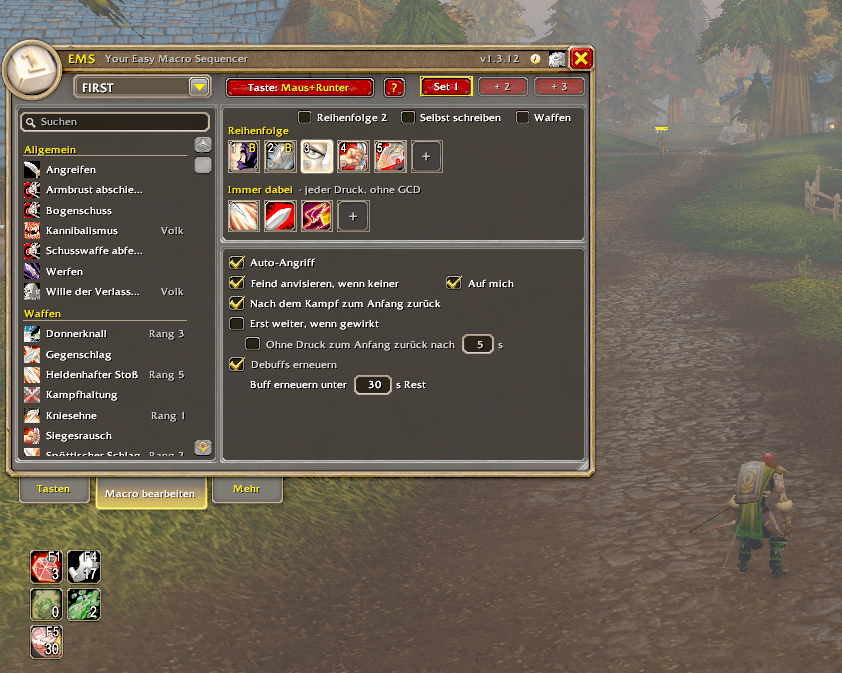
- Order — up to 10 steps, one per key press. The same ability can appear several times: 1, 1, 2, 1, 3 works.
- Always — abilities that fire on every press, next to the current step. Off-GCD abilities only, so they never block your rotation.
- Order 2 — a second row that takes turns with the first: per press (1, 2, 1, 2 …) or per round (all of order 1, then all of order 2). Off for new macros; tick Order 2 to show it, untick to hide it again — the steps stay saved.
- Items — food, bandages, potions, trinkets: anything in your bags with a Use effect goes into an order like a spell. Run out, and the step sits out until you have one again.
- On me — one tick and every spell and item in the orders is cast on yourself. Made for bandages, food and heals.
- Drag to reorder, right-click to remove. Steps can be moved between the two orders.
- New abilities are marked gold until you hover them, so you see what you just learned.
Weapon Swaps
Tick Weapons and a weapon row appears under each order: slot 16 (main hand) and slot 17 (off hand).
- Equipping is its own press before step 1, with no spell in it — nothing goes off with the old weapon.
- Already wearing them? The press is skipped. If equipping failed, it comes back.
- Each order can have its own weapons. That turns two orders into a swap macro — shield for one, two-hander for the other.
Write It Yourself
Know your macros? Tick Write it myself and the slots become a text box for the whole macro.
- It runs in full on every press. Want steps? Write
/castsequenceyourself. - Click a spell in the list to add it as a
/castline, or drag it onto the text box. - A character counter shows the length and warns past 255, where Blizzard's own macro window stops.
- Keys, Shift/Ctrl/Alt combos, sets and profiles work exactly as before. Untick it and your slots are back.
Switches per Macro
- Auto attack — starts auto attack with every step.
- Target enemy if none — no target, or it's dead? The next press picks an enemy, just like Tab.
- Back to step 1 after combat.
- Advance only once cast — a step repeats until the ability was really cast. No rage, on cooldown or out of range keeps the macro where it is.
- Back to step 1 after no press for N seconds (1–99), combined with "advance only once cast".
Every switch explains itself when you hover it.
Knows Your Class
- 46 off-GCD abilities across every class and race are recognised from the WoW Forever game data, so the "Always" row accepts exactly what really is off the global cooldown.
- Stances: a stance step is skipped if you are already in that stance.
- Toggle abilities are cast so they turn on, not off and on again.
- Pet abilities show up in their own group as soon as you have a pet.
- Channeled spells get a hint: the next press would interrupt them.
Keys, Sets and Profiles
- Any key — including mouse wheel up/down and mouse buttons 3, 4 and 5.
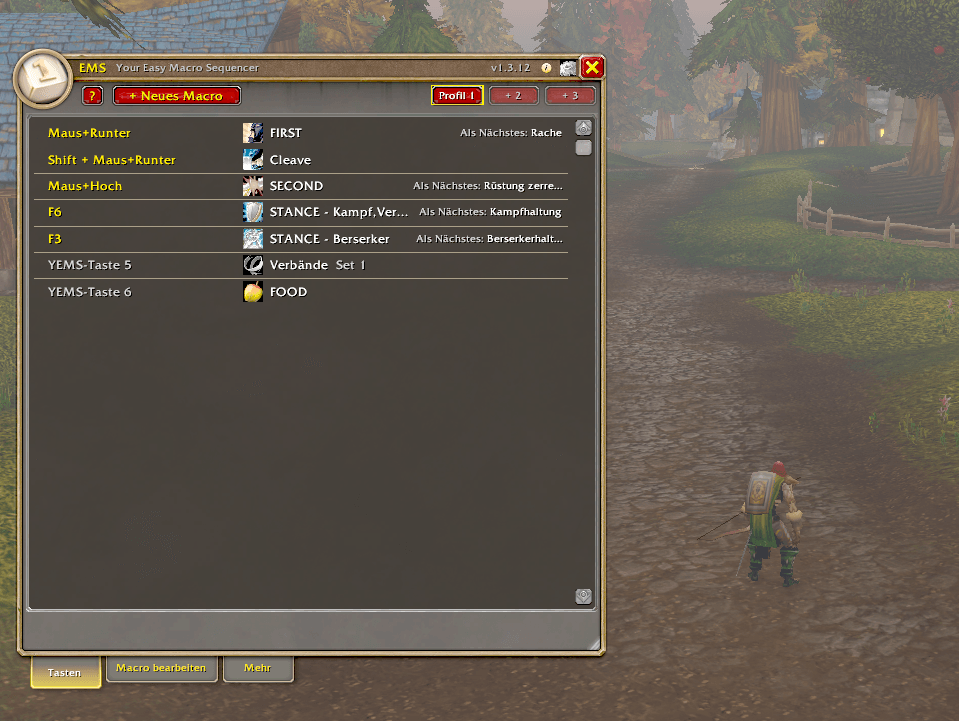
- Shift, Ctrl and Alt on the same key run further macros. One key, four sequences.
- Keys tab — every key with its macro and the next step at a glance. Conflicts with your normal key bindings are shown in red, one click puts the key on YEMS.
- Sets — up to three complete sequences per macro, e.g. solo and group.
- Profiles — up to three key layouts, e.g. leveling and dungeon. Your macros are shared, only the key layout changes.
- Rename, copy and delete macros and profiles with a right-click.
Native Look
Blizzard's own window frame, red buttons, sunken panels and tabs at the bottom — YEMS looks like it shipped with the game. Drag the corner to resize, adjust the background opacity, and reach it from the minimap button or the addon compartment.
Good to Know
- Works in combat. Changing sets or profiles does not — the game locks that during combat.
- No buff checks in combat. The game gives addons no way to read auras while fighting, so YEMS doesn't pretend to.
- With "advance only once cast", the game runs the sequence as one line of up to 255 characters. Very long sequences are shortened, and YEMS tells you how many steps were dropped.
- Needs the Rinyufx Hub — CurseForge installs it alongside. The hub holds the update notes and the minimap buttons of all my Forever addons in one place.
Slash Commands
/yems -- open or close the window
/yems reset -- all macros back to step 1
/yems options -- settings
/yems tour -- the guided tour
/yems help -- this list
Localization
Full German (deDE) and English (enUS/enGB) — every window, tooltip, tour step and chat line. Detected automatically from your client. Other languages fall back to English.
Privacy & Data
- Everything stays local in your SavedVariables. Nothing is sent anywhere.
- Account-wide — your macros are there on every character.
Client: WoW Forever (Interface 16001).
Feedback & Support
Found a bug? Missing an ability? Leave a comment on this page. YEMS is actively maintained and updated based on player feedback.
Creator: Rinyufx License: All Rights Reserved — Copyright (c) 2026 Rinyufx
YEMS is built by a player who got tired of pressing six keys for one rotation. If it saves you some, a thumbs-up on CurseForge goes a long way.
YEMS Forever - Your Easy Macro Sequencer Team