Rinyufx Hub
- By
One minimap button for all Rinyufx addons: open each one from a single window, see what changed since your last update, keep the map rim tidy. Built for WoW Forever.
Screenshot 2026-11-17 201209.png
Screenshot 2026-11-17 201223.png
Screenshot 2026-11-17 201158.png
Description
One button. Every Rinyufx addon.
One minimap button per addon. The rim of the map fills up, and whether any of them got an update you only find out by opening CurseForge. The hub fixes both.
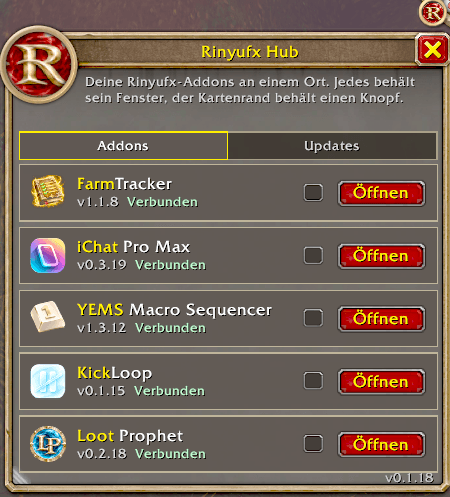
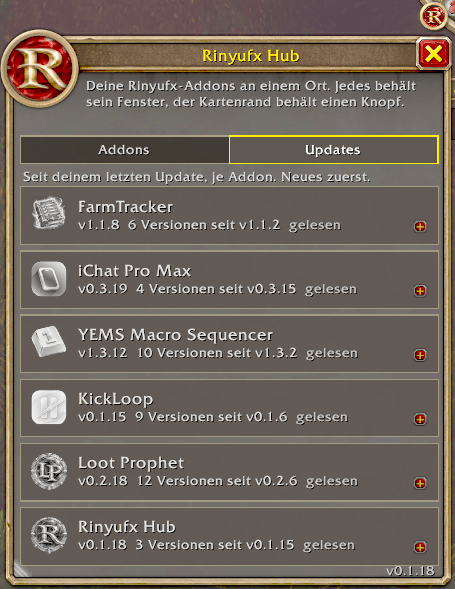
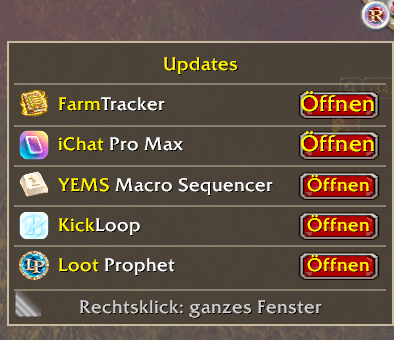
Rinyufx Hub is a single minimap button for all Rinyufx addons. Left-click it and a small list pops up with every connected addon and an Open button. Right-click it and the hub window opens: your addons and their versions, the Rinyufx addons you do not have yet, and an Updates view that shows what changed since the version you last had. Built for WoW Forever, by Rinyufx.
What the hub does
- One minimap button. Connected addons hide their own button and live in the hub instead. Want one of them back on the rim? Tick it in the hub.
- Mini list. Left-click the button: the connected addons, short names, Open. Next to Updates, More (n) counts the Rinyufx addons you are still missing; a click opens the window right on that tab. The list closes by itself 1.5 seconds after the mouse leaves it.
- The window. Three tabs. Addons shows every Rinyufx addon you have installed, with its version and an Open button. More shows the ones you do not have yet: description, pictures from the CurseForge gallery and the address with a Copy button; click a picture to see it large. Install one and it leaves More after your next game restart.
/rinyuopens the window any time. - Updates. The third tab lists, per addon, every version since the one you last got from CurseForge: a gold version header with date, the lines below, newest first. Addons with something new sit on top and carry a NEW badge; the mini list shows "Updates (2)" until you have looked.
/yems neu,/icpm neu,/kl neuand/farm neujump straight here. - Your order. Grab an installed row, drag it up or down, let go. The order is saved for your account and applies to the mini list and the Updates cards too.
Built for Forever
- The hub is the home of YEMS Macro Sequencer, iChat Pro Max, KickLoop, Loot Prophet, FarmTracker Forever Edition, Free my Bag, Send to Bank, Quest Turn In Route, Wife Aggro Forever, Guildbank Logbook and more to come - they connect on login and ship with the hub as their dependency. New Rinyufx addons show up in the hub by themselves.
- Update lines come from the addons themselves; nothing is loaded from the web, nothing phoned home. The gallery pictures ship inside the addon.
- Full German and English localisation. No libraries. All rights reserved.
Slash commands
/rinyu - open / close the hub (/rinyufx and /hub do the same)
/rinyu icon - show or hide the minimap button
/rinyu vorschau - preview every card as not installed, and back
Rinyufx Hub Team