HeadHunter - Wanted: Dead or Alive
- By
Track gankers, post WANTED posters and hunt outlaws with your faction. Shared death reports, PvP hotspots on the map and hunter ranks.



HeadHunter - Wanted: Dead or Alive
Got ganked? HeadHunter records who killed you, shares it with your faction and marks WANTED outlaws on the map. Form a posse and bring them to justice.
For Classic Era and WoW: Forever.
How it works
- An enemy player kills you. HeadHunter saves who did it: name, level, class, race and zone. If more than one player attacked you, it saves all of them.
- Your report is shared with every HeadHunter player of your faction.
- Gankers become WANTED. An enemy who kills 4 players within 20 minutes gets a WANTED poster. Every HeadHunter sees the same list.
- Hunt them down. You get an alert when a WANTED outlaw kills someone near you. Join the posse and go after them.
- Justice served. When a HeadHunter, or anyone in their group, kills a WANTED outlaw, the outlaw is no longer WANTED for everyone.
Features
WANTED list and ranks
- An outlaw stays WANTED until a HeadHunter kills them, or until 7 days pass without a new kill.
- Ranks grow with kills: Ganker, Outlaw, Desperado, Most Wanted and Dead or Alive.
Badges
Badges show how someone kills, not only how much:
- Coward: killed a player 10 or more levels lower, or a grey level player.
- Duo: killed a player together with one other enemy (2 vs 1).
- Gang: killed a player in a group of 3 or more.
- Serial Killer: 5 different victims in separate fights within a short time.
- Gunslinger: most kills were fair, one on one, at a similar level.
- Giant Slayer: killed higher level players alone.
Cowards are listed in the Hall of Shame.
Alerts
- WANTED sighting: "WANTED Ganker X is here!" when a WANTED outlaw shows up on your screen, even in combat.
- WANTED activity: a WANTED outlaw killed someone near you. Click Join the posse or Decline. Only players close to the outlaw's level get this popup, the others get a chat line.
- Justice served: a message when a WANTED outlaw is brought down.
- PvP hotspots: Skirmish, Battle or Warzone when a big fight happens near you.
World map
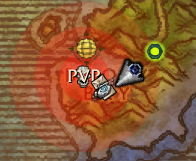
- A red PVP area shows where fights are happening. It gets darker as the fight grows and stays for 20 minutes after the last fight.
- A skull shows where a WANTED outlaw made their last kill (for 10 minutes).
HeadHunter window
Type /hh or click the minimap button:
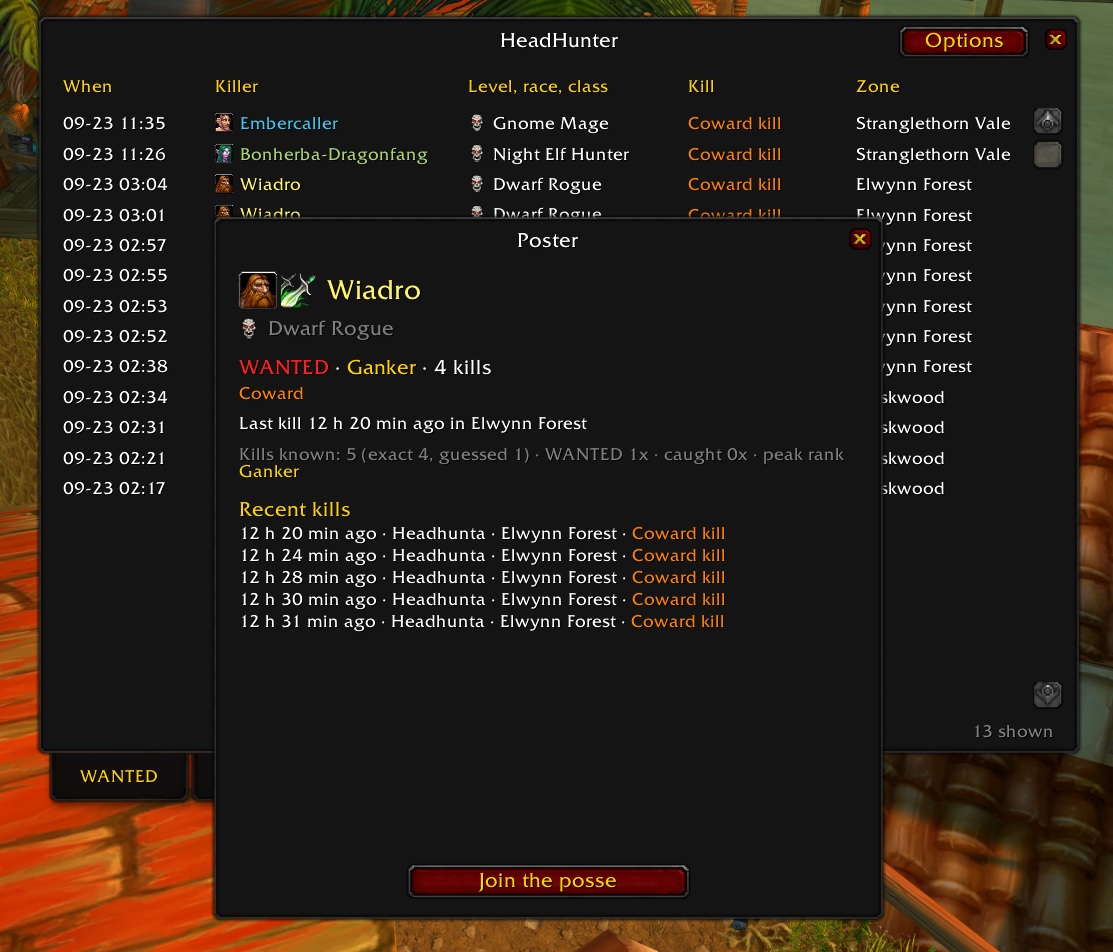
- WANTED: everyone who is WANTED now, sorted by rank, kills or last kill.
- Hall of Shame: every known coward.
- My deaths: who killed you, when and where.
- My marks: your hunter points and rank.
Hover a name for details, or click it to open the outlaw's poster: race and class, rank, badges, recent kills, posse and a Join the posse button.
Enemy tooltips
Mouse over an enemy player to see if they are WANTED, their rank, kills and badges.
Posse and hunter ranks
- Join a posse to hunt an outlaw together. Posse members see each other.
- Earn marks: +1 for joining a posse, and +3 to +20 when you or your group bring down a WANTED outlaw (more for higher ranks). Declining costs 1 mark.
- No marks for hunting players 10 or more levels below you. Hunting down is ganking too.
- Hunter ranks: Tracker, Bounty Hunter, Manhunter, Headhunter and Reaper.
Catch-up
When you log in, HeadHunter asks other HeadHunters what you missed while you were offline, so your WANTED list is up to date.
Commands
| Command | What it does |
|---|---|
/hh |
Open the HeadHunter window |
/hh help |
List all commands |
/hh options |
Open the options page |
/hh wanted |
WANTED list in chat |
/hh outlaw <name> |
Details about one enemy |
/hh deaths |
Your recent PvP deaths |
/hh posse |
Who is hunting which outlaw |
/hh marks |
Your hunter rank and marks |
/hh hotspots |
PvP activity per zone |
/hh map on/off |
PvP areas and skulls on the world map |
/hh tooltip on/off |
WANTED line on enemy tooltips |
/hh minimap |
Show or hide the minimap button |
/hh catchup |
Ask other HeadHunters what you missed |
All settings are also on the options page: Esc > Options > AddOns > HeadHunter.
Good to know
- Classic Era: reports go to your guild and group automatically. To reach every HeadHunter on the realm, click Report after a death (or type
/hh report). The same goes for Announce after you bring down an outlaw (/hh justice). The game only allows these realm-wide messages after a click. - Classic Era has no map waypoints, so HeadHunter tells you the coordinates in chat instead.
- WoW: Forever shares everything automatically.
- HeadHunter is off in dungeons, raids and battlegrounds. Duels never count.
- The more players use HeadHunter, the better it works. Tell your guild!
Found a bug or have an idea?
Please report it on GitHub: github.com/GudaAddons/HeadHunter/issues
The HeadHunter - Wanted: Dead or Alive Team