GuildSpy
- By
GuildSpy keeps you caught up on your guild’s activity, tracking joins, departures, rank changes, and level-ups—even changes discovered when you log back in.
log-window.png
professions.png
log-standalone.png
Description
GuildSpy
Know what's going on in your guild. Who joined, who left, who got promoted, who levelled and who came back: live while you play, and in one short summary when you log in. And who in the guild has which profession, in the guild window.
For World of Warcraft: Forever.
Download on CurseForge · Report a bug · What's new
A guild changes while you're away. People join, quit or get kicked, officers move members between ranks, notes get rewritten, and that rogue who vanished a month ago is suddenly back online. The game tells you some of this in chat if you happen to be online when it happens, and the rest nowhere at all. GuildSpy watches the roster and tells you.
It is the informational half of Guild Roster Manager and nothing else. GuildSpy only reads. It never changes a rank, a note or a member. It shares two ways, and both can be turned off: your log goes to your other accounts (with the guildmates' reports it holds), and only what this character saw itself goes to guildmates who use GuildSpy.
What it tells you
- Joins, rejoins and departures. Whether someone left on their own or was kicked, and by whom. A rejoin says when they left and at what rank.
- Promotions and demotions, with the officer who did them when the game says so.
- Changes to the guild's ranks: a rank renamed, added or removed.
- Note edits. Public notes, and officer notes if your character can read them.
- Level-ups. From level 10 by default, plus every tenth level. Reaching the level cap gets its own gold line and a fanfare (the sound can be turned off).
- Name changes.
- Members back after a long absence: two weeks away by default.
- A new message of the day.
- What you missed while offline, from your other accounts and from guildmates with GuildSpy who were online at the time.
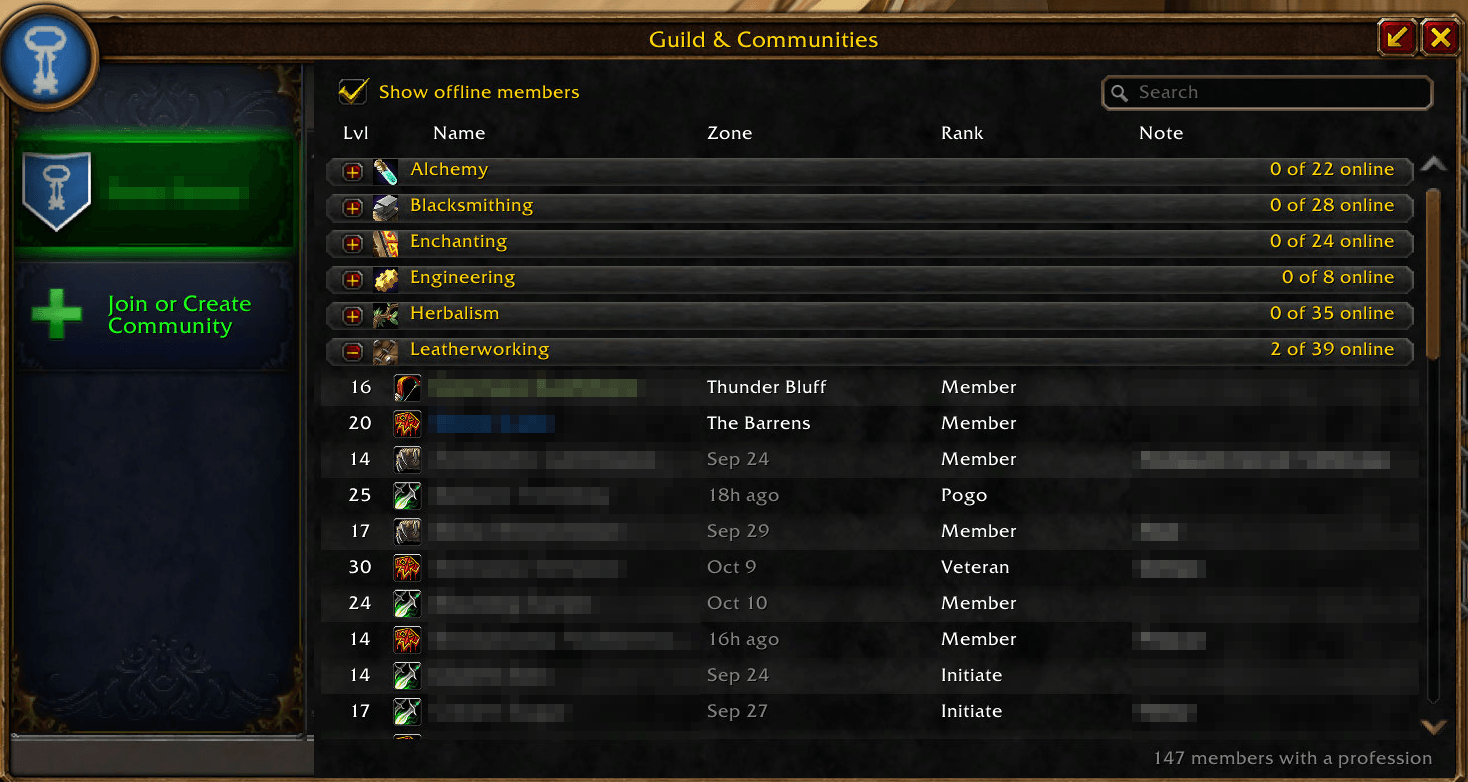
- Who has which profession, in a Professions tab in the guild window.
Live, and while you were away
While you're online, each change shows as one line in chat as it happens.
When you log in, you get one short summary of what changed since anyone on your account last
looked: the counts, then the most important changes first (membership, then ranks, then notes,
then levels). Click [open log] for the rest. Switching characters or /reload doesn't repeat it.
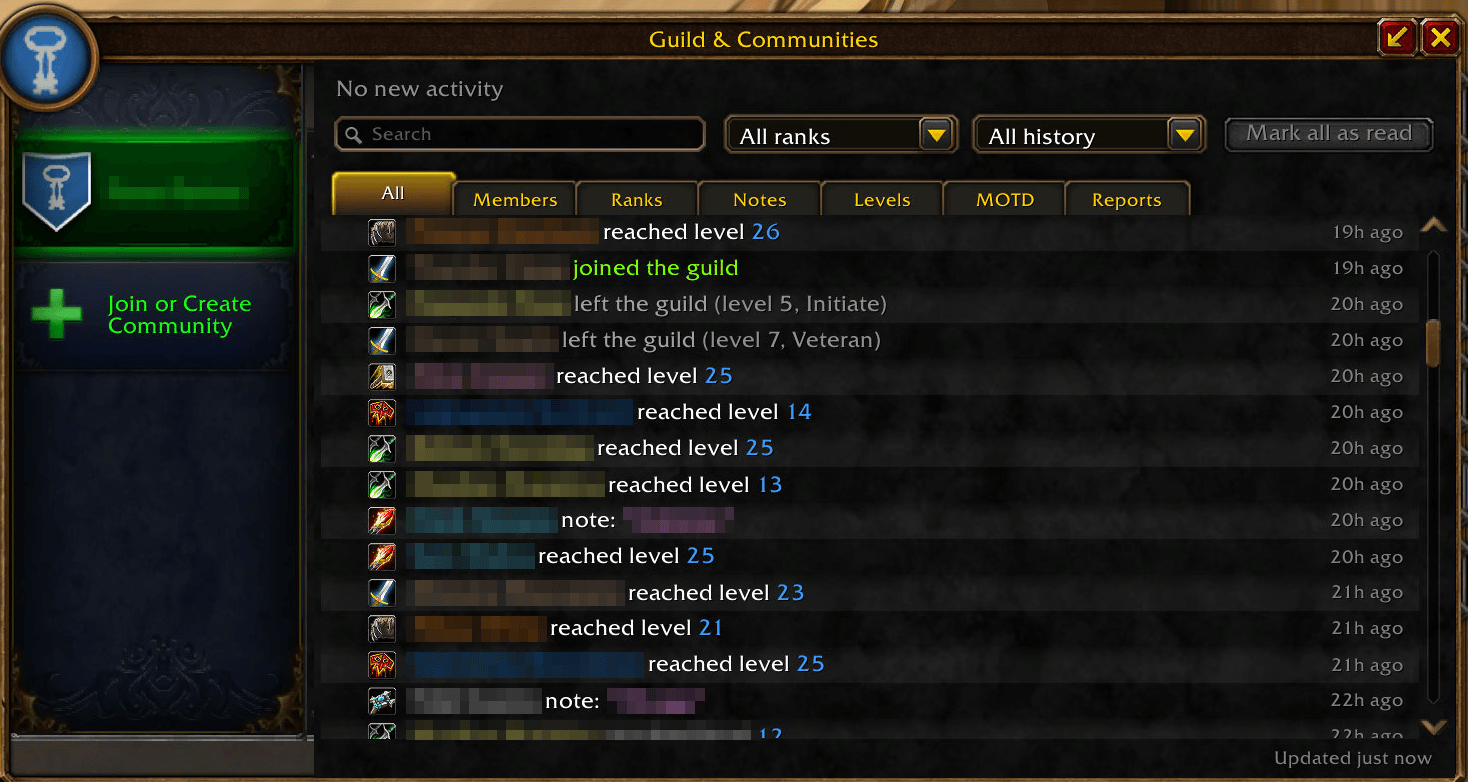
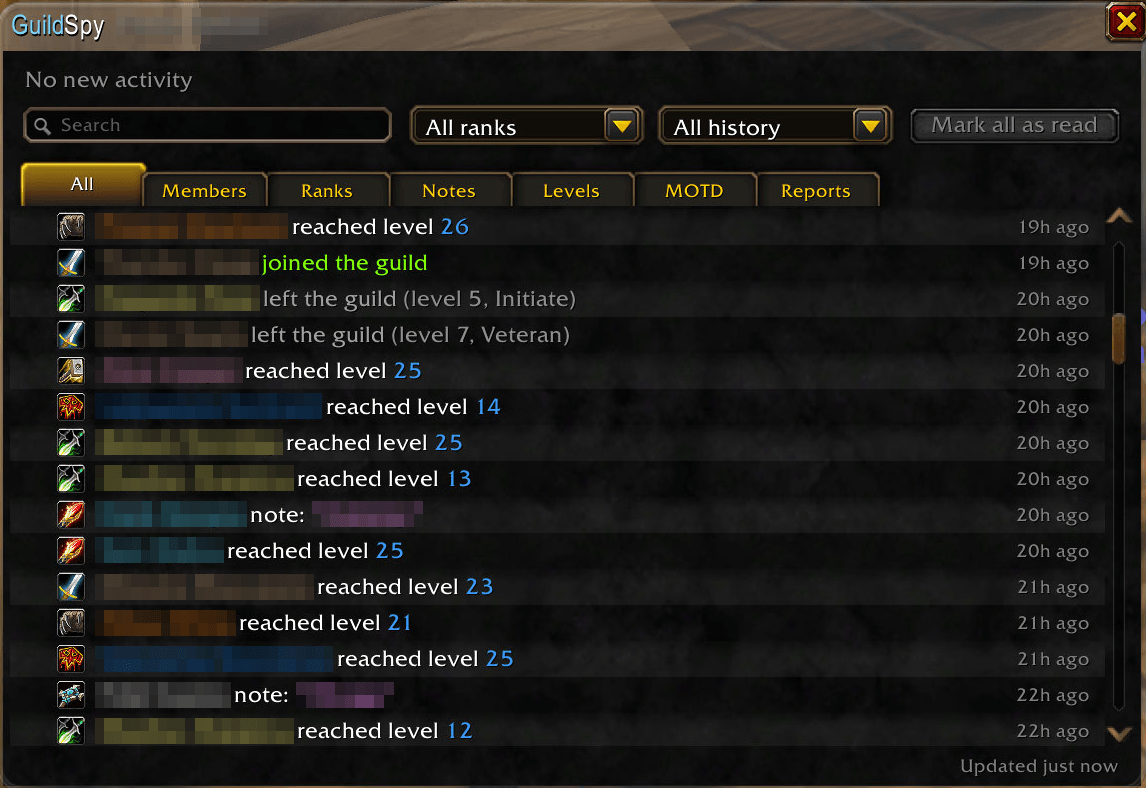
The log window
Open it from the GuildSpy tab in the guild window (J), with /gspy log, the minimap button, or
a key binding. It's styled like the guild roster.
- What's new at a glance: a line counting what changed since you last looked, with New and Earlier sections. Mark all as read when you're done.
- Filter by type: Members, Ranks, Notes, Levels, MOTD, and Reports (what guildmates told you).
- Filter by time: today, the last 7 or 30 days, or all history.
- Filter by rank: handy when your guild uses ranks as raid teams. A rank shows who is in it now, who left from it, and who moved in or out of it.
- Search by name, officer, rank or note text.
- Class icons and colours, and how long ago each change happened. Hover a row for the exact time, where GuildSpy learned it, and the member's notes (the officer note only if you can read it).
Guild professions
A Professions tab in the guild window (J), under the GuildSpy tab, lists who in the guild has which profession, like retail's guild profession view: a heading per profession with how many have it and how many are online, opening onto its members (level, class, name, zone or last online, rank, note), with "Show offline members" and a name search. There are no skill levels and no recipe browser: Forever's server doesn't share them.
Settings
In the game's Options > AddOns > GuildSpy, or with /gspy options:
- Login summary, on or off.
- Level-ups: every level, from level 10, 20 or 40, or only every tenth level.
- Back after a long absence: away 7, 14, 30 or 60 days or more.
- Sound at the level cap, on or off.
- Guild professions tab, shown or hidden (shown by default).
- Minimap button, shown or hidden. It's also in the minimap's addon list.
- Chat lines: on or off for each type of change. The login summary and the log window always keep everything.
Under Options > AddOns > GuildSpy > Sharing:
- Sync with my other accounts, on or off. While another of your WoW accounts is online in the same guild, the two share their logs over Battle.net, so what one saw while the other was offline shows up on both. Only ever within your current guild. The page shows which of your accounts last synced, and when.
- Share with guildmates, on or off (on by default, as GRM). What you saw yourself goes to guildmates with GuildSpy, and what they saw while you were offline comes to you, marked with who reported it. Best effort: only from guildmates online at the time. Never officer notes, the message of the day or the rank list.
- Guildmates' reports: in chat and in the log (at most five lines at a time), only in the log, or never. In the log they also have their own Reports tab.
- Accept reports from: every rank, or a rank and up.
The key binding is under Key Bindings > GuildSpy, with no key set by default.
Commands
| Command | What it does |
|---|---|
/gspy or /guildspy |
The list of commands |
/gspy log |
Open the log window |
/gspy log 20 |
Print the last 20 changes in chat |
/gspy options |
The settings |
/gspy minimap |
Show or hide the minimap button |
/gspy status |
What GuildSpy knows about your guild |
/gspy scan |
Look at the roster now |
/gspy rebaseline |
Start over from the current roster (the log is kept) |
/gspy version |
The addon's version and the game's build |
Good to know
- It starts from today. The first time GuildSpy sees your guild, it takes a snapshot and reports nothing. Changes are reported from then on.
- It compares what it has seen. If someone joins and leaves while nobody on your account is online, GuildSpy never sees them. A note edited twice in that time shows as one change.
- Who did it comes from the game's own messages and the guild's event log. When neither says, GuildSpy doesn't guess. A departure it can't explain reads "is no longer in the guild", never "left" or "kicked".
- Officer notes stay private. They show only on a character that can read them: in the window, and in chat as they change, if you keep that chat line on (it's a setting). If you lose the right, they disappear from the window at once.
- One log for your account. Every character on your account shares it. It keeps up to 180 days and 1,500 changes per guild, for up to 5 guilds.
- Light on the game. It asks the server for the roster once a minute, the same request the guild window makes.
- Your accounts sync completely, but only together. Two of your accounts share their logs only while both are online, in the same guild.
- Professions come from the game's member list, for every member, offline ones too, with no extra request to the server. The server shares no skill levels and no recipes, so neither does the tab.
- Guildmates' reports are best effort. They come only from guildmates online with GuildSpy, each marked with who reported it, and only what that guildmate saw themselves. Never officer notes, the message of the day or the rank list. Turn sharing off, or choose whose reports you take, under Sharing.
Found a bug? Have an idea?
GuildSpy is made and tested by one person in one guild, so your reports are how problems in other
guilds get found: open an issue. A Lua
error (turn them on with /console scriptErrors 1, or use BugSack) and the output of
/gspy status help the most. Ideas are welcome too.
Sharing is new in 0.2.0 and gets its real test on the Forever beta, between players. What arrives from guildmates (or doesn't), and anything odd in "reported by" lines, is especially worth a report. So is anything odd in the Professions tab (new in 0.3.0): a profession without its icon, or a member missing or under the wrong profession.
Credits
- The idea is the informational side of Guild Roster Manager: what it watches and how. No code is copied.
- Libraries, embedded under their own licences: LibStub, CallbackHandler-1.0, LibDataBroker-1.1, LibDBIcon-1.0 and ChatThrottleLib. Their authors and licences are listed in LICENSE.
- The glass is LibGlass, the material shared by the Glass addons.
- Account sync is LibAccountSync, shared with AltStable.
Licence
MIT: see LICENSE. Embedded libraries keep their own licences.
GuildSpy Team